We believe in the long term value of Apple hardware. You should be able to use your Apple gear as long as it helps you remain productive and meets your needs, upgrading only as necessary. We want to help maximize the life of your Apple gear.
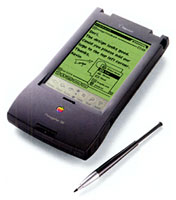
Recently I had the opportunity to purchase a Newton
MessagePad 130. I thought it might be fun to play with.
I'm not sure how long I'll
hang onto it, but I'd never used one before and wanted to see what
it was really like.
The nice thing about it is that it's got a very large screen, an
easy to hold stylus (unlike the smooth metal one on my Handspring),
and a memory card slot for expansion.
The operating system is similar to Palm's - and there are
definitely things they copied from Apple's Newton OS. However the
Newton is more complex and approaches being complicated. Deleting
applications is not self explanatory.
The idea of "backdrop applications" (the default application
that appears when you close all others) is confusing also - most
computer users think of a desktop or some sort of home screen. For
those who just don't get this concept, you can download a backdrop
application like Avi's
Backdrop (freeware) that acts more like what you're used to
with a desktop computer, complete with a clock, the date, a battery
gauge, and even a notepad that can be hidden from view if
desired.
Another oddity is the location of the close box for
applications: It's on the bottom right hand corner. It doesn't make
sense to me why it would be put there at all. The icon where the
close box should be, that looks like it should compose an email
message, really gives you properties for the open document.
There are other things that seem odd as well, but obviously this
is the way Apple wanted it designed.
Palm, however, decided to simplify things. One backdrop
application was selected, and that one allows you to open
applications. Preferences for systemwide behavior aren't hidden
away, like they are on the Newton (shouldn't the system font
options be in the 'Prefs' application? Instead, it's under Styles
on the Newton), and the way applications behave is more
consistent.
The Palm OS is definitely more user friendly, whereas the Newton
OS seems to have more features (although I haven't used anything
newer than Palm OS 3.1, so a lot has probably been added in 4 and
5).
For a pocket computer, the Newton is just a little bit too big.
While the large screen is nice, it's success was definitely
hampered by it's size. Too small for a tablet PC (and that concept
wouldn't have sold back in 1996) and too big to be practical as a
PDA.
Apple found an ideal spot for it though, in education, with the
eMate. The problem was that it was very expensive, and
computer technology in schools back in 1997 was usually limited to
a lab of LC 580s or LC 5200s. The idea of a computer for every
student - at their desk - wasn't really in the mind of many board
of education members, so the eMate, like the Newton, failed.
Apple probably won't come out with a PDA again anytime soon.
Palm, Sony, Toshiba, and others are already making decent ones,
demand is not as high as it was 3 years ago, and Apple just doesn't
see a need to be involved with that market.
Apple might, however, decide to market a tablet computer if that
design ever takes off. It's an excellent design, but it's not as
popular as (I think) many companies were hoping - and I doubt Apple
will want to have a repeat of the Cube, where they had a great
product with very few buying it.
It amazes me that people are still using their Newton's though -
and on eBay they're not exactly cheap, either, like you'd
think they would be after 7 years. I noticed some going for over
$200!
Software's still readily available. Just do a web search for
'Apple Newton Software' and you'll find hundreds of pages full of
shareware and freeware for the Newton. You can up back your
MessagePad to a serial port equipped Mac (like my beige G3 tower) or any PC, and I've heard of
people doing it inside of OS X as well. Clearly, with enough
people still using them to try to get the Newton working with
OS X, it shows what a great product the Newton was.
If only Apple had done it about 3 years later and 3" smaller.
We believe in the long term value of Apple hardware. You should be able to use your Apple gear as long as it helps you remain productive and meets your needs, upgrading only as necessary. We want to help maximize the life of your Apple gear.
We believe in the long term value of Apple hardware. You should be able to use your Apple gear as long as it helps you remain productive and meets your needs, upgrading only as necessary. We want to help maximize the life of your Apple gear.
All of our advertising is handled by BackBeat
Media. For price quotes and advertising information,
please contact
Page not found | Low End Mac
Welcome Image and Text
We believe in the long term value of Apple hardware. You should be able to use your Apple gear as long as it helps you remain productive and meets your needs, upgrading only as necessary. We want to help maximize the life of your Apple gear.


 I'm not sure how long I'll
hang onto it, but I'd never used one before and wanted to see what
it was really like.
I'm not sure how long I'll
hang onto it, but I'd never used one before and wanted to see what
it was really like.
