
I was recently reading a magazine called T3 (Tomorrow’s Technology Today), which has all sorts of gadgets that I would like to buy. They reviewed digital picture frames, and I could see how it would be neat to have a way to display continuous slideshows away from my computer. But the prices were outrageous – $400 to $600 for a small 640 x 480 resolution active matrix LCD.

This leads me to my most important network appliance: Picture Frame/Stereo. Someday I expect this combination may be as big as the clock-radio. I’d like to have pictures in the kitchen, and I’d also like to be able to listen to music. Ditto for the night stand next to my bed. I’m not sure that I can buy one of these in any store yet, but I’m sure I can make one for less than it would cost to buy one.
What features does the Picture Frame/Stereo need to have? Since I want pictures to look good, I think the LCD screen should be active matrix and able to display thousands of colors (16-bit). To be able to play MP3s, the Mac needs ethernet to get the music from the MP3 server. And it needs a PowerPC processor to play MP3s.
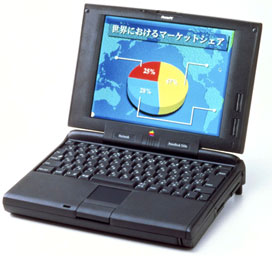 The first Mac to meet those requirements is a PowerBook 5300c with either a SCSI ethernet adapter or an ethernet PC Card. In February 2001, the 5300c can be found on eBay for around $300. Of course, it would be neat to use an AirPort base station with wireless ethernet, but that could quadruple the cost.
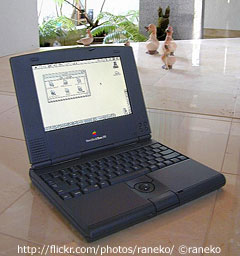 Now if you were making a picture frame only, a better option would be the Duo 270c or Duo 280c. Both of these tiny PowerBooks can display thousands of colors at a resolution of 640 x 400. Although they can’t easily access an ethernet network (the ethernet docks can cost as much as a Duo 270c), a typical 120 MB drive can hold software and more pictures than you could fit into any manageable “analog” photo album.
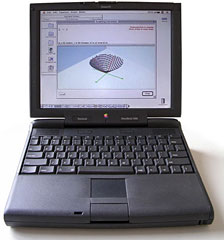 The hardest part of converting a PowerBook into a picture frame is the hardware manipulation. I just bought a PowerBook 3400 that I will eventually make into a picture frame/stereo. But for now, I’m just going to keep it as a laptop so I can take it to a friend’s house and go to the library with it. The overall process of converting involves three steps:
- Setting up the software for the picture frame/stereo.
- Taking the casing off the PowerBook.
- Putting the guts of the PowerBook into the picture frame.
I’m going to put off discussing the software until I get a chance to try out iTunes. For now, let’s look at the last two steps.
Disclaimer
I suppose I should make a disclaimer – even though it is patently obvious. Taking the case off your PowerBook and putting it into a new case can break the computer. I’m talking about this from a hobby standpoint. If you enjoy woodworking and building, you might consider this as a weekend project that you are doing for enjoyment. Because of the risk of damage, I would never do this on any Mac that is under warranty or that is so expensive that I would be distraught if it broke.
Remove the Case
To remove the casing off a PowerBook requires Torx wrenches and some patience. Most PowerBooks can be easily disassembled if disassembly is the only goal. They have many hidden plastic tabs that will break if you pry too hard, but if you aren’t worried about reassembly, that isn’t a problem. In particular, the Duos were made with cases that are almost disposable. It’s nearly impossible to open the case without damaging it somehow. If you want to keep the case in good condition, do not trust your dexterity alone. The best option is to get on the Internet and find instructions for your particular model.
Making a New Case
The most enjoyable part of making a designer Mac like this is crafting the case. The last time I did a Mac like this, my most useful tool was a router. Routers are frequently used for putting bevels on edges of wood, but they can also be used to make custom shaped spaces to fit the PowerBook’s innards. Making a good design before you start working is the most important step. On the PowerBook 540 that I did, I made some mistakes in my design, and that tripled the amount of time it took to construct the casing.
Have you made any custom Macs? Right now this is an idea rather than a reality. If you have a custom Mac that you’d like me to write about, send me an email.
Keywords: #digitalframe
Short link: http://goo.gl/mye7tx
searchword: soundandpictures
