
2001 – There’s a chasm that separates the promise and the reality of PowerBooks. Maybe it is marketing or collective delusion, but PowerBooks can be a horrendous value for many people. Many PowerBook users just don’t get their money’s worth.

On the other hand, even old PowerBooks have advantages that current desktop Macs lack. In this article I’d like to look at some of the empty promises of PowerBooks. My next article will focus on their advantages. A final article in this series will look at how to get your money’s worth when purchasing a laptop.
The Portability Promise
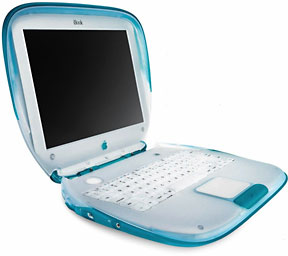 Of course, the number one promise of a PowerBook or iBook is portability. When Apple introduced the iBook, for example, Steve Jobs said it was an “iMac to go.” That’s a huge promise, and it gets people think. My mom wanted to get a laptop so that she could take it up to the cabin and do some writing. I’ve heard people talk about watching DVDs while flying cross country. There’s the ability to take your computer to the library to work on a paper. A friend of mine in college talked about taking his PowerBook to the Stanford Coffeehouse.
Portability is a nice promise, but I think that many users overestimate its value. Will you actually feel comfortable typing an email in a coffee shop, or will you try it once and decide it is too geeky? In the next three years, are you going to fly across the country only five times?
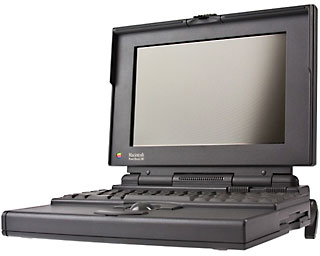 I’m not pointing my finger at other people. When I was in the Peace Corps, I had a solar panel for my PowerBook 160 – I could compute at a local waterfall. It was a great idea on paper, but I only did it a handful of times. And it always seemed like I did it so that I could brag about it, like I’m doing now.
Light Weight
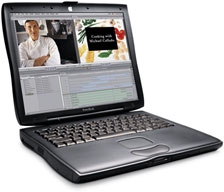 Another promise is that laptops are light. Back in 1995, my PowerBook 160 weighed less than 7 pounds. Last year my Pismo PowerBook was 5.9 pounds. Some lucky people have the new TiBooks that weigh a skimpy 5.3 pounds. My Duo 280 was the lightest Mac ever at 4.2 pounds. Some Windows-based laptops get into the 2 to 3 pound range.
But the weight of laptops is deceiving. In general, the lighter the PowerBook, the more padding necessary to make the owner feel comfortable carrying it around. Even if the new TiBook is built like a tank, it’s so expensive ($2,600 and up) that people put it into nice carrying cases to protect it. It’s almost a zero-sum game. If you have a light PowerBook, you need a heavy case, but if you have a rugged iBook, you can carry it all by itself.
A Desktop Replacement
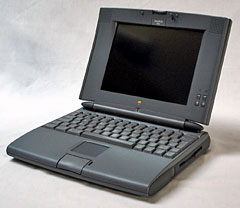 My favorite promise is the “desktop replacement” promise. I think the first time I heard this was when the PowerBook 540c came out. Until then, all PowerBooks had some deficiency compared to their desktop counterparts. But the 540c had everything. It had a color screen that was larger than the Duos or 180c. It had function keys on the keyboard. It had built-in ethernet. Indeed, there’s a convincing argument that the PowerBook 540c was the best laptop Apple has ever made.
This idea percolates up every year or two. The PowerBook 5300 could compete, because it had a PowerPC CPU. The PowerBook 3400 was as fast as any Mac with the same processor. The PowerBook G3 series had the cover of MacUser as a desktop invader.
I’ve used several PowerBooks as desktop replacements. Right now I’m using a PowerBook 3400 as my desktop computer. But PowerBooks can’t compete with desktops in important ways. Most importantly, laptops are dramatically more expensive. An iBook may be an “iMac to go,” but you can buy nearly two iMacs for the price of an iBook. If, for instance, your hard drive breaks, expect to pay twice as much per GB for a laptop drive.
Ergonomics
Ergonomically, laptops don’t replace desktops either. When set up right, your monitor and keyboard should be at different heights. That’s the idea behind keyboard drawers. On a laptop the screen is either too low or the monitor is too high for long work sessions. Of course this can be avoided if you hook up an extra keyboard to your PowerBook.
But hooking things up gets to another problem. If you hook up all the things that you normally hook up to a desktop computer, your laptop is no longer portable. My 3400 has six cables attached to it. I can’t just pick it up and head out to the coffee shop. Sure, I could get a BookEndz docking station, but that worsens the cost disadvantage of a laptop.
At this point, I’m sure that several readers are about to load up their email software and give me a piece of their mind. If you have objections, send them my way. I’m always looking for little bits of mind that I can use to augment my own.
Reasons to Love PowerBooks
I’m not against laptops categorically; in my next article, I’ll look at the other side of the coin. While PowerBooks and iBooks may have some unfilled promises, their reality can be wonderful. I’ll go over some of the reasons I love my PowerBook.
Keywords: #powerbooks
Short link: http://goo.gl/JKHO55
searchword: wrongwithpowerbooks
