
Last week, I reconsidered computing speed and came to the conclusion that time spent picking the right software and customizing it for the way you work is time well spent. With speed in mind, I think it is right that I discuss the slowest component of most Macintoshes.

Many English speakers are familiar with the proverb, “A chain is only as strong as its weakest link.” In computing, that weakest link is often termed a bottleneck. (I presume it comes from the idea that the neck of a bottle is what limits how fast you can pour. Wide-necked bottles can be emptied faster than those with narrow necks.)
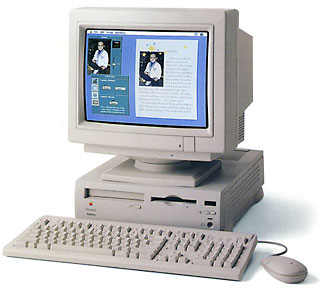 Dan Knight, Scott Barber, and other Low End Mac technical writers have written excellent articles about bottlenecks and even labeled certain Mac models as Road Apples. For example, the Performa 6200 series is considered a compromised design because it has a narrow system bus that slows down the whole computer. That is a perfect example of a bottleneck.
My first Mac was a IIsi, which also shares the Road Apple distinction. Luckily, no one has ever called my IIsi a “Road Apple” to my face – I might have to disabuse them of that notion. When I ordered it, I got 5 MB of RAM and an 80 MB hard drive. In Spring 1991, that was a pretty fast piece of hardware. I had been using 8 MHz Mac SEs and an occasional 16 MHz SE/30. The 20 MHz IIsi was, I remember thinking to myself, faster than I would ever really need.
Okay, admit it. Did you think the same thing about your first Mac? Nowadays people scoff at the idea of computers ever being fast enough, but for many years that was a common idea. I think as computers have dropped in price and increased in performance, it takes more to impress people today. And the inexorable tide of improvement has made most folks more cynical when it comes to computers.
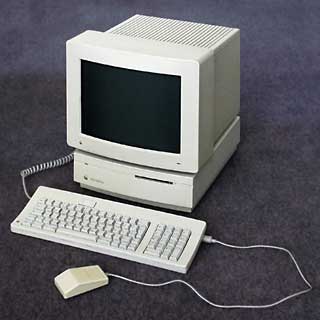 As I think back to my IIsi, I realize that I was oblivious to some of the bottlenecks it had. A 20 MHz processor is not that fast, and it was only three years later that I realized that with $10 of electronic parts I could boost the machine to 27 MHz. And I remember being confused about the role of the FPU when I was buying. A little later I realized that not having an FPU would crash the current version of Excel and make some graphics programs unusable.
When I got the IIsi, I also didn’t understand how the video built into the IIsi slowed the whole computer down. It was like getting a new computer when I switched to 1-bit video (black and white, no shades), because it freed the computer to work faster. But using the IIsi in color, as I usually did, could reduce the speed of the IIsi substantially. (See Low End Mac’s IIsi benchmark page to see how video and a freeware program called IIsi-RAM-Muncher influence performance.)
A year later, when I discovered the Internet, I realized that an 80 MB hard drive was not very spacious, and for three years afterward I had to fastidiously clean up my hard drive so I would have some space available for new shareware.
When I tried to back up my hard drive to floppies, it did not take long to realize how slow the floppy drive is. Swapping floppies required me to sit in front of the computer for an hour just so I could move the disks in and out.
The Real Bottleneck
It’s probably obvious to you that I know more about hardware now than I did when I first got my Mac. But even as a beginner, I correctly intuited which was the slowest component of my Mac: I was. And I strongly suspect that you are the slowest component of your Mac, too.
Some proud people reject the idea that they are only a component of the computing experience. They have a hierarchical relationship in their mind: “I’m the master, and my computer is my servant. It does what I want it to do. Humph, how could I be merely a component?”
I suppose they could be right. I’ll bet they are also the “master” of their dog. I’m not sure I understand their vocabulary completely, but apparently the master is the one who feeds, bathes, and houses the servant. In return the servant agrees to take naps, bark at strangers, and wag its tail occasionally.
Sure, I make my Mac do some work, but usually my Mac is waiting for me. It reminds me of Star Trek: First Contact. In the movie, the android known as Data is captured by Borg enemies, whose Queen offers him inducements to betray the Enterprise. He later admits that he considered the offer for a few parts of a millisecond. While the movie audience was laughing in relief that he didn’t become a turncoat, he poignantly notes that for a computer, a few milliseconds can be an eternity.
If I really measured all that my Mac is capable of producing, I’d bet that more than 75% of my processing power is being wasted. Probably more than 90%. One reason is that no matter how fast I am with my mouse and keyboard, I am magnitudes slower than even my old Mac IIsi.
Indeed, the idea of harnessing these wasted cycles is one of the reasons why several distributed computing programs have become popular. For example, the Search for ExtraTeresstrial Intelligence (abbreviated SETI) will send you work units that your computer can crunch while it would otherwise be idle. It’s cool to think that your Mac can serve your needs and still have leftover cycles that could possibly discover an intelligent signal hidden in reams of astronomical data. (For more on the SETI@home project, visit SETIonMac.)
This sets the stage for an obvious question: How can we upgrade the user?
I have several different approaches to this question for my next few articles. First, my opinions will become a little more pragmatic. I’ll look at the common types of Mac users. You can see where you fit in and might gain some ideas about how to effectively tutor a less savvy user. I’ll also look at software options that will make users faster. Finally, I will zoom out to look at the broader limitations to upgrading the user and discuss whether it is worth it to upgrade your Mac skills.
Keywords: #bottlenecks
Short link: http://goo.gl/jE3Teq
searchword: bottlenecks
