
The biggest news of Macworld week for Apple portable fans didn’t come from the keynote, in which there were no laptop hardware announcements at all, but rather from Sonnet and Newer Technology, both of which released 500 MHz G4 processor upgrades for WallStreet G3 Series PowerBooks from the former and a WallStreet/Lombard G4 upgrade from the latter, joining the existing G4 WallStreet/Lombard upgrade solution from PowerLogix.
- Sonnet G4 500 WallStreet Upgrade
- Newer Technology Announces 500 MHz G4 for WallStreet and Lombard
- Apple Newton eMate 300s Available at Wegener Media
- Cyclone USB Flash Key Pen “Drive”
- Granite Digital Ships Smart Drive FireWire Enclosures
- Griffin Introduces iCurve Stand for iBooks and PowerBooks
- WiebeTech LLC introduces NanoGB Pocket Drive in FireWire or USB
- Dr Bott T3Hub
- TiBook Memory Installation Tutorial
- Bargain ‘Books
Except as noted, prices are in US dollars.
Sonnet G4 500 WallStreet Upgrade
The Crescendo/WS G4 500 is the latest addition to Sonnet’s line of Crescendo/WS processor upgrades for PowerBook G3 Series WallStreet computers. This upgrade offers a Motorola G4 processor running at 500 MHz, with 1 MB Level 2 backside cache, which more than doubles the performance of a stock 233 MHz machine. The Crescendo/WS G4 500 also corrects a Mac OS “sleep mode” issue that can prevent these machines from waking up from sleep mode under OS 9 and earlier operating systems – the only G4 upgrade that fully supports sleep mode under Mac OS 9.x and earlier
The Crescendo/WS is compatible with the PowerBook’s existing hardware, software, peripherals, and RAM. This product supports a total RAM capacity of 512 MB and accommodates SO-DIMMs from 32 MB to 256 MB. It supports Mac OS 8.1 and higher, including the latest innovations of OS X without any additional software or plug-ins.
The Crescendo/WS is easy to install with step-by-step, illustrated instructions. Launch the included Sonnet Installer application to take advantage of the original system software. Shut down and open the system, remove the original processor, move the RAM to the Crescendo/WS, then simply pop the Crescendo/WS into place. Restart the system and you’re up and running!
Crescendo/WS G4 500 is available now and has an estimated street price of $399.95.
Newer Technology Announces 500 MHz G4 for WallStreet and Lombard
Newer Technology’s NUpowr 500 MHz PowerPC G4 processor upgrade for PowerBook G3 systems supports both WallStreet and Lombard ‘Books. The NUpowr G4 upgrade retains the stock backside cache, which means that owners of 233 MHz WallStreet LE and Lombard 333 MHz units retain their 512 MB cache.
For owners of the early “MainStreet” 233 MHz PowerBook G3 Series units with no Level 2 cache, Newer can also add the G4 card and 1 MB of Level 2 cache running at 250 MHz(at extra cost). That will be quite a dramatic performance boost for MainStreet owners.
As with Newer’s Pismo PowerBook G4 upgrade, the NUpowr G4 for the WallStreet and Lombard computers requires the customer to ship the computer to Newer Technology to perform the upgrade on the stock CPU card. Newer then removes the processor daughter card card, solders in the G4 processor and reinstalls the card in the PowerBook for testing and shipment back to the customer.
Mac OS X is supported, and the upgrade product is covered by a two year warranty.
The price of the NUpowr WallStreet/Lombard G4 upgrade is $350.
NUpowr 500 MHz G4 supports all WallStreet/PDQ/Lombard PowerBook models.
NUpowr upgrades are available exclusively at Other World Computing.
Apple Newton eMate 300s Available at Wegener Media
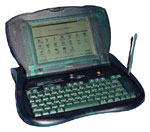
Get the original while you can! Wegener Media just acquired a bunch of Apple Newton eMate 300s atauction and is selling them for $199 each.
The price includes the machine, stylus, the battery, and a power pack. The software is installed, and is available elsewhere for download.
These have the standard PC Card slot, etc. – a very cool web/email/communications tool – at a dirt-cheap price.
Units are guaranteed working for 30 days. Batteries are new, but Wegener can’t guarantee the longevity.
Cyclone USB Flash KeyPen “Drive”
Cyclone USB Flash Key features:
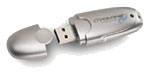 Plugs into a standard USB port and requires NO software.
- Ideal for quickly transferring files from a laptop to a desktop or vice versa. Perfect for any file format.
- Works with almost any OS: Windows XP, ME, 2000, 98 and MacOS 9.
- Transfers data instantaneously. Recognizes immediately as another drive.
- About 3 inches long and less than half the width of a business card.
- No moving parts. Drop it in your pocket or toss it to a friend.
Prices: 16 MB – $39, 32 MB – $49, 64 MB – $ 79, 128 MB – $154, 256 MB – $ 259.
Granite Digital Ships Smart Drive FireWire Enclosures
Granite Digital has announced it has begun shipping its new Smart Drive Series of FireWire enclosures. The Smart Drive Series includes low-profile, external storage enclosures with built-in LCD+keypad user interfaces.
The Smart Drive user interface incorporates a 2-line by 20 character LCD and a 2-button keypad. By default the user interface shows the enclosure’s real-time status or performance. Using the keypad, users navigate menus offering information on the FireWire-IDE bridge, the hard disk, the FireWire connection, and the host computer. Additional diagnostic and utility menus allow testing, verifying, and even erasing the hard disk without a host computer.
Granite Digital’s Field Update Utility is available for Apple computers running OS X or OS 9.
Each Smart Drive enclosure uses a Granite Digital FireVue 1394-IDE bridge controller. Customers can order Smart Drives with or without 3.5″ hard drives. FireVue bridge controllers use the industry-leading Oxford Semiconductor OXFW911, and Granite Digital’s proprietary firmware and hardware enhancements enable unique features like ATA-6 compatibility for hard drives larger than 137 GB.
Griffin Introduces iCurve Stand for iBooks and PowerBooks
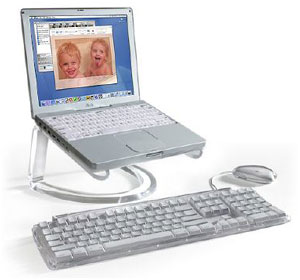
Griffin Technology has introduced its newest Mac accessory, the iCurve. The iCurve is a clear laptop standdesigned specifically for Apple’s PowerBook and iBook computers. Its main purpose is to place a PowerBook or iBook in an ergonomically correct position when using the laptop as a desktop computer. It achieves this goal in several key ways.
When positioned on iCurve, a PowerBook screen is raised to a height of 16 inches. This is the recommended height for computer screens as specified by the TCO 95 ergonomic standards. It greatly reduces neck strain caused by looking down at your laptop screen for extended periods of time.
The iCurve elevates an iBook 4″ above the desk surface – freeing up significant space for a full size keyboard and mouse. Although you can type directly on a laptop while it rests on iCurve, the addition of a full size keyboard and mouse makes for the most comfortable and healthy desktop experience. This also allows your laptop screen to be positioned the recommended distance – an arm’s length away.
Other highlights of the iCurve include:
- iCurve’s rounded clear surface is perfectly matched to Apple’s LCD monitors
- When placed on iCurve, a PowerBook screen tiles perfectly with the height of Apple’s LCD Cinema Displays
- iCurve greatly increases airflow underneath your laptop – keeping running temperature low and CPU performance high
- PowerBook’s back access door is fully exposed and easily accessible while resting on iCurve
- The curved base of the iCurve doubles as a handle, allowing a laptop to swivel and glide easily into any position
- With its unobtrusive form and clear design, iCurve is practically invisible when in use
The iCurve is priced at $39.99 and will begin shipping in September. Pre-orders are being accepted now.
WiebeTech LLC introduces NanoGB Pocket Drive in FireWire or USB
WiebeTech LLC introduces NanoGB, an extremely fast, extremely small FireWire pocket drive. NanoGB is available in capacities to 40 GB. The FireWire version utilizes the Oxford Semiconductor OXFW911 FireWire bridge in conjunction with proprietary WiebeTech technology to produce highest performance OS X transfer rates.
The USB version supports USB 2.0 and is also backwards compatible with USB 1.1, which is on virtually every computer shipped in the last three years.
NanoGB FireWire’s feature list is as follows:
- NanoGB uses a proprietary implementation of the Oxford OXFW911 FireWire bridge for best performance. WiebeTech has measured burst transfer rates of 30+ MB/sec utilizing high speed 2.5″ notebook drive mechanisms.
- Tough, Good Looking Industrial Design. NanoGB’s case is 100% aluminum.
- Small Size. Case dimensions are a wafer thin 0.47 in x 2.92 in x 5.60 in, for a total volume of only 7.68 in3. (11.9 mm x 74.2 mm x 142.7 mm, with volume of 125.6 cm3.)
- Self Powered. NanoGB exclusively operates off of FireWire bus power. There is no power jack or power switch.
- NanoGB is available in capacities of 20 GB, 30 GB, and 40 GB. Rotational speeds of both 4200 and 5400 RPM are available.
- Full Size FireWire Port. NanoGB utilizes a full size six pin FireWire port, so that standard FireWire cables can always be used.
NanoGB FireWire Pricing
- 0 GB, $119.95
- 20 GB/4200 RPM, $217.95
- 30 GB/4200 RPM, $259.95
- 40 GB/4200 RPM, $299.95
- 40 GB/5400 RPM, $419.95
(Basic product includes: Enclosure; FireWire cable.)
NanoGB-USB’s feature list is as follows:
- NanoGB-USB is based on the high speed USB 2.0 standard, which is up to 48 times faster than USB 1.1. As a result, it provides speedy transfers for large files.
- Tough, Good Looking Industrial Design. NanoGB’s case is 100% aluminum.
- Small Size. Case dimensions are a wafer thin 0.47 in x 2.92 in x 5.08 in, for a total volume of only 6.97 in3. (11.9 x 74.2 x 129.0mm, with volume of 114 cm3.)
- Self Powered. NanoGB-USB operates off of USB bus power or from a keyboard pass through power adapter. It also has a +5V DC power jack.
- NanoGB-USB is available in capacities of 20 GB, 30 GB, and 40 GB.
NanoGB-USB Pricing
- 0 GB, $79.95
- 20 GB/4200 RPM, $199.95
- 30 GB/4200 RPM, $239.95
- 40 GB/4200 RPM, $279.95
(Basic product includes: Enclosure; pouch, installation software, two USB cables, pass through cables, manual.)
In the U.S. and Canada, NanoGB may be purchased from dealers. NanoGB is also available directly from WiebeTech or from WiebeTech’s distributor, Dr. Bott.
Dr Bott T3Hub
T3Hub is the first USB hub to pick up the design of the new generation of portables from Apple.
Typically T3Hub will be used when the internal USB connections of the computer no longer satisfy the needs of a growing array of USB peripherals.
T3Hub is available in the colors Ice (iBook 2001), Titanium (G4 PowerBook), and also in the already classical translucent Graphite.
T3Hub is equally useful when it comes to quick expansion of the number of USB ports on a desktop computer as it 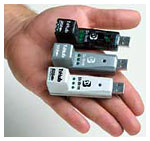 is on a notebook. In either setup T3Hub will expand a single USB port on the computer into 3 USB ports. T3Hub plugs directly into the USB connector on the computer. An optional USB extension pigtail is provided to reduce strain on the built-in port.
Like all mobile USB hubs, T3Hub cannot be connected to another non-powered hub such as the hub that is integrated into every USB keyboard for the Mac. As a result, T3Hub is always connected directly to one of the computer’s built-in USB ports.
Features
- T3Hub can be installed without turning your computer off.
- T3Hub is compatible with all USB devices.
- T3Hub is platform-independent, Mac OS, Win98/ME, Win2k and Linux are all fully supported.
- includes a separate USB extension cable to reduce strain on built-in USB ports.
Technical Features:
- compliant with USB 1.1 specs
- Plug-and-Play compatible
- bus error recognition and correction
- 12 and 1,5 Mbps transfer rate available on all 3 connectors.
- 3 USB Type A Ports for USB-devices, active devices indicated via LED.
Prices:
- T3Hub in Titanium, $33.95
- T3Hub in Graphite, $33.95
- T3Hub in Ice, $33.95
- T3Hub 3 Pack, $99.95
TiBook Memory Installation Tutorial
This Knowledge Base article explains how to install additional memory in a PowerBook G4 computer. You may also view the procedure in QuickTime at http://www.info.apple.com/installparts.
Installing memory requires these basic steps:
- Turn off the computer.
- Remove any cables and the battery.
- Remove the keyboard.
- Remove the memory you are replacing, if any.
- Install the new memory.
- Reinstall the keyboard.
- Reinstall the battery and cables.
The only tool required for this procedure is a jeweler’s flat-blade screwdriver.
Bargain ‘Books
There are two different versions of WallStreet running at 233 MHz, the cacheless MainStreet version and the later Series II with a level 2 cache. It’s not always possible to determine from the vendor’s listing which is being offered, so we’ve included links within this paragraph to the two models. The same goes for the PowerBook G4/667 (Gigabit Ethernet) and G4/667 (DVI).
Small Dog Electronics
- iBook 600, 14″, 256/20 GB/Combo drive, factory refurbished, one year warranty with refurbished iPod, $1,749
- iBook 500, 12″, 128/15 GB/CD-ROM, new, $899
- iBook 500, 12″, 128/15 GB/CD-ROM/Airport (new, but no box), $949
ExperCom
- PowerBook G4/667, 256/30 GB/Combo drive, new, $2,499
- iBook 600, 128/15 GB/DVD, 12.1″, Apple Refurbished, $1,079
- iBook 600, 128/20 GB/Combo, 12.1″, Apple Refurbished, $1,199.99
MicroCenter
- PowerBook G4/550, 256/20 GB/Combo drive, $2,199
Keywords: #wallstreetupgrade #lombardupgrade
Searchword: bookrev20020719
