
This Compleat Guide installment might well be named the Short and Sweet Guide to the Original PowerBook G3, since it only covers one model with a single revision that was in production for less than six months.
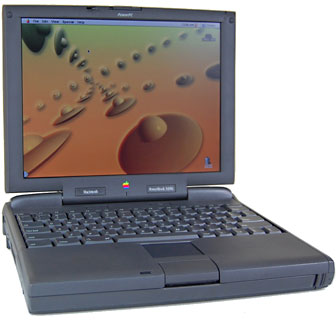 On 1997.11.10, Apple Computer – already purveyor of what had been the fastest laptop computer in the world, the PowerBook 3400c/240 – radically upped the speedstakes ante with the introduction of a machine more than twice as fast as the 3400c – the original PowerBook G3.
The 3500 (I shall henceforth refer to the original 250 MHz PowerBook G3 in this article mainly as the 3500 – Apple went to the well too many times with the PowerBook G3 nomenclature) had a mighty impressive specification over and above its lightning-fast processing chip.
With its 250 MHz G3 PowerPC 750 processor, the original PowerBook G3, code named Kanga or 3500, scored 747 on the MacBench 4 processor test, versus the 240 MHz 3400c’s score of 337 (the subsequent 250 MHz WallStreet PowerBook G3 Series scored 881, the disparity being attributable to the WallStreet having double the amount of Level 2 cache and a faster frontside bus), which calculates out to Kanga being 150% faster than the PowerBook 3400, whose Power PC 603e processor ran only 10 MHz (just 4%) slower – a prima facie illustration of why clock speed is a fairly useless criterion for performance comparisons outside of the same processor family.
The PowerBook 3500 has the dubious distinction of being the only Apple G3 model that was never officially supported by any version of Mac OS X (note even the public beta). At a modest 250 MHz with a 160 MB RAM ceiling, that isn’t a tragedy – OS X wouldn’t perform very well on it anyway, and there is no processor upgrade path. It was also the only G3 PowerBook to sport the traditionally colored Apple logo; future PowerBooks would have a plain white logo.
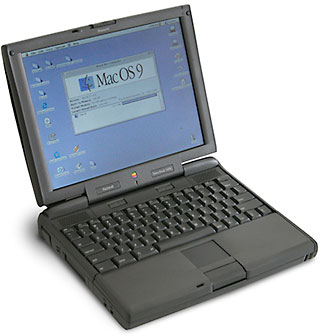 The 3500’s 12.1″ 800 x 600 TFT display – the same screen used in clamshell iBooks, seems almost quaint nowadays, but it was state of the art (at least for Apple) back in 1997.
When I first heard the news about the 3500’s release from the EvangeList (anyone else remember that?), it was almost unbelievable. Here I had been hankering after a speedy 3400, and now there was this new machine that could blow the 3400 – as well as every PC laptop – into the weeds without breaking a proverbial sweat. The Kanga really raised the bar in laptop performance just six months after the 3400’s introduction. (See Apple Canada’s Press Release.)
A stopgap model, the Kanga was essentially a 3400 motherboard modified for the G3 CPU with a faster system bus stuffed into a 3400 case. It offered performance bettered only by Apple’s own Power Mac G3 desktop machines of the day.
The 3500 sported an internal bus speed of 50 MHz and a 512 KB level 2 cache, with 32 MB of RAM soldered to the motherboard, expandable up to 160 MB maximum. Its 5 GB hard drive was a major step up from the 3 GB unit in the 3400c/240.
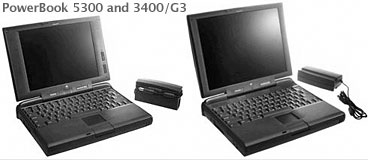 However, 3500 buyers willing to lay down the hefty hunk of cash Apple asked for the hot new machine (US$4,500-6,500) got no shot of new model cachet in the looks department – the 3500 was visually identical to the 3400 series, which in turn owed a great deal in the plastics department to 1995’s PowerBook 5300.
This was a mixed blessing. Even though I own a PowerBook G3 Series II WallStreet machine, I have to confess that I’ve never been terribly smitten with the WallStreet’s looks (its best aspect, by my lights, being from the back, which reminds me of the business end of a spaceship one might see on Star Trek, but I digress), and I actually prefer the more businesslike, albeit angular, lines of the 5300/3400/3500. I expect that I’m in a distinct minority on that score.
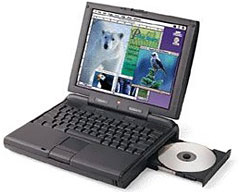 The 3500 had a 20x CD drive – up from the 3400’s 12x unit – and continued the 3400’s PCI architecture, built-in 10Base-T ethernet and 33.6 kbps modem with a special RJ-45 connector that would accept either an ethernet connector or modem cord, as well as support for the 3400’s hot-swappable expansion bay modules (including a standard floppy drive; expansion bay modules from the 5300/190 series would also fit), and a four speaker sound system with its misnamed “subwoofers” that resulted in these models’ bulging screen lid.
The 3400’s standard 1 Mbps IrDA wireless information transfer support and two PC Card slots (semi-CardBus compliant), which supports two Type II or one Type III card, were also continued unchanged. One upgrade from 3400 specs was a higher-capacity 47-watt/hour lithium-ion battery and 2 MB of VRAM, supporting 24-bit video out and millions of colors on an external monitor.
The 3500’s 12.1″ 800 x 600 pixel active-matrix TFT display (same as the 3400, the LE WallStreet, and the clamshell iBook) supports 16-bit color, and an upgrade from 3400 specs was an enhanced Chips and Technology 65554 PCI video controller that supported hardware acceleration for faster graphics, allowing the 3500 to update its screen image 74% faster than the 3400. Also included were 16-bit stereo in/out, Zoomed Video support, and software-based MPEG-1 decompression.
Some caveats are that the 3500’s PC Card slots do not fully support the CardBus protocol, so CardBus USB, FireWire, and wireless networking adapters may not work (according to CardBus for Your PowerBook 3400c or Kanga G3, the problems are mostly due to a smaller-than-spec slot and lack of a ground plane). Speedwise, the 3500 is about the same as (or a bit slower than) the 233 MHz WallStreet Series II (with 512 KB cache), due to the WallStreet’s faster internal bus – and substantially slower than the 250 MHz WallStreet Series I, which has a 1 MB L2 cache and an even faster internal bus. As noted above, the WallStreet has a much better keyboard and also incorporates a 56 Kbps internal modem, as opposed to the 3500’s 33.6 Kbps unit.
The 3500’s 76-key keyboard with 12 function keys represented one of the machine’s weaker points, being identical to the ‘board the 3400 inherited from the PowerBook 5300, which in turn was pretty much the same as the keyboard introduced on the 500 series PowerBooks. It was serviceable, but much inferior to the beautiful keyboard on the PowerBook 1400 series and the silky-smooth scissors-action keyboards of the tiny PowerBook 2400c that preceded it and the G3 Series ‘Books that were to follow.
The 3400’s “tappable” trackpad was also carried over unchanged, and I personally like the positive and light clicking action of the 5300/3400/3500 trackpad button much better than that of the big, stiff, “bow-tie” buttons on WallStreets, Lombards, and Pismos.
The 3500 was no lightweight, tipping the scales at the same 7.7 pounds as the 3400 (and the WallStreet). It is 1/2″ thicker than a WallStreet (due to that “subwoofer” bulge), but actually more compact than either WallStreet and Lombard in width and depth.
Although obviously a transitional model designed to hold the fort until the WallStreet Series was ready to ship, the 3500 was a powerful and comprehensively equipped laptop.
Unfortunately, one thing that wasn’t transitional was the price – a whopping US$5,695 (or an almost unbelievable C$8,199 on my side of the border). That was cheaper than the 240 MHz 3400c’s astronomical introductory price of US$6,400, but still more than enough to make you suck in your breath. This makes the prices for today’s MacBook Pros seem like fire sale bargains. The 3500 was another über-‘Book in its day that, like the 5300ce and the 240 MHz 3400c, sold for more than was really justifiable when it was new.
The 3500 had a production life of only about five months, making it, despite its historical importance, one of the rarer PowerBook models. There are not a whole lot of them available, and consequently, an example in nice condition is definitely a collectable PowerBook.
Kanga PowerBook G3 (3400) Specifications
- Requires Mac OS 8.0 or later
- CPU: 250 MHz PPC 750 ( G3)
- MacBench (Processor) Score – 747
- Frontside bus: 50 MHz
- ROM: 4 MB
- Maximum RAM: 160 MB (32 MB soldered), expandable using a single EDO RAM DIMM
- Level 2 cache: 512 KB backside cache running at 100 MHz
- VRAM: 2 MB
- Display: 12.1″ 16-bit 800 x 600 color active matrix also supports millions of colors on external displays
- Lithium Ion battery (roughly 3-4 hours use)
- tappable trackpad
- 4 built-in speakers (including “sub-woofers”) with active crossover and microphone
- 2 PC Card slots
- 10Base-T ethernet
- Built-in 33.6 Fax/Modem
- ADB port for keyboard and mouse
- DIN-8 serial port on back of computer
- 1 Mbps IrDA infrared support
- video-out
- 16-bit stereo sound input/output
- 20x CD-ROM drive
- 5 GB IDE drive
- supports SCSI Disk Mode
- internal slot for 8-bit video or ethernet card
- Weight: 7.9 pounds
- Dimensions: 11.5″ x 9.4″ x 2.4″
Bundled Software: Mac OS 8, Microsoft Internet Explorer 3, Apple Internet Connection Kit, Apple Remote Access, PC Exchange, Macintosh Easy Open, MacLinkPlus translators (for Macintosh Easy Open) with DataViz, PowerBook File Assistant, Apple Location Manager.
Next Model: Compleat Guide to WallStreet PowerBooks
* No, it isn’t a typo. Compleat is a legitimate, albeit archaic, spelling for complete. As Kenneth G. Wilson says in The Columbia Guide to Standard American English: “This obsolete spelling of the adjective complete suggests an air of antiquity that seems to please some of those who name things….” We find that fitting for Low End Mac’s Compleat Guides to “obsolete” hardware and software.
Keywords: #compleatkanga #kangapowerbook
Short link: http://goo.gl/yHTXLj
searchword: compleatkanga
