
2009 – My Apple Certified Refurbished (ACR) 13″ 2.0 GHz Late 2008 Aluminum MacBook arrived last Thursday afternoon, just a couple of hours short of a week after I ordered it, having been air-shuttled by FedEx back and forth across the continent twice, from Rancho Cordova, CA, to Memphis, TN, to Calgary, Alberta, to Halifax, Nova Scotia, where it had actually arrived last Monday – and then that last 150 miles by truck to here. Happily, the still-necessary-for-me USB modem, shipped by Apple Canada via Canadian parcel service Purolator, arrived on the same local subcontractor’s truck.
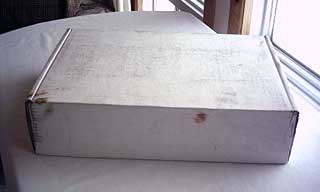
The box my MacBook shipped in.
The shipping carton – unadorned no-name white rather than the logoed brown box my ACR 17-incher arrived in three years ago – showed the wear and tear of its travels, but fortunately it was structurally undamaged.
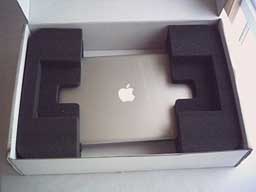
My MacBook in its box.
The computer inside, simply but effectively suspended in fitted foam blocks and swaddled in clear plastic, appeared to be in fine fettle.
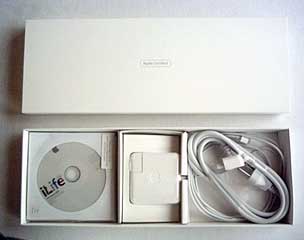 The MagSafe power adapter, vestigial manuals, and software restore disks were nicely packaged in a sleeve-closure carton that reminded me a bit of the packaging my WallStreet PowerBooks incidentals came packed in 10 years ago, except that the WallStreet came with a lot more stuff. On the other hand, the WallStreet also cost me about Can$3,500 compared with the Can$1,199 I dropped for the ACR MacBook.
As with did 17″ unit in 2006, this ACR MacBook shows absolutely no sign of ever having been used and is cosmetically flawless – indistinguishable from a new unit.
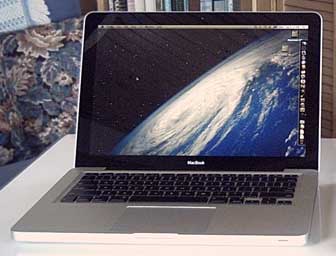 Over the past several days, I have been grabbing spare moments getting acquainted with the little MacBook and gradually setting it up to take over from my old 17″ G4 PowerBook as my anchor production machine. It’s slow going, as I take a methodical approach to setup that used to drive my kids nuts.
I had planned to devote several hours on Saturday afternoon to the project, but I ended up loading, hauling, and piling six loads of hardwood firewood in my 4×4 pickup instead, taking advantage of a perfect-weather winter day with a good coefficient of traction for ascending our steep hill. I digress.
Preparation: Partitioning the Hard Drive
I did manage to get the hard drive partitioned late Friday evening, a super-easy operation now that it’s an optional functional included in OS X’s Disk Utility. I decided to hive off a second 40 GB partition on the 160 GB drive, which left usable capacity on the main partition of about 109 MB, which should be ample for me for at least a while, since I’ve been getting along quite comfortably on the 80 GB drive in my PowerBook up to now. I won’t be installing all the OS 9 stuff I have on the G4 machine’s drive that I used to use in Classic Mode under OS X 10.4 Tiger, but which has been pretty much dormant since I upgraded to OS X 10.5 Leopard in October 2007.
While I’m on the topic of hard drives, the one in the MacBook is almost silent – even quieter than the little 20 GB IBM unit in my old G3 iBook. I hope it stays that way as the iBook’s drive has.
Migration
Late Saturday evening I got around to initiating transfer of my files and settings from the PowerBook to the MacBook using the Migration Assistant, which is very slick – at least in theory. The Unibody MacBook is famously bereft of FireWire, so ethernet would have to do – the first time I’ve used ethernet with Migration Assistant, although its my usual medium for updating file backups manually. The two machines found each other (Migration Assistant must be open and configured on both), and the transfer commenced with an estimate of just under four hours to completion. I couldn’t help musing about how much faster it might have been with FireWire. Oh well. I went to bed and left them to it.
Around dawn I checked to see how things were going – and discovered not well. The MacBook’s screen was black, although the hard drive was still spinning, and it resisted my attempts to get the LEDs to light it up. The PowerBook was still up, but the progress bar in Migration Assistant was stalled. Groggily I powered down the MacBook by holding down the power key and rebooted (satisfyingly faster than the old PowerBook boots Leopard). I restarted Migration Assistant in both machines, but they wouldn’t connect, and it took a reboot of the PowerBook as well to get them talking to each other again.
Fortunately, Migration Assistant is smart enough to resume the transfer process at the point it was interrupted, so I went back to bed hoping for success the second time around. Happily, that was achieved, and when I got up both machines were showing that the file transfer process had been successfully completed.
Working from Time Machine
Or not. As it turned out, some of the copied folders contained no files or incomplete contents. Plan B was to copy the files over from my most recent Time Machine backup, which went rather better and completed without incident in a fraction of the time it had taken via Ethernet. That mode would be my recommendation if it’s available to you.
I’m hoping that the file transfer crap-out on my first attempt was just one of those things and not an indication of why this machine ended up in the ACR channel (one has to wonder about such things).
I’ve never bought AppleCare and wasn’t about to start now, being in philosophical agreement with Consumer Reports that extended warranties in general represent poor value for the money – except, of course, when they turn out not to be in particular instances, of which I’m sure many AppleCare buyers can provide examples. However, had I purchased AppleCare for all of the new and ACR Apple machines I’ve bought over the past 16 years, I would have spent well in excess of a new MacBook Pro with interest factored in, and I’ve never missed it. I get my base one-year Apple warranty doubled anyway by my credit card supplier.
Using the Unibody MacBook
As for my impressions of the MacBook itself, in a word, it’s gorgeous, and the first moments I had it out of the box confirmed for me that I had made the right call in going Unibody rather than buying one of the new 2.0 GHz white MacBooks. The feel and heft (amazingly light actually – at 4.5 lb., it weighs less than a 12″ PowerBook) of the unibody housing is ultra-solid, reminding me of a Rolex watch’s Oyster Case.
In general, I’m partial to small computers, and in my opinion the 13-incher is the glamour-puss of the Unibodies and a real little jewel. As for the glossy display, I think I’ll get along with it okay, and I’ll not pass judgment until I’ve used it for a while, but I think I’d still prefer a matte unit given the option. I will say that at least in my workspaces, reflections have not proved an issue. The LED backlighting certainly is bright, and I expect I’ll be setting it at about 50% most of the time vs. about 85% with the CCFL backlights in my PowerBooks.
Going down to a 1280 x 800 13.3″ display from the 1440 x 900 17″ screen I’ve gotten used to over the past three years to will take some adjustment. We’ll see how that goes.
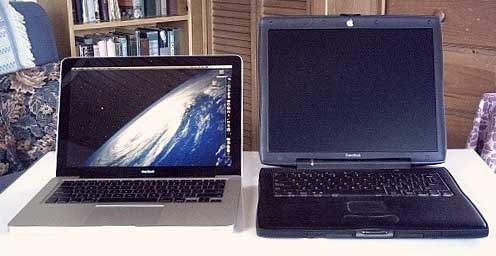
My new Unibody MacBook next to my 2000 PowerBook Pismo.
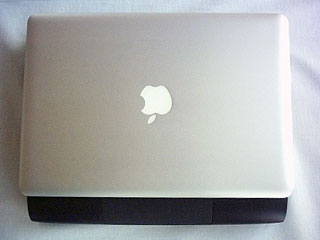
Unibody MacBook atop Pismo PowerBook.
Comparing this with a 17″ unit is probably unfair, and it fares much better head-to-head with my old workhorse Pismos, with their 4:3 aspect ratio 1024 x 768 displays. I was surprised how little smaller the footprint of the MacBook is compared with the old black PowerBook – somewhat narrower in chord, but almost the same width.
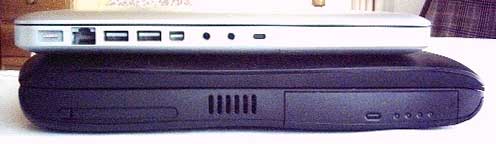
Side view of Unibody MacBook atop Pismo Powerbook.
It’s in the side aspect where the contrast becomes radical, and to think that the Pismo’s form factor was introduced 10 years ago (with the Lombard) as being “ultra-slim”. I’m still not convinced that razor thin laptops make much sense from a functional perspective, and indeed they have many shortcomings in practical terms, not least contributing to heat issues and perhaps the increasing poverty of I/O ports, although PC netbook makers still somehow are able to supply plenty of port and expansion connectivity in their even smaller units, so I think it’s more a perversity of Apple philosophy.
The Trackpad
The buttonless gonzo-sized trackpad is better than I had expected, and I got on to clicking anywhere intuitively with my thumb (although the click resistance is maddeningly uneven) quite quickly, but click action is too stiff for my liking. In fairness, I also hate how stiff the Pismo and WallStreet PowerBook trackpad buttons are, and the one on in my 17″ G4 PowerBook could be lighter and more positive as well. For me the gold standard in trackpad buttons are the PowerBook 1400 and the PowerBook 5300/3400 trackpad buttons.
I am somewhat fanatical about light-action click buttons on pointing devices. I like them so that barely more than the weight of your finger will trip them. The buttons on the new “for Mac” Targus mice are about perfect in weight and feel, as is the Logitech V-550. With trackpads, I resort to tap-clicking most of the time anyway, but it seems in the early going that the Unibody MacBook needs a sharper tap to register than with my PowerBooks, and that is a disappointment. I expect they’ve dialed back tap sensitivity to avoid misfires with that big trackpad, but I find it annoying, again requiring a light touch action to satisfy me.
I’ll use a mouse whenever practical.
The Keyboard
I haven’t done enough typing on it yet to pass definitive judgment, but I’m thus far not smitten with the key action and landing feel of the MacBook’s chiclet keyboard. It’s too “clicky”, too stiff, and the landing is too hard. I’m even more picky about keyboard action than I am about pointing device clicking, and I like them really light with a minimum of over-center click feedback and a nice soft landing – but still positive. It’s hard to describe effectively, but I know it when I feel it, and the high water marks for me in computer keyboards are the WallStreet, Pismo/Lombard, the 1400 PowerBooks, and in external ‘boards the Kensington SlimType keyboard. The chiclet jobbie in the Unibody MacBook is far from the worst I’ve used, but it’s not making me love it so far, and I prefer the old school type ‘board in the 17″ PowerBook.
The Modem
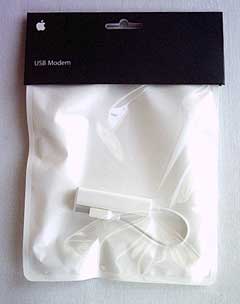
I checked out the external USB modem last evening. It works really well, but it’s a monumental pain to have to tie up one of the already oversubscribed USB ports. The directions insist that it must be plugged directly into the computer, not into a hub. I intend to experiment with the veracity of that, but I’m probably going to end up using two self-powered USB hubs in tandem with this machine.
Too Few USB Ports
I was barely getting along with one hub and a lot of plug swapping on the G4 PowerBook, but if the caveat about direct-plugging proves accurate, plus the loss of FireWire connectivity exacerbates an already tight workstation situation where I have an external keyboard (with no repeater USB ports), a right hand mouse, a foot mouse, an RF USB receiver for my wireless mouse, a printer, the scanner (now that FireWire is no longer available), a USB microphone, the download cable for my camera, my USB flash drive, and the USB external hard drive all vying for those five ports.
When even $400 netbooks like the new Asus Eee 1000HE come with three USB ports, you have to wonder what Apple is thinking.
But I do love this computer, despite its several warts.
Keywords: #late2008aluminummacbook #aluminummacbook
Short link: http://goo.gl/ojTZmb
searchword: mooresmacbook
