Low End Mac Reader Specials
TypeStyler For Mac OS X is Now Shipping! Download The Free Fully Functional 60 Day Tryout at www.typestyler.com
OWC: Mercury On-The-Go FW800+USB2 up to 1.0TB. Bus Powered, no external power supply needed. Macworld Editors Choice, CNET Very Good Starting from $99.97, 500GB $159.99. Click here
Don't install Parallels to play poker online! Poker Mac will show you how
to download and install a native Mac poker application such as Full
Tilt Poker Mac.
Laptop Hardware Provided by TechRestore - Overnight Mac & iPod Repairs.
Compare products like desktop computers, apple laptops, apple macs, and LCD Monitors side by side! All the information and reviews to make the best purchasing decision for new mobile phones, sat nav systems, or MP3 players. The Ciao online shopping community makes searching products easy for you.
'Book Value
Mac 'Book Power Management Adventures
Charles Moore - 2009.05.19 - Tip Jar
Popularity: ![]()
![]()
![]()
![]()
My First Mac's Chris Kerins says he's been trying to get every last month out of his 6-year-old 17" PowerBook G4, but it's been not starting lately. He's had power issues in the past, after he cracked the big PowerBook open to do a repair and broke a connector; since then the power will cut out if he presses on the case in the wrong spot when the power cord isn't connected.
Power Manager Reset
Recently when Chris couldn't get the PowerBook to start even up even when plugged in, one of his students mentioned the same thing had happened to his PowerBook, and an Apple Store Genius instructed him in the art of unplugging the laptop, taking out the battery, and holding the power button down for 10 seconds - resetting the Power Manager Unit (PMU).
A related technique can be used on MacBooks and MacBook Pros as well, but the hardware on Intel-based 'Books is called the System Management Controller (SMC), and late 2008 and 2009 models can be reset with a key press sequence instead of removing the battery.
Apple says that the System Management Controller (on Intel 'Books) or Power Manager Unit (on PowerPC 'Books) are integrated circuits on the logic board that are responsible for power management of the computer, controlling backlighting, hard disk spin down, sleep and wake, some charging aspects, trackpad control, and some input/output as it relates to the computer sleeping. Over time, for reasons Apple doesn't elaborate, settings in the SMC or PMU may become unusable, which can result in operational anomalies with the computer, such as not turning on, not waking from sleep, not charging the battery, or not recognizing the AC adapter, among others.
Apple cautions that the SMC and PMU are not intended for resolution of a stall or situation in which the computer is unresponsive, and SMC/PMU resets should not be necessary except as a last resort in cases where a hardware issue with the power management system is suspected. Performing an SMC/PMU reset changes the hardware power management functions. For specific instructions on doing these resets, see:
- Apple Portables: Resetting the System Management Controller (SMC) for Intel 'Books
- Resetting PowerBook and iBook Power Management Unit (PMU) for G3 and G4 'Books
- PowerBook 100 through PowerBook 5300: Resetting Power Management Unit (PMU) for pre-G3 'Books
My Experience
Interestingly, I experienced a possible power management issue
with my own old 17"
PowerBook last weekend. The big AlBook has been recently demoted to
B team service since I got my Unibody MacBook. The original
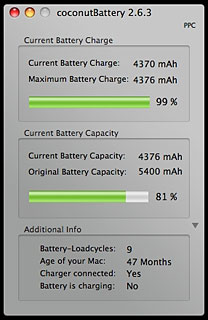
battery, now 48 months old, still works, but it is getting long in the
tooth, with Coconut Battery
reporting that it's down to 81% capacity when fully charged, so it
doesn't last terribly long on a charge even when the PowerBook is
asleep - and last week I neglected to plug it in after I used it to do
some scanning and printing.
A few days later, I noticed that the little pulsing sleep light had gone out, so I just moved the 'Book back to where its power adapter was plugged in and left it to recharge. I didn't get back to the PowerBook for several days, but Sunday afternoon I hit the Power button and . . . nothing. No chime, no grunt from the optical drive, no hard disk spooling up.
Evidently dead.
I turned the PowerBook over, removed the battery, and performed the four-finger Power Manager reset salute for this machine: Ctrl-Opt-Shift-Power (COPS), then hit the Power button again.
Still no response.
I was beginning to sweat a bit, especially with the recent demise of our G3 iBook with similar symptoms and non-responsiveness which defied all efforts to revive it.
Here's the especially interesting part. I happened to be using a FastMac AC power adapter, which has provided flawless service for more than two years. I like the FastMac adapter because it's compact and extremely rugged. However, while it has a power-on LED indicator on the housing, there is no function to match the stock Apple adapter's glowing green/orange color coding for charging status on the jack that plugs into the PowerBook.
Back to Life!
I decided to try the Apple adapter to see if I could get some better indication of what was going on, and when I connected it and speculatively pressed the Power button, the PowerBook came to life. The startup took a long time due to the improper shutdown when the battery died with a couple of dozen applications open, and once that completed I immediately shut it down again to reinstall the battery, not wanting to do anything that might upset the PMU again.
However, everything seems to be back to normal. The battery has charged, and the FastMac power adapter is working fine, as I'm typing on the machine right now.
The abiding mystery is why the FastMac adapter evidently wasn't able to recharge the battery from its flat dead state or power up the 'Book when the battery was dead, while the Apple adapter seemed to have no problem with either.
Or was it just a PMU issue that I addressed with the reset?
I ran it by my tech support professional daughter, and she was stymied as to the cause as well, but speculated that the power output from the FastMac adapter, while it works fine under normal circumstances, may have some subtle difference from the stock power adapter's output the prevented it from energizing the PowerBook's charge circuitry with the battery flat dead.
Beats me, but I'll be watching to see if this happens again. I also
need to get a new battery!
Charles Moore has been a freelance journalist since 1987 and began writing for Mac websites in May 1998. His The Road Warrior column is a regular feature on MacOpinion, and he is a news editor and columnist at Applelinks.com. If you find his articles helpful, please consider making a donation to his tip jar.
Recent \'Book ValueColumns
- Thoughts on Downsizing from a 17" 'Book to a 13" MacBook, 11.17. With its big screen, the 17" PowerBook was a real workhorse, but the smaller, lighter, faster MacBook is just about the perfect notebook computer.
- Razer Orochi: One of the Nicest Mice I've Ever Used, 11.03. The author detests the trackpad on the 17" PowerBook. This notebook gaming mouse is an absolute pleasure to use.
- Goldtouch Go! Travel Keyboard: Ergonomics for the Road Warrior, 09.29. Ergonomic keyboards designed for mobile use are few and far between. This one from Goldtouch is compact, solidly built, and very flexible.
- Retro Clamshell iBook Case Returns for Modern 'Books, 09.14. Originally designed for the clamshell iBook, the Classic Case from MacCase is back - and just right for 12" and 13" iBooks, PowerBooks, and MacBooks.
- More in the 'Book Value index.
Links for the Day
- Mac of the Day: 15" MacBook Pro Core Duo, Jan. 2006 - The first Intel-based MacBook launched at 1.83-2.0 GHz, had several teething problems.
- Group of the Day: System 6 is the email list for those who choose System 6.
- November 21 in LEM history: 00: OS upgrades, downgrades - AltiVec vs. Pentium III - 01: Saved by the clones - Computer of the future - 02: Apple Education: Let's get to it - 03: Panther lets Macs and PCs work together, - Lombard SCSI bug - 05: 3 survivors from the 1970s - Real world battery life inadequate - Windows to Mac file transfer with Zip disks - $99 alternative to Microsoft Office - 06: Parallels 1.0 far more polished than beta
- Support Low End Mac
Recent Content on Low End Mac
- Apple's Tablet an End Run Beyond Netbooks, Frank Fox, Stop the Noiz, 11.20. Whatever Apple has planned will leverage existing technologies while going beyond what its competitors can offer.
- i5 iMac Benchmarked, Mac mini 'Shouldn't Be Overlooked', Twitter Client for Classic Mac OS, and More, Mac News Review, 11.20. Also why Apple leaves the low end to others, 10.6.2 fixes video playback problem in 27" iMac, 3D Leopard and Snow Leopard performance, and more.
- NASA Chemical Sensor for iPhone, Smartphone Death Match, iPhone Earrings, and More, Ian R Campbell, 11.20. Also mobile phone dangers, new apps, GPS solution for iPod touch, new iPod and iPhone cases, and more.
- Apple #4 in Reliability, Apple Tablet a Gadget for All?, HP's i7 Notebook Outdoes Mac Rivals, and More, The 'Book Review, 11.20. Also Flash 10.1 improves video on Hackintosh netbooks, thin-and-light notebooks impress, Windows XP finally on the way out, and more.
- Replacing the Hard Drive in a Clamshell iBook, John Hatchett, Recycled Computing, 11.19. Yes, it is one of the most difficult Apple notebooks to disassemble and reassemble, but a 10 GB hard drive just will not do.
- IBM Model F: A Great Old Keyboard with an Outdated Layout, Tommy Thomas, Welcome to Macintosh, 11.19. Although it used a different technology than the revered IBM Model M keyboard, the Model F was a great keyboard in its own right.
- More links in our archive.
Recent Deals
- Best eMac Deals, 11.18. Used 1 GHz Combo, $100; SuperDrive, $269; 1.25 GHz Combo, $119; SD, $319; 1.42 GHz Combo, $289; SD, $498.
- Best Mac OS X 10.6 and Mac Box Set Deals, 11.18. "Snow Leopard", single user, $25; 5 users, $45; Mac Box Set, single user, $139; 5 users, $180; Server, $414. Shipping included.
- Best Xserve Deals, 11.18. Used 1 GHz dual G4, $649; 2.3 dual G5, $795; 3.0 4-core Xeon, $1,899; refurb 2.26 4-core, $2,499; new, $2,888; refurb 8-core, $2,999; new, $3,449; more.
- Best 15" MacBook Pro Deals, 11.17. Used 1.83 GHz, $750; 2.16, $800; 2.33, $900; refurb 2.4, $1,299; 2.53, $1,449; 2.66, $1,699; 2.8, $1,899; new 2.53, $1,579; 2.66, $1,799; more.
- Best Power Mac G4 and AGP Video Card Deals, 11.17. Used 400 MHz, $50; 933 MHz, $80; 500 dual, $60; 867 dual, $90; 1 GHz dual, $150; 1.25 GHz dual, $225; 1.42 GHz, $499.
- Best Mac OS X 10.5 Deals, 11.17. "Leopard" upgrade, $80; single user license, $135; 5 users, $173; Mac Box Set, 5 users, $230; Server, 10 users, $340; unlimited, $850. Shipping included.
- Best Mac mini Deals, 11.16. Used 1.42 GHz G4 mini, $379; 1.66 GHz Core Solo, $419; 2.0 Core 2, $450; new 2.26 GHz nVidia, $580; 2.53 GHz, $769; Server, $990.
- Best iBook G4 Deals, 11.16. Used 12" 1.07 GHz Combo, $210; 1.33 GHz, $298; 14" 1.33 GHz, $398; 1.42 GHz, $479; SuperDrive, $498.
- Best iPod shuffle Deals, 11.16. Used 1 GB, $35; 4 GB, $65; refurb 1 GB, $39; 2 GB, $59; new 2 GB, $55, 4 GB, $75. New and refurb prices include shipping.
- More deals in our archive.
About LEM | Support | Usage | Privacy | Contacts
Navigation
Used Mac Dealers
Apple History
Video Cards
Email Lists
Favorite Sites
MacSurfer
MacMinute
MacInTouch
MyAppleMenu
InfoMac
Macs Only!
The Mac Observer
Accelerate Your Mac
RetroMacCast
PB Central
MacWindows
The Vintage Mac
Museum
DealMac
DealsOnTheWeb
Mac2Sell
ramseeker
Mac Driver Museum
JAG's House
System
6 Heaven
System 7 Today
the pickle's Low-End
Mac FAQ
Abandonware
Petition
Mac vs. PC Info
Affiliates
The Apple
Store
Mac
Connection
B&H
MacMall
TechRestore
ExperCom
Crucial
Memory
batteries.com
Advertise
MacMinute
MacInTouch
MyAppleMenu
InfoMac
Macs Only!
The Mac Observer
Accelerate Your Mac
RetroMacCast
PB Central
MacWindows
The Vintage Mac
Museum
DealMac
DealsOnTheWeb
Mac2Sell
ramseeker
Mac Driver Museum
JAG's House
System 6 Heaven
System 7 Today
the pickle's Low-End
Mac FAQ
Abandonware
Petition
Mac vs. PC Info
Mac Connection
B&H
MacMall
TechRestore
ExperCom
Crucial Memory
batteries.com