Low End Mac Reader Specials
TypeStyler For Mac OS X is Now Shipping! Download The Free Fully Functional 60 Day Tryout at www.typestyler.com
OWC: Plug & Play Hardware RAID up to 8.0TB. High Performance, Data Redundant Solutions. FireWire 800, FireWire 400, USB2, or eSATA. Hot Swappable Bays, Data Rates over 200MB/s. Click here
Don't install Parallels to play poker online! Poker Mac will show you how
to download and install a native Mac poker application such as Full
Tilt Poker Mac.
Laptop Hardware Provided by TechRestore - Overnight Mac & iPod Repairs.
Compare products like desktop computers, apple laptops, apple macs, and LCD Monitors side by side! All the information and reviews to make the best purchasing decision for new mobile phones, sat nav systems, or MP3 players. The Ciao online shopping community makes searching products easy for you.
Mac Spectrum
Replacing Your Lombard or Pismo Optical Drive with a SuperDrive
- 2008.08.15 - Tip Jar
Popularity: ![]()
![]()
![]()
![]()
I purchased a "Lombard" PowerBook G3 in 2005 and started upgrading it, adding everything from more RAM, and a bigger hard drive to a DVD-RW. I parted with it in 2007 and kind of missed it, so I bought another one recently and plan to do the same upgrades to it, maxxing it in every way.
This is a nice machine for its age (built in 1999) and still capable of meeting most needs for most users. It is capable and supported by Apple to run Mac OS X 10.3 "Panther". With 512 MB, mine coped very well.
With a modified Tiger DVD I managed to install Mac OS X 10.4 "Tiger" on my Lombard without the need for tweaking, hard drive cloning, or using third party installers like XPostFacto.
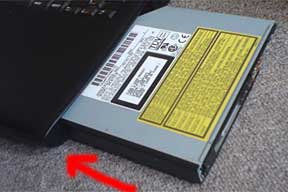
There is plenty to be done to boost your aging PowerBook. You can upgrade the RAM, replace the hard drive and the optical drive, and upgrade the processor to a faster G3 or even a G4. This guide shows you how to replaced the optical drive in both the Lombard and the Pismo PowerBook, which uses exactly the same drive bay modules.
Preparation
Before you start, you should power off the machine and remove the mains plug. Leave it for about 10 minutes before you do anything else to it. This will just let it cool off a little.
Drive Bay Removal
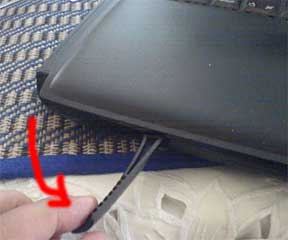
Next, remove the battery. Pull the release tab, and the battery will pop out a little. Now pull the battery further until it is clear of the machine.
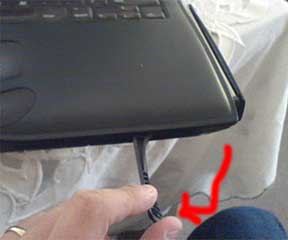
Next, do the same to the optical drive.
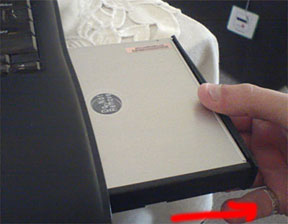
For instructions on how to replace the CD-ROM drive with a different drive, please see step 11 at the bottom of the page.
Hard Drive Caddy Note
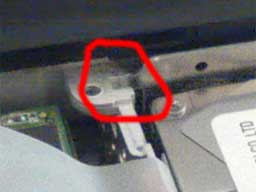
Now you are
happily putting everything back into place, this is a small note to
remember.
When you replace the hard drive caddy, the top end where the screw holes are at the edge nearest the screen fits into a little lug. Ensure this it pushed into the lug - otherwise the metal shield will not go home.
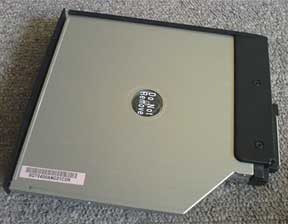
Replacing the Optical Drive
Please
follow steps 1 and 2 before proceeding to replace the optical drive. My
PowerBook came with a CD-ROM drive, and I first replaced it with a
DVD-ROM, and more recently with a DVD-RW. You can replace it with
virtually any laptop optical drive.
While it is possible to replace it with a CD-RW drive or DVD-RW drive, burning drives are less compatible, so be sure it will work before purchasing one, check out Accelerate Your Mac for compatibility. Mine is fitted with a slot loading Panasonic/Matshita UJ-815-A DVD-RW.
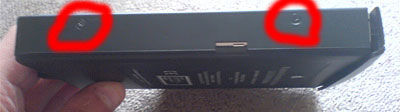
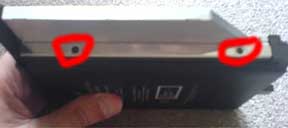
Anyway, once you have the drive out, you need to remove the casing that helps it fit into the drive bay slot. This is held in using four screws, two on each side.
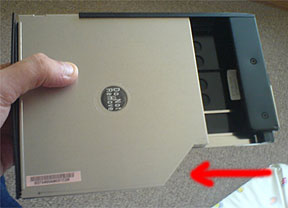
Once the screws are out, simply slide the current drive out of the casing. Then slide the new drive into place.
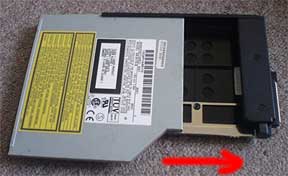
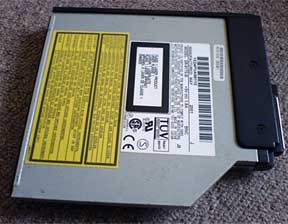
Then replace the four screws to hold the drive into the
casing and slide it back into the drive bay.
NOTE: You may need to remove the drive bezel from the front of the new drive. These are generally a specific shape depending on what machine they came out of.
You may be lucky enough that the bezel from the PowerBook's original drive will fit. If not, you will have to trim the bezel from the new drive until it allows the drive to close properly.
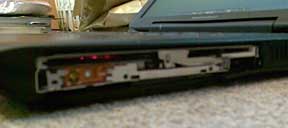
Unfortunately mine came without a bezel, but it works fine,
just looks a little ugly.
BE AWARE: the button and drive light may not be in the same place as the previous drive so you may need to use the new bezel and trim it.
About This Mac
To ensure the drive you installed is working, you can check the Apple System Profiler.
Under OS 9, boot the machine. Click on the Apple Menu in the top left hand corner and select Apple System Profiler. On the first screen you will see memory, processor, and start up drive. If you click the Devices and Volumes tab, you can see which drives are installed.
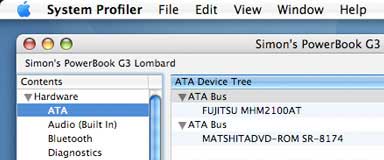
Under OS X, boot the machine. Click on
the Apple in the top left hand corner and select About This Mac. This
will tell you what OS version you are running, what processor you have,
and the amount of RAM installed. Click the More Info button, and under
ATA it will show which drives are installed.
If you want to use your new optical drive with iTunes, iDVD, etc., you will probably need to use Patchburn, a free utility that is available for Mac OS X 10.2, 10.3, and 10.4. Most third-party software should recognized and work with your new drive.
Have fun with your upgraded PowerBook. If you have any questions or suggestions for this guide, please email me.
Hardware upgrades are performed at your own risk. I and Low End Mac
take no responsibility for any damage to any equipment or data when you
perform an upgrade using this guide. I have successfully done this
myself and offer this information to aid others.
Recent Columns by Simon Royal
Royal also has his own Mac specific website.
- A Place for the Classic Mac OS in the Age of Snow Leopard, 10.19. Mac OS 9 has been out of production for nine years, but for basic tasks, such as word processing and email, it provides plenty of power.
- Adding USB 2.0 to a Titanium PowerBook G4, 08.20. TiBooks have built-in USB 1.1, but with a compatible USB 2.0 CardBus card, you can go 2.0. Problem is, not all cards work.
- 'Snow Leopard' and the End of PowerPC Macs, 08.14. Mac OS X 10.6 will be the first version of OS X without PowerPC support. That marks the beginning of the end for G4 and G5 Macs.
- Lombard, the Forgotten PowerBook, 05.06. Sitting between the legendary WallStreet and the widely known Pismo, Lombard provides great value and handles OS X nicely.
- More in the Mac Spectrum index.
Links for the Day
- Mac of the Day: 17" iMac G4/800 MHz, July 2002 - The iMac 'grows up' with a 17" 1440 x 900 display.
- Group of the Day: LisaList supports Lisa users.
- November 8 in LEM history: 99: OS 9: I think I like it - 01: The simplified Mac life - Soured on Windows - Flea market Mac - 02: Little room for improvement in new 'Books - Combo drive upgrade for iceBooks - 04: Re-Porter - 05: Fix the old iMac or buy a Mac mini? - Apple's Copland project - 06: MacBook Core 2 - MacBook value equation - Cheap is as cheap does - 07: Problems with Classic mode in Tiger - The G4 Power Mac that won't run Leopard
- Support Low End Mac
Recent Content on Low End Mac
- Quad-Core CPU Makes Sense in MacBook Pro, OS X 10.6 Causing Overheating, Overseas Power, and More, The 'Book Review, 11.06. Also Late 2009 MacBook reviewed, how to add RAM to new MacBook, 18.4in Acer notebook used Intel i7, and SanDisk SSD chosen for Sony VAIO X.
- Dumping Macs for Google Apps, SSD in iMac, Late 2009 iMac Performance Problems, and More, Mac News Review, 11.06. /newsrev/09mnr/1106.html
- WiFi Paranoia, iMac-O-Lantern, Magic Mouse Does Click, Free Clipboard Managers, and More, Charles W. Moore, Miscellaneous Ramblings, 11.05. Also strange time stamps, problem with ColorIt on Intel Mac, and the story behind OS X 10.5.4 install discs.
- IDE Is Dead; Long Live SATA!, Dan Knight, Mac Musings, 11.04. SATA has displaced parallel ATA. While IDE hard drives haven't disappeared, the best deals are in SATA hard drives.
- QuickTime X in Snow Leopard Imports, Trims, and Publishes Video Quickly and Easily, Alan Zisman, Zis Mac, 11.04. The long, slow process of importing video into iMovie to edit it, then render it to another format, is history as QuickTime X does that much more quickly.
- More links in our archive.
Recent Deals
- Best Mac Pro Deals, 11.03. Used 2.66 GHz 4-core, $1,300; 3.0 8-core. $2,299; refurb 2.66 4-core Nehalem, $2,149; 2.93, $2,549; 2.26 8-core, $2,799; 2.93, $4,999.
- Best iPhone Deals, 11.03. New 8 GB iPhone 3G, $$99; refurb 16 GB 3GS, $149; new, $199; 32 GB, $299.
- Best 12" PowerBook G4 Deals, 11.03. Used 867 MHz SperDrive, $348; 1 GHz, $499; 1.33 Combo, $298; SD, $559; 1.5 Combo, $448; SuperDrive, $589.
- Best Power Mac G3 and PCI Video Card Deals, 11.02. Used beige 300 MHz, $25; G4/366, $49; blue & white 350, $80; 400, $90; 450, $105; PCI video cards from $15; shipping additional.
- Best Power Mac G4 and AGP Video Card Deals, 11.02. Used 400 MHz, $50; 733 MHz, $69; 933 MHz, $209; 1.25 GHz dual, $299.
- Best 15" MacBook Pro Deals, 11.02. Used 2.0 GHz, $800; 2.2, $900; 2.4, $1,000; refurb 2.53, $1,449; 2.66, $1,699; 2.8, $1,949; 3.06, $2,169; new 2.53, $1,579; 2.66, $1,799; more.
- Best Mac mini Deals, 10.30. Used 1.33 GHz G4 mini, $379; 1.42, $389; 1.5, $419; 1.83 GHz Core Duo, $350; Core 2, $439; new 2.26 GHz nVidia, $580; 2.53 GHz, $770; Server, $990.
- Best G4 iBook Deals, 10.30. Used 12" 1.07 GHz Combo, $225; 1.33 GHz, $298; 14" 1 GHz, $349; 1.33 GHz, $398; 1.42 GHz SuperDrive, $498.
- Best Classic Mac OS Deals, 10.30. System 6.0.8 floppies, $10; 7.1, $12; 7.5, $20; 7.5 CD, $4; 7.6 $13; 8.1, $11; 8.5, $20; 8.6, $90; 9.0, $20; 9.2.2, $30.
- More deals in our archive.
About LEM | Support | Usage | Privacy | Contacts
Navigation
Used Mac Dealers
Apple History
Video Cards
Email Lists
Favorite Sites
MacSurfer
MacMinute
MacInTouch
MyAppleMenu
InfoMac
Macs Only!
The Mac Observer
Accelerate Your Mac
RetroMacCast
PB Central
MacWindows
The Vintage Mac
Museum
DealMac
DealsOnTheWeb
Mac2Sell
ramseeker
Mac Driver Museum
JAG's House
System
6 Heaven
System 7 Today
the pickle's Low-End
Mac FAQ
Abandonware
Petition
Mac vs. PC Info
Affiliates
The Apple
Store
Mac
Connection
B&H
MacMall
TechRestore
ExperCom
Crucial
Memory
batteries.com
Advertise
MacMinute
MacInTouch
MyAppleMenu
InfoMac
Macs Only!
The Mac Observer
Accelerate Your Mac
RetroMacCast
PB Central
MacWindows
The Vintage Mac
Museum
DealMac
DealsOnTheWeb
Mac2Sell
ramseeker
Mac Driver Museum
JAG's House
System 6 Heaven
System 7 Today
the pickle's Low-End
Mac FAQ
Abandonware
Petition
Mac vs. PC Info
Mac Connection
B&H
MacMall
TechRestore
ExperCom
Crucial Memory
batteries.com