Low End Mac Reader Specials
TypeStyler For Mac OS X is Now Shipping! Download The Free Fully Functional 60 Day Tryout at www.typestyler.com
Don't install Parallels to play poker online! Poker Mac will show you how
to download and install a native Mac poker application such as Full
Tilt Poker Mac.
Laptop Hardware Provided by TechRestore - Overnight Mac & iPod Repairs.
Compare products like desktop computers, apple laptops, apple macs, and LCD Monitors side by side! All the information and reviews to make the best purchasing decision for new mobile phones, sat nav systems, or MP3 players. The Ciao online shopping community makes searching products easy for you.
Mac Spectrum
Adding USB 2.0 to a Titanium PowerBook G4
- 2009.08.20 - Tip Jar
Follow Simon Royal on Twitter.
Popularity: ![]()
![]()
![]()
![]()
Tweet this article. Short link: http://bit.ly/4zMHe
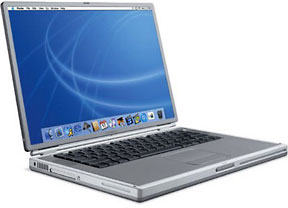
Despite my 867 MHz Titanium PowerBook G4 (TiBook) being introduced in November 2002, making it nearly 7 years old, it is still an excellent machine. It is the earliest Titanium model to officially support Mac OS X 10.5 "Leopard" (being an 867 MHz model), and it copes with it very well.

Apple's Titanium PowerBook G4
It has been upgraded slightly. It maxed at 1 GB of RAM, and I put a 5400 RPM 80 GB hard drive in place of the original drive. Leopard runs very well - better than you would think - and it is my main machine.
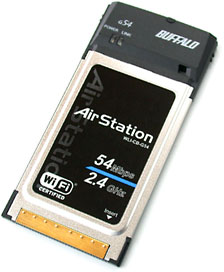
It has a CardBus slot, which adds some expandability. Currently it has an AirPort Extreme compatible card installed in the CardBus slot, giving me high speed 802.11g wireless speeds, as opposed to the limited original internal 802.11b AirPort Card.
However, there is one thing that lets it down, the lack of USB 2.0, which only became a standard PowerBook feature with the aluminum models introduced in 2003. The TiBook has two built in USB ports, but they are only USB 1.1. This can make data transfer to USB drives very slow, so I wondered if it was possible to use the CardBus slot to add USB 2.0.
A few years ago I had a 400 MHz TiBook that I put a USB 2.0 card in under Mac OS X 10.4 "Tiger". It worked, but I couldn't remember what make of card I had used.
Macs are funny things. You can use a lot of "Windows only"
peripherals in a Mac if they have the right chipset.
My Buffalo WLI-CB-54G wireless card uses the same chipset as Apple's AirPort Extreme cards, so my machine thinks it is an Apple card. My cheap USB Bluetooth adapter is "Windows only" (BT-ET06), but pop it in a Mac, and it is detected without the need for any drivers or setting up.
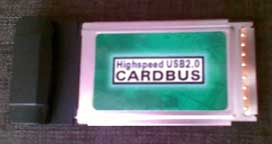
I looked for a cheap USB 2.0 card on
eBay and went for a non-brand-name card. I popped it in and checked
System Profiler - it detected two built-in USB 1.1 ports and two high
speed USB 2.0 ports. The card specs in System Profiler said the Vendor
ID is Cambridge Silicon Radio Ltd and the Version is 11.20. There are
no identifying marks on the card and nothing else in System
Profiler.
Now for the test.
I copied a 672 MB Ubuntu ISO to a 1 GB USB 2.0 flash drive. First I did it on a USB 1.1 port, and it took 33 minutes. I then copied it while it was plugged into the CardBus card, and it took 5 minutes - over six times faster. It definitely works.
There is very little information on the Web about using USB 2.0 on a Titanium PowerBook. Some have success; some don't. Some successfully use it with iPods and iPhones, and some don't. But it is possible, and it does mean you can squeeze a few extra miles out of your aging buy lovely PowerBook.
I will try to do some more research into what cards work and if
particular chipsets work and report back. But the short of it is, it is
possible.
Recent Columns by Simon Royal
Royal also has his own Mac specific website.
- A Place for the Classic Mac OS in the Age of Snow Leopard, 10.19. Mac OS 9 has been out of production for nine years, but for basic tasks, such as word processing and email, it provides plenty of power.
- 'Snow Leopard' and the End of PowerPC Macs, 08.14. Mac OS X 10.6 will be the first version of OS X without PowerPC support. That marks the beginning of the end for G4 and G5 Macs.
- Lombard, the Forgotten PowerBook, 05.06. Sitting between the legendary WallStreet and the widely known Pismo, Lombard provides great value and handles OS X nicely.
- Does Using Matched RAM Make Your Mac Faster or More Stable?, 04.28. Most Macs don't need matched memory modules and seem to run just fine with mismatched brands and capacities, but matching modules may be a bit faster.
- More in the Mac Spectrum index.
Links for the Day
- Mac of the Day: 'WallStreet' PowerBook G3, May 1998 - WallStreet offered 3 screen sizes and CPU speeds from 233 to 292 MHz.
- Group of the Day: Mac UK is for Mac users in the United Kingdom.
- February 9 in LEM history: 00: Think choices - Promoting the Macintosh - 01: Apple vs. Mac clones - 05: Apple and the $100 laptop - Yojimbo - Core Duo vs. G5 - 07: The story behind After Dark - Microsoft Office 2007
- Support Low End Mac
Recent Content on Low End Mac
- Do We Really Need Another Mac Email Client?, Charles W. Moore, Miscellaneous Ramblings, 02.08. Mac users have a host of free and low-cost email clients to choose from. Does Brent Simmons' 'Letters' project make any sense at all?
- MacBook Pro a Revelation, Dan Knight, Mac Musings, 02.08. After using G4 Macs for over a decade, spending a weekend prepping a first generation MacBook Pro was a real eye opener.
- 42 Reasons a Netbooks Is Better than an iPad, Hard Drive Upgrade Value, Faster Netbooks, and More, The 'Book Review, 02.05. Also why the iPad can't compete with netbooks, 802.11n WiFi card for older Intel MacBooks and Mac minis, and a DJ keyboard cover for MacBooks.
- iPad Perfect for Handheld Computing, John Hatchett, Recycled Computing, 02.05. You can hold the iPad in one hand and operate it with the other, giving it real advantages over a laptop computer.
- iPad Targets Netbook Users, iPad 'Flaws' Don't Matter, In-page Search for iPhone Safari, and More, iNews Review, 02.05. Also FSF considers iPad 'iBad' for freedom, Touch Mouse app turns iPhone into wireless keyboard and trackpad, privacy screen for iPhone, and more.
- Touch Shifts the Apple Empire, Tim Nash, Taking Back the Market, 02.05. Apple dominates mobile computing, and it will be difficult for competitors to match the value of the iPad.
- 90% of Premium PCs Are Macs, OS and Browser Market Share, Chrome Browser to Dominate, and More, Mac News Review, 02.05. Also 27" iMac too popular for supply, eco-friendly 2 TB hard drive, Puppy Linux for PowerPC Macs, 6-core Mac Pro rumored, and more.
- iPad Should Support a Stylus, CoolBook Quiets MacBooks, Puppy Linux for PowerPC Macs, and More, Charles W. Moore, Miscellaneous Ramblings, 02.03. Also the iPad as a genie in a bottle, Eudora Classic 6.2, notebook battery life, and more uses for 'obsolete' technology.
- More links in our archive.
Recent Deals
- Best 15" MacBook Pro Deals, 02.02. Used 2 GHz, $700; 2.4, $999; refurb 2.53, $1,449; 2.8, $1,699; 3.06, $2,199; new 2.53, $1,610; 2.66, $1,839; 2.8, $2,109; 3.06, $2,550; more.
- Best G3 iMac Deals, 02.02. 500 MHz CD-ROM, $40; 450 MHz DVD-ROM, $60; 600 MHz CD-ROM, $230 shipped; 700 MHz CD-RW, $300 shipped.
- Best eMac Deals, 02.02. 1 GHz SuperDrive, $269; 1.25 Combo, $100; SD, $360; 1.42 GHz Combo, $299; SD, $439.
- Best Mac mini Deals, 02.01. Used 1.25 GHz G4 Combo, $369; 1.5, $399; Core Solo, $399; 1.83 GHz Core Duo SD, $439; new 2.26 GHz nVidia, $580; 2.53 GHz, $759; Server, $985.
- Best iBook G4 Deals, 02.01. 12" 1.07 GHz Combo, $200; 1.33 GHz, $259; 14" 1.42 GHz SuperDrive, $399.
- Best Titanium PowerBook G4 Deals, 02.01. 800 MHz Combo, $285; 867 MHz SuperDrive, $400; 1 GHz Combo, $549.
- Best 13" MacBook & MacBook Pro Deals, 01.29. Used 1.83 GHz, $570; 2.0, $599; 2.4 GHz, $800; 2.26 MB, $849; new, $925 after rebate; Pro, $1,108, 2.53, $1,399 a/r.
- Best Power Mac G5 Deals, 01.29. 1.8 GHz single, $399; dual, $479; 2.0, $549; 2.5, $609; 2.7, $799; 2.3 GHz dual-core, $709; 2.5 GHz Quad, $939.
- Best Mac OS X 10.0-10.3 Deals, 01.29. Mac OS X 10.0, $30; 10.1, $20; 10.2, $50; 10.3, $50; 10.3 Server, unlimited users, $130.
- More deals in our archive.
About LEM | Support | Usage | Privacy | Contacts
Navigation
Used Mac Dealers
Apple History
Video Cards
Email Lists
Favorite Sites
MacSurfer
MacMinute
MacInTouch
MyAppleMenu
InfoMac
Macs Only!
The Mac Observer
Accelerate Your Mac
RetroMacCast
PB Central
MacWindows
The Vintage Mac
Museum
DealMac
DealsOnTheWeb
Mac2Sell
ramseeker
Mac Driver Museum
JAG's House
System
6 Heaven
System 7 Today
the pickle's Low-End
Mac FAQ
Abandonware
Petition
Mac vs. PC Info
Affiliates
The Apple
Store
Mac
Connection
B&H
MacMall
TechRestore
ExperCom
Crucial
Memory
batteries.com
MacMinute
MacInTouch
MyAppleMenu
InfoMac
Macs Only!
The Mac Observer
Accelerate Your Mac
RetroMacCast
PB Central
MacWindows
The Vintage Mac
Museum
DealMac
DealsOnTheWeb
Mac2Sell
ramseeker
Mac Driver Museum
JAG's House
System 6 Heaven
System 7 Today
the pickle's Low-End
Mac FAQ
Abandonware
Petition
Mac vs. PC Info
Mac Connection
B&H
MacMall
TechRestore
ExperCom
Crucial Memory
batteries.com