
When you use a computer frequently, whether it is for leisure or work, you risk repetitive stress injuries. Most stress injuries can be avoided easily if you are careful enough to position your body correctly and remember to spare your wrists from unnecessary strain.
- Description: Doing the little things right
Difficulty level: Not applicable
System version: Not applicable
Required: Not applicable
The first step to take is to make sure that you position your body correctly when sitting down in front of a computer. Your feet should be flat on the ground or laying on an object to keep a straight position. Fold your legs to make a 90 degree angle with your knees. With such a straight position, you should avoid annoying knee and thigh pain that many experience whenever they use a computer for a long period.
Apply the same rule to your arms. Normally, your forearm and arm should form a 90 degree angle, and your forearm should rest in a flat position. Your hands should be at the same level as your elbows; therefore the forearm should rest flatly on your chair and the surface where you put the keyboard. Also, sit in a position to keep your back straight.
You are not a contortionist, so you really have to be careful about this. Do whatever you have to do to observe the above tips. This could mean adjusting the height of your chair – the good news is that lots of chairs can be adjusted. If you need a wrist rest in front of your keyboard to have the right arm position, then you should make sure to get one. In some cases, getting a better chair or better hardware could be the solution. If it is the case, do not hesitate to purchase.
Standing Desks
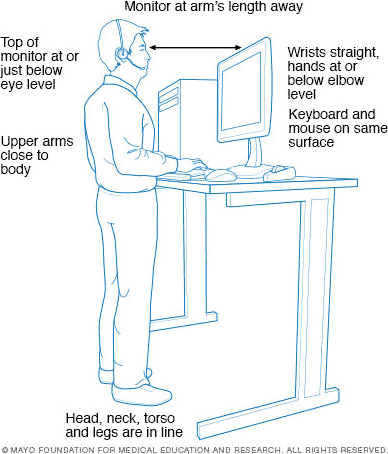 Standing desks have taken the workplace and home office by storm since this article was first published. Some let you switch between sitting and standing, while others are standup-only. Here are some articles on the subject:
- Standing Workstation: What You Need to Know, Mayo Clinic (source of image to right)
- 5 Things You’re Doing Wrong at Your Standing Desk, Aaron Couch, Make Use Of, 2014.02.10. Best tip: Don’t stand up all the time, use a stool at your standup desk or have one you can convert to desk height and use with a chair.
- Sitting and Standing at Work, CUergo, Cornell University Ergonomics Web. Recommends sitting at your computer, and “about every 20-30 minutes take a posture break and stand and move for a couple of minutes.”
For more on standing desks, see Sitting or Standing at Your Computer?
Mousing Tips
The most important part of using a mouse is to have the right one. If yours causes problems, shop around to see which one is best for your hand size and shape. Products such as the Microsoft IntelliMouse, Contour Design mice, Logitech mice, and many others were designed with ergonomics in mind.
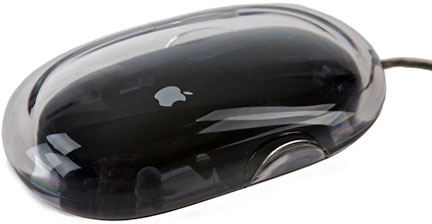
Apple Pro Mouse
If you are to switch mice, be careful not to pick one that’s too big for your hand. If the mouse is too big, your hand will be stuck in awkward positions. A mouse such as the Apple Pro Mouse, which ships with new Macs (and is available separately), is just great. It fits all hand sizes, and clicking is easy, since you simply push down the mouse itself.
No matter what mouse you have, remember to avoid clutching it. Doing this puts your hand under unnecessary stress, making an effort that does not bring anything to your computer use. Your hand should rest on top of and around the mouse in a relaxed position. Make each click a as effortless as possible. Press very lightly; do not put any intensity into the movement. You really have to avoid clutching and pushing hard.
Keyboard Tips
Again, the key (pun intended) is to adopt a relaxed hand position. Make sure to put your fingers in natural positions and avoid over-extension when you type or hold down multiple-key shortcuts. If your left thumb hits the Command key and your left index goes toward the O key, you are overextending. When two keys are on different ends of the keyboard, use both hands to press the keys.
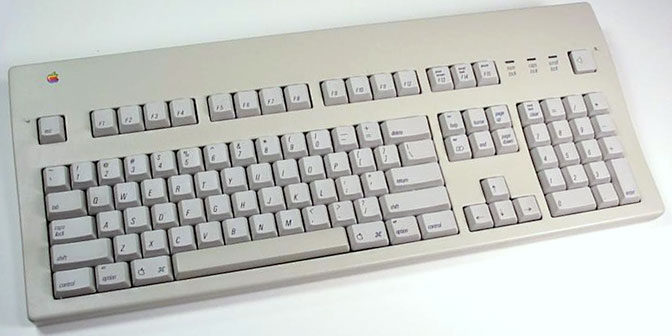
When you do not need to use the keyboard, it can be a good idea to put your hands elsewhere, perhaps on a wrist rest or on your thighs. Keeping your hands up all the time requires an additional effort, and you have to know your limits. If you feel pain when your hands are on the keyboard, but do not feel pain when they rest on your thighs, you can feel it yourself.
General Tips
- Take breaks. Your body needs to rest at times. Get up and walk, plop down on a couch, or do some exercise. Do anything you can to break up your computer sessions. Sitting down for 10 hours straight in front of a computer can be a factor when repetitive stress injuries are concerned. Combine this with bad habits, and you are one big injury waiting to happen.
- In this spirit, limit your computer use to the time you need to spend in front of it.
- If you have the necessary hardware, switch mice every once in a while. Different input devices use different parts of your hand, so this kind of rotation is definitely a good thing to implement.
- Make sure that your keyboard, mouse, and screen are in front of you, not to your left or to your right. As I said above, you have to keep a straight position, and this applies to lateral movement, not just to the level of your hands and feet.
Those are only a few tips, but they can correct several bad habits. Positioning yourself correctly, using the right hardware, and knowing your limits can make the difference between feeling relentless pain or feeling as if you weren’t using a computer.
Keywords: #ergonomics
Short link: http://goo.gl/vP5ali
