
In the first part of this tutorial, we covered general use of StuffIt Deluxe. This time we are going to discuss file exchange on the Internet. StuffIt Deluxe encodes and compresses files for the Net and has features designed to make file transfers easier.
- Description: Using compression software on the Net
Difficulty level: Intermediate
System version: Depends on what StuffIt version you have
Required: StuffIt Deluxe 6.5
Before we start, here is a quick explanation of what the Translate menu options mean. StuffIt Deluxe can produce and open different file types that are usually used for different computer environments.
- AppleSingle: This format preserves the information unique to Macintosh files, even when used on different file systems.
- Binary to ASCII: If btoa and atob mean nothing to you, this may not be an important encoding operation in your case. 🙂
- BinHex: This is the most used encoding on the Mac on the Internet. The files that end with a .hqx extension are encoded in BinHex, especially after being compressed by products such as StuffIt.
- BZip and GZip: Used mainly by Unix systems – remember, Mac OS X is Unix – these two will not be used on Mac OS 9 and earlier. GZip handles single files only.
- LHa: Mostly a Japanese thing.
- MacBinary: Used by lots of Mac users, this is an excellent file encoding, especially after compression. It is smarter than BinHex because it takes less space, and is friendlier with Mac OS 8.5 to Mac OS 9.2 files.
- Tar: It stands for Unix tape archiver. It combines files into one.
- Unix compress: I’ll let you guess.
- UUEncode: It can be used to transfer files to a Unix station or a PC.
- ZIP: The default compression format for Windows computers.
Contextual Menu
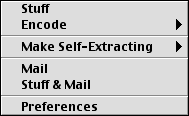 The easiest way to send files over the Internet – think of email attachments – with compression is to control-click on a file and select Stuff and Mail from the contextual menu. This little option takes a file (or several files), compresses it (or them) into an archive, and goes to your email application to open a new message with the archive as an attachment.
If your email app is not active, StuffIt Deluxe will launch it for you. You can select your preferred email application in the Magic Menu’s preferences.
StuffIt Express Personal Edition
On to the good stuff! When I started using StuffIt Deluxe 6.5, which was recently released, I found its newest edition to be welcome.
What is StuffIt Express Personal Edition? In short, it automates things. You create drop boxes that will, when you drop files on them, execute the steps they were programmed to execute. The best part is that, unlike AppleScript, this is easy to do. If you know how to read and click on a mouse, you should know how to handle this.
I find this application to be at its best when sending attachments to the same people regularly. For example, I am a freelance writer for a newspaper, and I have to send several Word files a week to the same person at the newspaper. Creating a drop box that compresses, addresses, and sends everything makes this easier and much faster. It saves time and the hassle of doing all the steps manually.
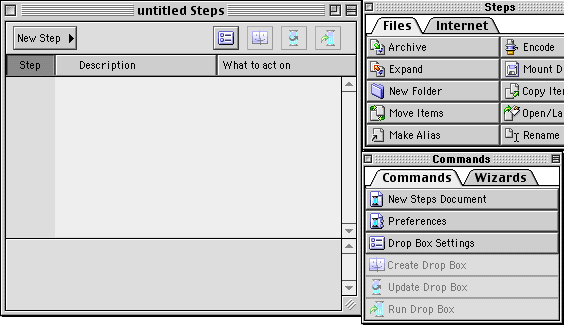
This is the standard interface when creating a drop box.
The first thing to do is to create a new drop box. When you open StuffIt Express PE, it starts one by default. To create new steps, just click on a step in one of the available tabs, namely Files and Internet. When needed, the application will ask you how to handle the task by customizing the step. For example, when I want a file compressed, the app asks me what name I want to give to the file. I give the compressed file a basic name with the .sit extension to the file. For example, when I send my articles to Low End Mac, the archive automatically created gets this name: lemsubmission.sit.
In this spirit, create steps that allow you to compress, encode, move, copy, or perform whatever operation you need before sending it somewhere. With all the available options, you can create drop boxes that what whatever you want.
When you send files via email, the drop box will activate or launch your favorite email application and do all the work for you. If you specify a subject and a message in your drop box settings, it will handle it for you. Here is an example of a drop box to handle files and send them over email:
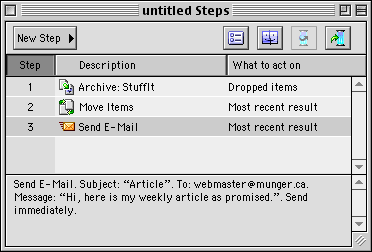
 With a specified subject and message, it sends the files – after compressing them – to a specific address. To create the drop box, all I need to do, from this point, is to click on Create Drop Box in the Commands window from StuffIt Express PE. Save it wherever you want and get ready to use it by dropping files on it.
You can use the software for whatever need you have, including FTP uploads. And you can update drop boxes by modifying the steps and clicking on the button to update the drop box. I recommend experimenting with it.
Keywords: #stuffit #stuffitdeluxe #stuffitexpress #archive
Short link: http://goo.gl/n2urvG
