Low End Mac
Search LEM 
Donate · Amazon.com · MacResQ · Advertise
Other Cobweb sites: Low End Living · Reformed.net

Quicklinks: · Power Macs · 'Books · Early Macs · Week's Best Deals · Best Buys · OS Downloads

iBasics

Make Your Mac Faster

Low End Mac Reader Specials

Memory To Go Special: MacPro 8 Core Memory 4GB kit $192 / 2GB kit $109. MacBook Pro / MacMini / iMac Intel Core2 DUO 2GB $44 1GB $23--Free shipping available.

Download Typestyler, still the Ultimate Styling Tool for Internet, Print and Video Graphics. Works great in Classic with a Native OS X Version on the way. Free Tryout: www.typestyler.com

LA Computer Company: LA Computer Company: Specials on AppleCare, Apple Displays, MacBooks, iMac's, MacBook Pros, Laptop and iPod accessories and more. Apple A/C Adapters for laptops starting at $25.00 Call 1-800-941-7654 or Click Here.

Other World Computing: OWC Mercury Elite FW800/FW400/USB2/eSATA TOP-RATED Solutions offer High Performance, Reliable storage for all your data storage needs. Industry leading 2yr limited + up to 5yr HD Mechanism Warranty too! Up to 2.0TB(2000GB), 500GB specials from $199.99

Mac users can finally play Party Poker for Mac. Not only that, they can also learn how to play PokerStars for Mac.

Laptop Hardware Provided by TechRestore - Overnight Mac & iPod Repairs.

NEW MacPro Memory 800Mhz With Apple Spec Heat Sink 2GB Kit $104 / 4GB Kit $184 / 8GB Kit $362 Click to Maximize your Macs...

- 2001.05.09

Description: Modifying the system to make it faster
Difficulty level: Easy
System version: Mac OS 8 to Mac OS 9.1
Required: A bit of patience

Your Mac was so darn fast when you bought it. It was a top-of-the-line and state-of-the-art computer, but it suddenly seems older than you. You have the impression that with all its power, it could deliver the goods in much less time than it does now.

You are absolutely right. Here are a few tips to give some life back to your Macintosh and preserve its power in the future.

Memory

Your memory, in the form of your RAM and hard disk drive, is one of the keys to your Mac's speed. If you manage it correctly, you are more likely to use all its power at maximum speed.
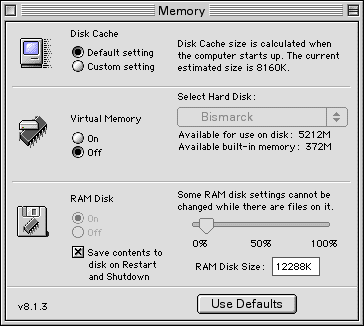
Disk Cache

The disk cache is very important for your overall performance. The first tip is to avoid giving it less memory than its default setting. It can be tempting to see the disk cache as a RAM hog, but if you decrease the amount of allocated memory, you will find out quickly that your Mac will choke on even the least demanding tasks, Web browsing included. Make sure to give it at least its default setting, and if you have some spare RAM, increase the cache's memory by one or two megabytes.

Virtual Memory

I already talked about this in iBasics. The virtual memory (VM) setting is simple: turn it off. Your RAM is the fastest memory available on your Mac, and this is why it is the most expensive per megabyte. By turning VM off, you reduce hard disk accesses and allow your RAM to take over a few things that your hard disk used to do. As long as you are not tight on RAM, you can afford to turn virtual memory off. VM can be useful for file mapping, but it will slow you down.

RAM Disk

What about the RAM disk in the control panel? Refer to a Speed Up Internet Explorer to learn how to use it, and remember that it can be used for any file that you use frequently.

Memory Usage

The way you use your Mac will impact your use of memory. When you launch and close applications all the time, you abuse your system greatly. The memory structure of the classic Mac OS (before Mac OS X) is a bit outdated and does not handle application memory as well as a modern operating system such as Mac OS X. Don't abuse it by repetitive application launching and closing unless you are tight on RAM. If you launched Internet Explorer, keep it open, since you know you may use it in a few minutes anyway.

Avoid having everything opened at the same time. If you are short on RAM (less than 5 megabytes available) when you are working on your Mac, you will see a serious speed hit. Your desktop picture or background will seem messed up and switching between applications will be a pain. Turn a couple of applications off when this happens; you will regain speed.

Restarts

Speaking of memory management, a great way to wipe everything clean and start over is to restart when you notice a speed decrease. When you launch applications and work with files, your RAM collects and loads libraries as well as data. Your clipboard will contain the last bit of information you copied and pasted. All of this takes RAM space and forces your Mac to carry more weight around when you execute other tasks. A restart will refresh your Mac's RAM by eliminating all the stored information that you will not use later in your session. It cleans everything up.

Desktop pictures

Ah, that sunset at the mountain was dazzling when you shot the picture during your last vacation! But it slows your Mac down when it is in the background. If you need a temporary speed boost or if you simply think that you can live without the sunset picture, turn it off and replace it with a desktop pattern. Whenever I want a speed increase, I just revert to an entirely black desktop pattern. It is dark, but it works and is easy on the eye.

Networking

Whenever your Mac does network operations, it executes pauses, even if they are not always perceptible. The pauses are greater if you use network protocols such as Web sharing, File Sharing, and AppleTalk. Those are useful features, but they can really slow you down when they are turned on and in use.

Unless you need them 100% of the time, turn them off until you need to use them. Go to the control strip (above) and turn AppleTalk off. Go to the Web Sharing control panel and make sure to turn it off by clicking on Stop. Do the same in the File Sharing control panel.

Manage extensions

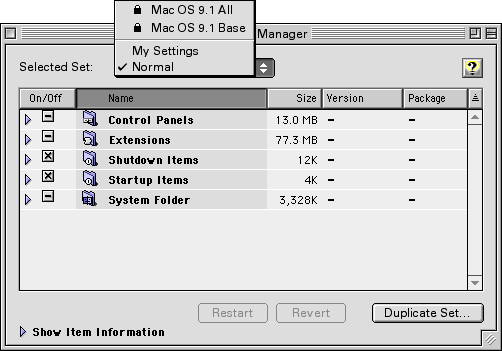
The best way to improve your performance is to manage your extensions with the Extensions Manager control panel. Turn off all the extensions that you do not need - or turn them off until you need to use them. Whenever you install software, you get an installation report which tells you what has been installed and where. Referring to such files is an excellent way to find out what extension is used with what software. Otherwise, you can click on the arrow besides "Show Item Information" to figure things out.

If you wish to have an "everything loaded" configuration, keep it as a set. You can rename it by choosing Rename Set in the File menu. Then, click on Duplicate Set to create a set where you turn off extensions and control panels that you do not use all the time. Name that set. When you have multiple sets, all you have to do to switch between them is to click on the popup menu called Selected Set (see screen shot) and select one, then click on Restart.

In all the available sets, the best one to use for maximum speed is Mac OS All. The other set (Mac OS Base) is not a very appropriate extension set since its prime use is troubleshooting.

In the Extensions Manager, the Startup Items are easily visible. Those are useful if you want the same item to launch at every startup, but you will quickly note that it slows you down during startup when you arrive on the desktop. This can get annoying. Make sure not to put anything in Startup Items unless the items in question are essential to your use.

Here are a couple of extensions and control panels that create a speed hit when activated: Kaleidoscope, StuffIt Deluxe's True Finder Integration, Timbuktu Extension, and anything that adds something directly to the Finder and its menu bar.

Rebuild the desktop

The desktop files store all the icons that you have seen on your screen since the latest rebuild. If you are one to download icon sets from the Web or to use CD-ROMs often, the number of unused icons stored in your desktop files can be scary. Wipe everything clean by restarting and holding the Command and Option keys down. When you get an alert about rebuilding your volumes' desktop, click on OK each time you get the alert. You will notice a speed boost after the rebuilding process.

Beware of upgrades

Always be careful with software updates and upgrades. Get them only if they fix bugs or add features that you cannot live without. Software always grows bigger and adds more hardware requirements. The upgrade cycle can make a new Mac look very old within two years, while conservative upgrading behavior will make your Mac shine for years to come.

That's it for this week. Enjoy your faster Mac.  LEM

Links

Recent Content on Low End Mac

  • Open source virtualization for Macs, iMac shutdowns, Psystar reviews, and more, Mac News Review, 05.16. Also aluminum iMac USB power concerns, Penryn iMac twice as powerful as fastest G5 iMac, Radeon vs. GeForce in top-end iMac, Odysseus email client in beta, and more.
  • Limited USB bus power in Santa Rosa Macs, 1 TB in your 'Book, MacBook cooler, and more, The 'Book Review, 05.16. Hitachi first to market with 320 GB 7200 rpm notebook drive, Apple to refund for sparking power adapters, 10 hour external MacBook Air battery, bargain 'Books from $150 to $2,699, and more.
  • Best iBook G4 deals, Low End Mac Deals, 05.16. Used 12" 1.07 GHz Combo w/AP, $350; 1.33 GHz w/o AP, $400; 14" 933 MHz w/AP, $400; 1.07 GHz, $425; 1.33 SuperDrive, $450; 1.42, $500.
  • Best iPhone deals, Low End Mac Deals, 05.16. New 8 GB iPhone, $399; 16 GB, $499.
  • Best Mac Pro deals, Low End Mac Deals, 05.16. Refurb 2.66 GHz 4-core, $1,888; 2.8, $1,999; 3.0, $2,299; 8-core '07, $2,499; new 2.8 4-core, $2,199; 8-core, $2,598 after rebate; 3.0 '08 $3,399 a/r; 3.2, $4,169 a/r.
  • Mac Pro beats HP and Dell at their own game: Price, Frank Fox, Stop the Noiz, 05.16. Whether comparing the top-end or low-end of Mac Pro options, comparable models from Dell and HP cost more.
  • Mac of the Day: PowerBook 500 Series, May 1994 - 25-33 MHz 68040 powered PowerBooks with smart batteries, grayscale and color displays.
  • List of the Day: G-Books is for G3 PowerBooks and iBooks.
  • May 16 in LEM history: 98: iMac: A second look - 00: Raised in a 6-color world - 01: The exclusivist Mac - Troubleshooting your Mac - 02: MP3 and the Mac - SE/30 catharsis - 03: Don't confuse a pretty interface for an easy OS - SCSI and OS X on a beige G3 - 05: The Apple III and Lisa era - Bigger, faster, more: Enough! - G4 upgrade for iMac A-D - 06: MacBook - PowerBook 3400: Surprisingly useful and spry - 07: MacBook value equation - 3 GB in a MacBook
  • Leopard is the way to go, even on most old G4 Macs, Carl Nygren, My Turn, 05.14. The useful and just cool features in Mac OS X 10.5 make this the biggest step forward in the history of the Mac OS.
  • Windows on Macs: Three paths for integration, Jason Packer, Macs in the Enterprise, 05.14. Mac users have three routes for running Windows apps: Run Windows using Boot Camp or virtualization, or use a compatibility layer such as WINE.
  • Mac OS 9 still nice, anticipating Odysseus, PowerBook 1400 upgrades, and more, Charles W. Moore, Miscellaneous Ramblings, 05.14. Also rebuilding PowerBook batteries, FastMac vs. NuPower replacement batteries, and only one G4 upgrade left for WallStreet PowerBooks.
  • Up-to-date or low-end, we need technology in our schools, John Hatchett, Recycled Computing, 05.14. Modern computers are great educational tools, but sometimes less distracting options (like no Internet) make more sense.
  • Best iMac G4 deals, Low End Mac Deals, 05.14. Used 15" 800 MHz Combo, $320; SuperDrive, $380; 1 GHz Combo, $400; SD, $485; 17" 1.25 GHz, $459; 20", $750.
  • Best Mac OS X 10.0-10.3 deals, Low End Mac Deals, 05.14. Mac OS X 10.0.3, $40; 10.1, $49; 10.2, $60; 10.3 DVD, $50; CD, $100; 10.1 Server, unlimited users, $109; 10.3 Server, $130.
  • Best MacBook Air deals, Low End Mac Deals, 05.14. 1.6 GHz, 80 GB, $1,694 after rebate; 1.8 GHz, $1,994 a/r; 1.6 GHz, 64 GB SSD, $2,689 a/r; 1.8 GHz, $2,950 a/r; SuperDrive, $99.
  • 10 cult Macs adored by collectors, Tamara Keel, Digital Fossils, 05.13. Macs are not only noted for their longevity, but also by the passion which collectors have for some of the most interesting models ever made.
  • Low End Mac's Compleat Guide to the Lombard PowerBook G3, Charles W. Moore, 'Book Value, 05.13. With the Lombard PowerBook, Apple abandoned the legacy ADB and serial ports for USB, trimmed 20% from WallStreet's weight, and hit 400 MHz.
  • Best PowerBook G3 deals, Low End Mac Deals, 05.13. Used 14" WallStreet G3/266 MHz, $90; Lombard G3/400 MHz, $200; Pismo G3/400 MHz, $300; 500 MHz, $350.
  • Best Apple TV deals, Low End Mac Deals, 05.13. Refurb 40 GB Apple TV, $199; new, $210; refurb 160 GB, $279; new, $319.
  • Best Xserve deals, Low End Mac Deals, 05.13. Used 1 GHz dual G4, $1,399; close-out 2.0 dual-core Xeon, $1,999; refurb 2.66, $2,799; 3.0, $3,499; new 2.8 GHz quad, $2,888; 8-core, $3,299; 3.0, $4,059.
  • More links in our archive.

Go to the iBasics index.

Low End Mac Reader Specials

Memory To Go Special: MacPro 8 Core Memory 4GB kit $192 / 2GB kit $109. MacBook Pro / MacMini / iMac Intel Core2 DUO 2GB $44 1GB $23--Free shipping available.

Download Typestyler, still the Ultimate Styling Tool for Internet, Print and Video Graphics. Works great in Classic with a Native OS X Version on the way. Free Tryout: www.typestyler.com

LA Computer Company: LA Computer Company: Specials on AppleCare, Apple Displays, MacBooks, iMac's, MacBook Pros, Laptop and iPod accessories and more. Apple A/C Adapters for laptops starting at $25.00 Call 1-800-941-7654 or Click Here.

OtherWorld Computing: NewerTech miniStack FW400+USB2 up to 750GB + Built in Hubs. Ultimate in performance storage + saves space with built in FW/USB2 Powered Hubs - all in convenient & sleek 6.5" x 6.5" x 1.5" profile. SPECIALS: 500GB now $219.99; 250GB now $139.99!

Mac users can finally play Party Poker for Mac. Not only that, they can also learn how to play PokerStars for Mac.

Laptop Hardware Provided by TechRestore - Overnight Mac & iPod Repairs.

Memory For New Intel Core2 DUO MacBooks, MacBook Pro, MacMini & iMacs" 4GB Kit $80, 3GB Kit $60, 2GB Kit $40, 1GB $20. Click to Maximize your Macs...

  • Mac of the Day: PowerBook 500 Series, May 1994 - 25-33 MHz 68040 powered PowerBooks with smart batteries, grayscale and color displays.
  • List of the Day: G-Books is for G3 PowerBooks and iBooks.
  • Channels
     Power Macs
     iMac Channel
     iBook/PowerBook
     MacInSchool
    Computer Profiles
     iMac
     Power Mac
     PowerBook/iBook
     Performas
     Mac Clones
     Older Macs
     LisaNeXT
    Editorial Archive
    Mac Daniel's Advice
    Email Lists
    LEMchat (uses AIM)
    Online Tech Journal
    Consumer
     advice, reviews
     guides, deals
    Software
    Apple History
    Best of the Web
     Best of the Mac Web surveys
    Miscellaneous Links
     Best Used Mac Buys
     Used Mac Dealers
     Video Cards
     Mac OS X
     Mac Linux
     Macspeak
     RAM Upgrades
    About Low End Mac
    Site Contacts

    Open Link

    Support LEM

    Affiliates

    The Apple Store
    .mac
    iTunes Store
    Club Mac
    MacMall
    MacResQ
    ExperCom
    eBay
    Amazon.com
    PayPal
    PCMall
    PC Zone
    Crucial Memory

    Our advertising is handled by BackBeat Media. For detailed price quotes and advertising information, please contactat BackBeat Media (646-546-5194). This number is for advertising only.

    All iBasics articles ©2001-2005 by Michel Munger. Entire Low End Mac website copyright ©1997-2008 by Cobweb Publishing, Inc., unless otherwise noted. All rights reserved. Advice presented in good faith, but what works for one may not work for all. Please report errors to .
      LINKS: We allow and encourage links to any public page as long as the linked page does not appear within a frame that prevents bookmarking it.
      Access our RSS news feed at http://lowendmac.com/feed.xml.
      Email may be published at our discretion; email addresses will not be published without permission, and we will encrypt them in hopes of avoiding spammers. If you prefer your message not be published, mark it "not for publication." Letters may be edited for length, context, and to match house style.
      PRIVACY: We don't collect personal information unless you explicitly provide it. For more details, see our Terms of Use.
      Low End Mac is an independent publication and has not been authorized, sponsored, or otherwise approved by Apple Inc. Apple, the Apple logo, Macintosh, iBook, iMac, eMac, iPod, PowerBook, MacBook, Mac Pro, Apple TV, and AirPort are registered trademarks of Apple Inc. Additional company and product names may be trademarks or registered trademarks and are hereby acknowledged.