
2001-06-29: BookEndz for PowerBook G4 shipping. Mini power adapter. SmartDisk battery charger for TiBook. Bargain ‘Books. More ‘Book news.
- BookEndz G4 Docks in Stock and Shipping
- MadsonLine Mini Power Adapter
- SmartDisk Offers VST G4 Battery Charger for PowerBook G4
- VST Power Adapters for PowerBook G4
- Apple Instructions: How to Clean an LCD Panel
- Apple Software Downloads Now Part of Knowledge Base
- MacFool Opens for Business
- Bargain ‘Books
Except as noted, prices are in US dollars.
BookEndz G4 Docks in Stock and Shipping
Photo Control Corporation 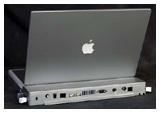 now has BookEndz docks available for the Titanium PowerBook G4.
Product highlights:
- Easier docking requires less insertion force.
- Easier undocking using new ejection levers.
- All rear panel PowerBook ports are replicated: FireWire, USB, ethernet, S-video, composite video, modem, reset button, IrDA, power, and Kensington lock slot feature. Also included is a built-in retainer to clip and hold user’s audio cable.
- Angled IrDA port allows easy side-access to infrared transmission
- Low profile design allows increased stability; optional rubber feet included for added versatility.
- Available in two colors. Your choice of “titanium silver” to closely match the PowerBook or basic black.
The BookEndz Docking Station conveniently converts your PowerBook to a desktop computer in seconds
Here’s how it works:
All of your peripheral devices plug into the dock once and remain plugged in.
All it takes to connect your PowerBook to all of your peripherals simultaneously is to slide your PowerBook into the dock. There is no need to plug the devices into the PowerBook individually every time you want to use them. Gone is the hunting for cords and cables which have fallen behind the desk. There is no wear and tear on connectors from constant plugging and unplugging. You are connected to all of your devices in about two seconds.
With a BookEndz dock, you can connect or disconnect a video monitor, ethernet network, USB devices, FireWire device, modem and AC power adapter simultaneously. You quickly have the equivalent of a desktop system. For even more convenience, you can have docks in multiple locations (example: at home and at work) and dock to all your peripherals in either location quickly. You can use the same PowerBook as a desktop machine in both locations, with no need for file transfer or synchronization.
The initial one-time installation takes only a few minutes, only the time it takes to plug in your devices to the dock once.
As of 06/12/2001, the PowerBook used in Photo Control Corp’s BookEndz 1999 and BookEndz 2000 dock manufacturing tests has accumulated more than 9.6 years of normal use, with no problems.
The BookEndz Docking Station for the PowerBook G4 comes in black or titanium, and sells for $229.95 and $244.95 respectively.
BookEndz docks for the 2000 and 1999 PowerBooks (Lombard and Pismo) are also in stock and available.
BookEndz Products will be on display at the Macworld Expo in New York’s Jacob Javits Center, July 18-20, Booth #369.
MadsonLine Mini Power Adapter
Photo Control Corp also offers 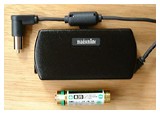 the MadsonLine mini power adapter, which features:
- Credit card size: 3 1/4″ x 1 5/8″ x 7/8″
- Weight: 5 oz.
- Enjoy the added convenience of having a second adapter.
- Right angle power plug saves space.
- Heavy duty 20 wire-gauge DC cord eliminates fraying.
- Automatically adjusts for use between 100-240 volts AC.
- Output: 24 Volts at 45 Watts continuous.
- Extensively tested by Underwriter Laboratories. All UL, SA, CE, and Dentori approvals.
- Two AC cords included; 18″/48 cm and 6’/184 cm.
- For PowerBook G3 (All Models), iBook, 3400, 2400, 2300, 1400 and Duo.
- Unconditional 30-day money back guarantee.
- 1 year warranty from manufacturer.
SmartDisk Offers VST G4 Battery Charger for PowerBook G4
The new SmartDisk VST G4 Battery Charger for the PowerBook G4 will charge two Apple 2001 PowerBook G4 Li-Ion batteries safely and in the shortest possible time. Real time indicators are provided for charge mode, charge completion, and battery error detection.
The SmartDisk VST G4 Battery Charger delivers a complete charge every time, providing maximum runtime and longest overall battery life.
Compact and ultra-lightweight, the SmartDisk VST G4 Battery Charger is powered by the standard Apple PowerBook AC adapter (included).
The Apple PowerBook G4 Li-Ion battery is the lightest weight and highest energy density battery available. And with the SmartDisk VST G4 Battery Charger, you’ll always have one fully charged and ready to use!
SmartDisk also offers the Ultimate Mobility Bundle for the PowerBook G4, which includes:
- Li-Ion Battery for PowerBook G4
- SmartDisk PowerBook Battery Charger with two charger bays
- SmartDisk AC Adapter for PowerBook G4
With the SmartDisk Ultimate Mobility Bundle for the PowerBook G4, you’re ready to work anywhere. Web price: US$169.95
VST Power Adapters for PowerBook G4
The PowerBook G4 AC Adapter safely and conveniently provides power to your PowerBook G4, as well as the SmartDisk VST PowerBook G4 Battery Charger
Web price: US$69.95
VST Airline Adapter for the Titanium Series PowerBook G4
Designed especially for the PowerBook G4, this adapter works with the EmPower™ DC power ports now adopted by many major commercial airlines. Extremely small and portable, The PowerBook G4 Airline Adapter from SmartDisk increases your mobility while reducing cable clutter.
Web price: US$39.95
Apple Instructions: How to Clean an LCD Panel
A new Apple Tech Info Library (TIL) article describes the best way to clean an LCD panel such as those used on PowerBook computers and Apple flat panel displays.
To clean the LCD:
- Turn off the computer or display. You may need to turn off the computer in order to turn off some Apple displays.
- Dampen a clean, soft, lint-free cloth or paper with water only.
- Wipe the screen. Do not spray liquid directly on the screen.
Apple has tested a product called Klear Screen made by Meridrew Enterprises and found it does not cause any harm to the plastics. This product may not be available worldwide.
Klear Screen safely cleans all LCD laptop displays and computer monitors. Recommended for the PowerBook, Klear Screen contains a unique 3-step liquid polymer-based formula that lifts and dissolves surface contaminates and fingerprints, floating debris off the screen surface, leaving an antistatic coating which dramatically reduces surface friction & wear, resists fingerprinting and provides a renewable protective screen barrier.
Features:
- Antistatic
- Alcohol and Ammonia Free
- Nontoxic
- Polishes
- Protects
Klear Screen’s formula is antistatic, 100% nontoxic, environmentally friendly and is the most “recommended”, non-damaging, alcohol & ammonia-free screen cleaner you can buy. Klear Screen is a BMUG Choice Product award winner
Apple Software Downloads Now Part of Knowledge Base
If you try to visit the former Apple Software Downloads site, you will be redirected to a notice that reads, in part:
- Software Downloads are now available from the Knowledge Base, the same database that contains Apple’s Technical documents. In the new Software Downloads format you can read an update’s Read Me file, and download the software from one convenient location.
On 2001-06-26 the asu.info.apple.com search page will be retired. Any links to that site will be redirected to this article.
Note: In the Knowledge Base you’ll find only the most current Apple software updates. To find updates for earlier versions of Mac OS or updates to earlier Macintosh hardware please browse the Downloads Web site.
You can keep your Mac up-to-date by using the Mac OS software update feature to automatically download and install Apple updates, drivers, and plug-ins. Enable this feature in the Software Update control panel (Mac OS 9), or in the Software Update pane of System Preferences (Mac OS X 10.0). Using this feature you can check to see if an update is available and then install it. You can also create a schedule for the computer to automatically check for and install updates. All automatically installed updates are recorded in the Automatic Software Update Install Log. Learn more about the Auto Updating feature by viewing pages on Apple’s Mac OS Web site.
You can also download most of the updates available through the Mac OS Software Update feature using your Web browser. To find an update, see the featured items below, or type the name of an update or product in the search area. You can also browse for updates on the Downloads Web site.
You can also visit an Index of Apple_Support_Area/Apple_Software_Updates.
MacFool Opens for Business
MacFool.com this week announced it has formally opened its virtual doors for business to the Macintosh community.
Featuring such products as PowerBook accessories, networking solutions, USB and FireWire peripherals, storage devices, and a host of other products compatible with the Macintosh, MacFool is positioned to serve Mac consumer.
“If you’ve got a Mac, you owe it to yourself to check out our insane values,” Jon Hart, MacFool spokesperson, says. “We’ve got products for today’s Macs, as well as yesterday’s. We feel it would be foolish not to serve as many Mac users as we possible can,” Mr. Hart added.
MacFool is an online Macintosh accessory store based in Albuquerque, New Mexico. For additional information please visit their website.
Bargain ‘Books
This Week’s PowerBook Deals
A bit thin on the deals front this week, but I found a few interesting ones.
The PowerBook Guy
- PowerBook 1400c/133 16/750 MB/floppy, $449.95
- PowerBook 1400cs/117 12/500 MB/floppy, $379.95
- Apple Video Card for PowerBook 1400, $129.95
- Apple Battery for PowerBook 1400, $69.95
- New Apple Li-On Battery for PowerBook G3 iBook (1999-2000), $79.95
GlobalDeals.com
- PowerBook G3 WallStreet 233 MHz 32/2 GB/CD/12.1″, $750.00. I’m assuming that’s the original, cacheless 233 MHz model
- PowerBook 3400C/240 16/3 GB/12x CD/modem, $650.00
- PowerBook 3400C/200 16/2 GB/6x CD/modem, $525.00
