
1999 – Many iMac users want to be able to do their work on the road, but we have come to the painful realization that it is quite hard to put your iMac on your lap during an airplane ride. So many of us have bought a PowerBook to be able to compute on the road.

With this we come to yet another painful realization; it is very hard to transfer your work back to your iMac when you return from your trip. We are faced with this problem because, with the introduction of the iMac, desktop Macs and non-G3 PowerBooks have no ports in common. So, when I wanted to share files with my iMac and PowerBook Duo 280c, I was faced with this problem, and I’ve come up with a few ways to get over it.
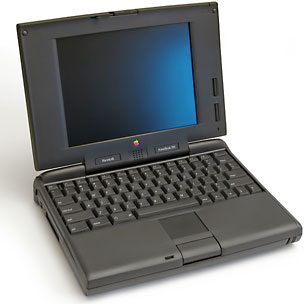 The cheapest (and slowest) option is very easy to pull off, and you can probably achieve this with the equipment you already have. All you need is a phone cord. Once you have it, connect it to the modem on the iMac and to the modem on the PowerBook. Then follow the instructions on this page: iMac: Transferring Files Modem to Modem to get your computers hooked up. But beware, it will only go as fast as the slowest modem, so if your PowerBook has a 14.4 modem, that’s how fast you’ll be sending.
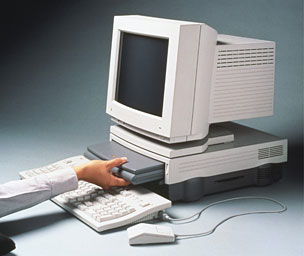
PowerBook Duo in a DuoDock.
Another solution is a somewhat more expensive solution, but also a much faster one. Apple made a product called the Duo Dock II. This miracle product transforms your PowerBook Duo into a full desktop computer, giving you a second hard drive, more video RAM, and a very neat thing called an ethernet port. Now your PowerBook Duo and iMac will have a port in common. All you’ll have to do is buy an ethernet crossover cable for around US$10-15 at your local CompUSA or other computer store. Then set up the necessary software, and voilá, you have very fast file sharing.
One other option is for non-candy Macs only (sorry, iMac and Blue and White G3 owners), and you probably have all the necessary cables right on your desk. Reach over to your serial-based printer (ya know, an ImageWriter II, a StyleWriter, a DeskJet, anything but a laser printer). Pull out the cable from it and plug it into your PowerBook. Just set it up the same way you do with an ethernet network, and you’ll have a network, for about ten bucks (if you need to buy a Mac printer cable).
There is always the solution of sneakernet: copy the file to a floppy, put on your sneakers, walk over to the other computer, and just copy it to the other Mac (iMac or Blue and White G3 will need a USB floppy drive for this).
In the end, you don’t need to be as rich as Bill Gates to set up a home network of your own.
For two more options, see Part 2.
Keywords: #networking
Short link: http://goo.gl/W8qAt9
searchword: networking
