
1999.06: No, this article isn’t about C2, the second-generation iMac expected Real Soon Now. This is about where computers, including the iMac, are going over the next few years.
History
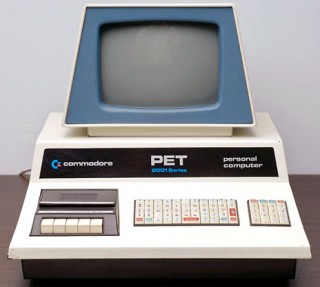 Commodore started the integrated personal computer revolution with the PET in 1977. The PET had a keyboard, monitor, and data storage (cassette tape) – all in a single unit.
However, the industry went more and more with separate components, which reached its peak with the IBM PC of 1981. The basic IBM PC came with 16 KB of RAM and a detached keyboard. The floppy disk drive was optional. You could use a text card with a green screen monitor, a graphics card with a color monitor, or both. Memory for the first batch of PCs was limited to 256 KB, although later models could reach 640 KB. Even serial and parallel ports were optional.
Hard drives were too expensive for consumer computers back then, although they were starting to become popular among power users.
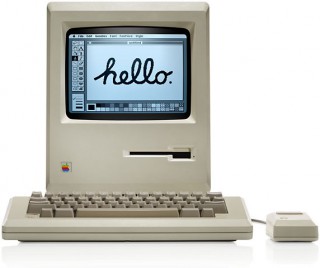 Then came The Macintosh. One box, one keyboard, one mouse. A whopping 128 KB of memory (remember, this was 1984), a tack sharp 9″ b&w monitor for both text and graphics, and a high capacity 400 KB floppy. In its way, the 24 pound Mac was a real alternative to suitcase-sized portables from Compaq and others.
The compact Mac line included an 8 MHz 68000-based model from 1984 until 1992, when the Mac Classic was discontinued, Apple also sold 16 MHz 68030-based compact Macs with the 9″ screen. (Black-and-white was quite literal on these models – they were unable to display any shade of gray without an additional video card.)*
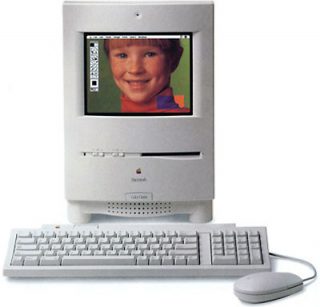 February 1993 saw the first compact Mac with color, the Color Classic. The slightly larger 10″ screen went beyond black and white to offer thousands of colors with a VRAM upgrade.
Later in 1993, Apple introduced the LC 520, the first of a series of all-in-one Macs that eventually displaced the compact line with their 9″ and 10″ displays. Using a larger 14″ screen and a more popular and practical 640 x 480 resolution, these utilitarian machines lacked the charm of the compact Macs. However, they were very popular in schools, where the integrated design eliminated a lot of extra power cords and equipment cables.
The Next Generation
In May 1998, Steve Jobs showed off the iMac. In August 1998, Mac fans could buy it. A lot of us compared the iMac to the older compact machines since it shared an integrated design and was far less ungainly than the 500-series.
The iMac is compact, but a lot of people are clamoring for an even larger iMac with a 17″ screen. I’d love to see Apple do it without losing the iMac charm, but it won’t be easy – a larger screen makes for a bigger computer.
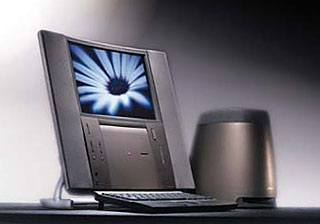 However, before the iMac, Apple did think different about computer design. The Twentieth Anniversary** Macintosh (TAM, left) was so stylish that they used it in one of the Batman movies. It was just inches deep, came with a subwoofer, and used a liquid crystal flat panel display (the same kind found in PowerBooks).
But because Apple only produced 12,000 TAMs, because the price was stratospheric, and because so many saw Apple in a death spiral in 1987, this unique machine was almost completely ignored beyond, “Wow, cool!”

Fast forward to June 1999. Gateway is showing off the Profile (right), a slim computer with an LCD screen. It’s less attractive than the TAM, but it will probably be much more affordable. And, like Apple’s computer, it won’t take up a whole lot of space on the desktop.
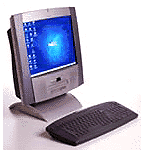
Packard Bell NEC Z1
This past week, Packard Bell NEC announced an integrated computer with an LCD monitor. The Z1 appears to use a wireless keyboard, which is a very nice touch. Unlike the Gateway Profile, with a side-mounted drive, the Z1 seems to have a CD-ROM or DVD drive beneath the screen.
There are several reasons the industry is moving in this direction, following a direction set by Apple with TAM in 1987.
First, there’s the wow factor. That’s what pushed the iMac from being just another computer and made it the most prominent computer of 1998. A computer with a new look gets your attention.
Second, flat panel displays tend to be easier on the eyes. Working with a traditional CRT monitor 8-10 hours per day fatigues the eyes. LCDs don’t do that.
Third, these can be promoted as space-saving designs, because they aren’t 18″ deep monsters like most of us use. Instead, these computers are perhaps 6-8″ deep.
Fourth, they draw less electricity than traditional designs. Big computers with lots of expansion slots use a lot of power. So do CRT monitors. But LCDs are energy misers – a big reason they’re used on laptops.
Fifth, LCDs are dropping in price. It will probably take a few more years before they are as inexpensive as old-fashioned monitors, but that day will come.
Sixth, the computers are smaller and lighter. They’ll take up less warehouse space – or you can keep more inventory in the same space. And they’ll cost less to ship.
Tomorrow’s iMac
Those are the arguments in favor of LCDs eventually displacing CRTs. I find them compelling and anticipate they will be the norm within five years.
That means future integrated Macs may share as much in common with the 20th Anniversary Macintosh as with the iMac.
 The minimum practical screen these days is 800 x 600 pixels, the default setting on the iMac. LCDs displaying 800 x 600 are available in a range of sizes down to the 10″ (diagonal) range. Apple could conceivably create a truly compact Mac – as compact as the original Macs – with one of these screens. It could have the profile of the Color Classic but be only 6-8″ deep. The small display would show as much as the iMac does at its most used video setting.
A more practical screen size today is the 1024 x 768 resolution common on 17″ monitors and the latest PowerBooks. With a 14.1″ diagonal, the screen is about the same size as the picture tube used in the iMac – but the entire Lombard is under 2″ thick, while the iMac measures almost 18″ from front to back.
 A future iMac using that screen could be a good 12″ shallower than the iMac, lighter, and the screen would be easier on the eyes.
Going beyond the size of today’s laptops, higher resolutions are on the way. The next jump will be to 1280 x 1024 screens – the resolution is often used on high-end systems with 19-21″ monitors. Assuming a slightly tighter pixel size than the screen used in the PowerBook G3 Series, we’d be looking at a tack-sharp screen with about a 16-17″ diagonal.
Then we get into serious screen real estate: 1600 x 1200. Using today’s technology, these screens would have a 20″ or larger diagonal, but researchers are also developing LCDs with more pixels per inch.
Marriage to Digital TV
Most computer screens are rectangular. With the exception of the occasional portrait monitor, they are wider than they are tall. In fact, they tend to emulate the 4:3 ratio of TV screens, since those were the affordable choice for early computer displays.
Look at the most common video resolutions: 640 x 480, 800 x 600, 832 x 624, 1024 x 768, 1152 x 870, 1280 x 960, 1280 x 1024, and 1600 x 1200. Except for 1280 x 1024, they are all the same 4:3 ratio: width is one-third greater than height.
But tomorrow’s TVs are leaving that behind. In DVD circles, the big deal is 16:9 display, which is the ratio TVs of the 21st century will have. Screens will be about 78% wider than they are high – that’s one-third wider than today’s standard TVs.
I expect computers will follow along. Today’s fairly common 800 x 600 screen may be replaced by a 1024 x 576 screen. More likely, since resolution seems to increase over time, a 1280 x 720 display would become the norm on all but the least expensive systems.
These extra-wide screens change the design parameters. While the 20th Anniversary Mac looked great with tall, thin speakers surrounding the screen, I believe we’re more likely to see small speakers above or below the right and left ends of the screen. Whether we’ll see a woofer behind the screen or a subwoofer on the floor (as with the TAM) remains to be seen.
On the flip side, by 2006 when digital TV replaces analog in the United States, we’ll be running multi-GHz processors in our computers, LCDs will be relatively cheap, and we should expect a greater convergence between TV and computer.
Your TV itself may be a 3-4″ deep panel hanging on the wall. It may contain a G6 CPU, gigabytes of RAM, and who knows what else. Your remote control is already wireless, but you’ll also be able to use a wireless keyboard, mouse, or game controller to operate the TV/computer.
Thanks to Linux, Mac OS X, and BSD, your TV will probably have a Unix-like operating system with a Mac-like shell. The OS will be CPU independent, so it won’t even matter if you’re using an Alpha, PowerPC, or some other type of CPU. (Have you heard about the Emotion Engine for the PlayStation 2?)
You’ll still have portable computers, which will include high-speed wireless communication – and they may pretty much displace the desktop machines we use today.
Of course, everything will be networked using wireless fast ethernet at home and some form of digital radio outside the home. [This was written months before 802.11b WiFi came into existence.] The Internet will be fast, and so will your Internet connection. You’ll receive TV feeds and computer data over the same high-speed connection, whether cable or satellite.
And you’ll look back at the C2 iMac from 1999 as a quaint but usable relic, much as today’s Mac users look back at the SE/30 and Color Classic.
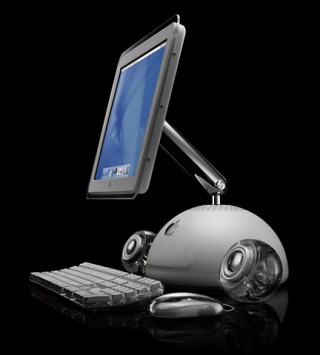
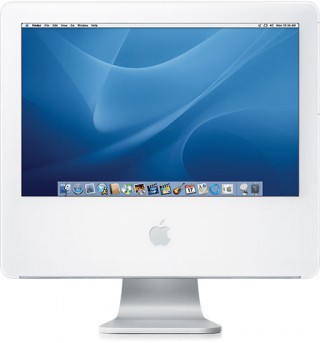
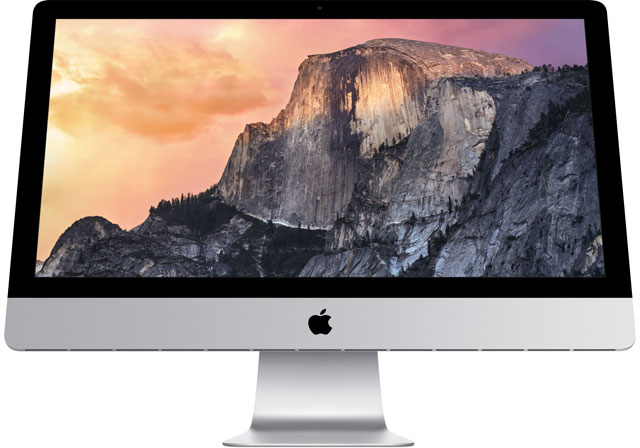
The three images of flat panel Macs are the 2002 iMac G4 with a 15″ 1024 x 768 display, the 2004 iMac G5 with a 17″ 1440 x 900 display, and the 21.5″ 2009 iMac with the same 1920 x 1080 pixels as a 1080i HD TV – the first iMac with a 16:9 aspect ratio. They were obviously not part of the original 1999 article.
keywords: #imac #flatpaneldisplay #widescreen
short link: https://goo.gl/xuqGs4
