
2001 – Based on recent feedback from readers, I think the following points covered in 75 Mac Advantages, part 2 are worth noting.
15. DLL libraries on Windows cause problems.
Several readers, including Greg Weston, pointed out that my comparison of DLL problems to Mac OS extension conflicts was comparing apples to oranges. Extensions add functions to the system software, whereas DLL (dynamic link libraries) are resources shared between programs and the operating system. However, they also stated, my error did not negate the Mac advantage, as Greg Weston explains:
While this statement is true, it’s not an analogous situation. Mac OS extensions – the troublesome ones – are patches to the OS. The talking point discusses some relative weaknesses in the Windows shared library mechanism. Apple’s shared library mechanism is very robust. I wish other systems had the powerful versioning mechanism Apple offers.
Advantage: Macintosh.
20. Ease of adding peripherals.
Because of their experiences in attempting to add multiple USB devices to PCs, several readers said I was off the mark in neutralizing the Mac advantage here. Apparently PCs with multiple USB devices can still have major driver conflicts, and the inherent limit to multiple devices in the USB standard does not negate the problems Windows itself has handling multiple peripherals. Frankly, this has not been something I have observed in my limited experience adding USB peripherals to PCs, but lacking further data, it would seem reasonable to add that advantage back in – not because ADB was bad and good riddance, but because Apple’s implementation of USB seems to be easier to use in practice.
As several readers, including John Balint and Donald Michael Kraig, pointed out, on a Mac you add a driver for the new device, reboot, and go. On a PC, you have to run an installer program, which may detect a conflict, and then the game’s afoot and good luck. Often you can only use one USB input device at a time on a PC.
John Balint even reported that installing a Microsoft Intellimouse was easier on his G4 than on his PC!
Advantage: Macintosh.
22. Aliases work better on a Mac.
I must have been asleep at the wheel here, too, because my understanding of aliases was way off the mark. I tested many of the other items on the list before committing to a position, but I figured I understood how aliases worked on the Mac.
Well, they say it takes a big man to admit his mistakes, and so I’m living large these days.
François Lorrain writes:
I am not sure I understand what you mean here. Suppose you have an alias for an application. Suppose this application is on volume XXX. Then moving the application to any other place on the same volume XXX will not break the alias. Of course, if you copy the application anywhere and delete the original application, then the alias will be broken! So Mac aliases keep track of where the application is on one given volume, but not of where it is copied (whether on the same volume or on another). Of course you must know all this, but what you wrote did not make this clear.
A quick and simple experiment bears this out. Windows at first glance functions in much the same way. Moving the original application on the same hard drive to a different folder had the same effect as it did with Mac OS; Windows searched for and found the application and started it.
On the other hand, moving (not copying, but moving) an application to a shared folder on the network broke the alias.
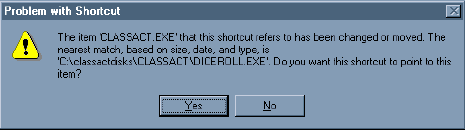
The advantage remains with Macintosh.
Keywords: #75macadvantages #macadvantagefeedback
Short link: http://goo.gl/lS7iLm
searchword: macadvantagefeedback
