
Use Your Bluetooth Phone to Control Your Mac? Maybe
Low End Mac Reader Specials
Download Typestyler, still the Ultimate Styling Tool for Internet, Print and Video Graphics. Works great in Classic with a Native OS X Version on the way. Free Tryout: www.typestyler.com
LA Computer Company: LA Computer Company: Specials on AppleCare, Apple Displays, MacBooks, iMac's, MacBook Pros, Laptop and iPod accessories and more. Apple A/C Adapters for laptops starting at $25.00 Call 1-800-941-7654 or Click Here.
OWC: NewerTech miniStack FireWire/USB 2.0 HD & Hub Up to 1.0TB of Performance Storage + FW/USB2 Powered Hubs - convenient & sleek 6.5" x 6.5" x 1.5" Featured: 500GB $169.99; 750GB $209.99; 1.0TB $339.99
Mac users can finally play Party Poker for Mac. Not only that, they can also learn how to play PokerStars for Mac.
Laptop Hardware Provided by TechRestore - Overnight Mac & iPod Repairs.
Compare products like desktop computers, laptops, and LCD TVs side by side! All the information and reviews to make the best purchasing decision for a new cell phone GPS products or MP3 players. The Ciao network makes searching products easy for you.
New MacPro Memory 800Mhz With Apple Spec Heat Sink 2GB $104 / 4GB $172 / 8GB $338. Click to Maximize your Macs...
- 2007.02.27
Did you ever see a command or an option in a control panel or a utility in your Applications folder and not quite know what it was for?
OS X does a lot of stuff. Some of it isn't documented in the Help files or even on Apple's website, unless you know exactly where to look.
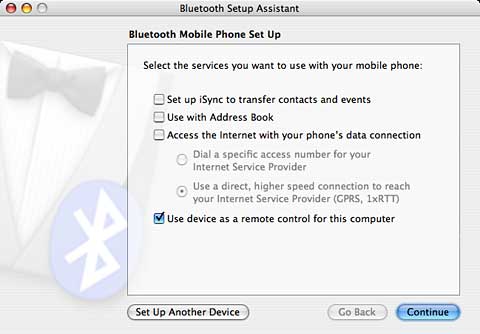
While setting up a Bluetooth connection with my Sony Ericsson cell phone, I noted a little option in the setup screen that hinted that I might be able to use the phone as a remote clicker.

I'd read about this before but didn't know that it might work with my phone. There's no documentation about this little toggle in Mac Help, and I couldn't find any mention of it with a cursory search of Apple's website.
So how do you activate it? I turned to Google for help.
God bless Google, it comes through every time.
It turns out that if you have a Sony Ericsson that is the right model, the phone vendor provides a little utility to allow you to use the phone as a remote. You can even map the phone's keys to functions and mouse buttons and so on. To see if you have such a phone from Sony Ericsson, visit their Miscellaneous Docs & Tools page.
And if you don't own a "blessed" Sony Ericsson phone - or if you have some other brand of phone - there's still hope. Slightly farther down the page, the Google search brought up Using Your Bluetooth Phone as a Remote Control from the MacDevCenter. It states:
"In a nutshell, the Salling Clicker is an application that transforms your Sony Ericsson Bluetooth-enabled phone into a remote control. I was skeptical about its use at first, but after downloading the demo, I was so impressed that I went ahead and paid for it...."
I downloaded Salling Clicker and tried the "30-clicks before reconnecting" demo. It worked! Even better, many other brands of phones and models are supported.
I thought it was pretty simple to set up. When setting up your phone's Bluetooth connection (as shown above), you have to tell the Mac that the phone can be used as a remote.
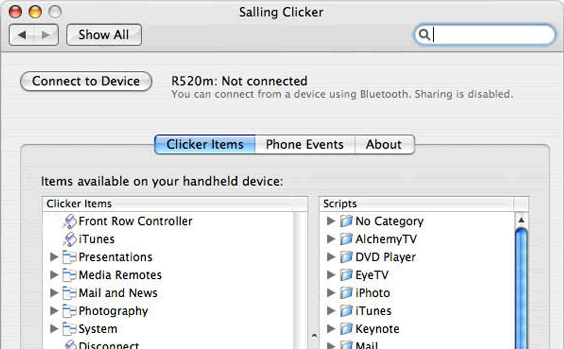
Then you start the Salling Clicker (by the way, it's "S-A-L-L-ing" not "S-A-i-L-ing" Clicker) preference panel in System Preferences. You have to tell Salling Clicker to connect to your phone (a matter of picking the brand and model), then you connect to it with an obvious button, and that's it.
On the phone, you select Accessories. That's under the Connection function on my phone - the same place where you establish Bluetooth accessories. When you select it, then a list of scripts enabled by Salling Clicker will appear. Several useful scripts are included, including a PowerPoint and Keynote control, iTunes launcher and selector, System Sleep, a mouse pointer (the Ericsson I have has a tiny joystick that can be used with this application to move the mouse on the Mac), and many others.
In my brief testing I opened up a PowerPoint on my laptop and walked away from it,and then controlled the presentation with my cell phone, moving forward and back, and even restarting the presentation when it automatically kicked out at the end.
It also appears the phone can be used as a proximity sensor - when you move out of range, the computer goes to sleep or invokes a screen saver (and password, if you have your screen saver set up that way). Other cool features include the ability of the phone to pause your iTunes and DVD player playback when the phone rings, control other media programs such as VLC and QuickTime player, and more. You can even create your own AppleScripts and initiate them with Salling Clicker, adding even more functionality.
If you want to unchain yourself from behind the keyboard during a presentation without spending a lot of money on a new remote (essential for poking sleepy students with sticks), you could hardly do better than try Salling Clicker ($23.95 pretax).
The software is also available for Windows. A free version
that's limited to specific newer Ericsson phones is available on
the website.
Link: Salling Clicker
Jeff Adkins is a science teacher who isn't afraid to state his preferences in computing platforms. In his classroom he has everything from a beige All-in-One to a a G4 XServe, and they all work together nicely. He calls himself the "poster child for technology integration" in the classroom. He was the 2006 Outstanding Educator of the Year for the California Computer Using Educators (CUE) organization. He also maintains a site for astronomy teachers at www.AstronomyTeacher.com.
Recent Mac Lab Reports
- Microsoft Word 2004 vs. iWork Pages 1.0 for writing a book, 01.10. Microsoft Word is great for technical writing, powerful yet slow, while Pages lets you concentrate on just writing, making it great for novels.
- iWeb a great tool for quickly creating an attractive website, 09.11. Apple's iWeb software isn't just easy to use, it also integrates nicely with .mac and other programs in the iLife bundle.
- Two more markets the iPhone could conquer, 02.01. How Apple could redefine the ebook and calculator markets with a pair of free apps for the iPhone.
- More in the Mac Lab Report index.
Recent Content on Low End Mac
- Time Machine can now backup to a shard hard drive, Alan Zisman, Zis Mac, 07.08. Earlier versions of Leopard didn't seem to allow backup to a shared drive on another Mac, but the 10.5.4 update allows it.
- More air: Expectations for future MacBook and MacBook Pro models, Dan Knight, Mac Musings, 07.08. Next generation 'Books are expected to include Intel's next generation Montevino processor, but wireless power and wireless USB could give Apple a leg up on the competition.
- Safari 3.1 Is the best browser for Macs and for Windows, Carl Nygren, Classic Macs in the Intel Age, 07.08. Apple's Safari browser is fast, lightweight, and compatible with pretty much any website that doesn't require users to run Windows and Internet Explorer 5.5 or later.
- Best iBook G3 deals, Low End Mac Deals, 07.08. Used clamshell, $100; 500 MHz CD, $169; 700, $279; 600 CD-RW, $240; 900 Combo, $299; 14" 700, $300; 900, $449.
- Best Power Mac G4 deals, Low End Mac Deals, 07.08. Used 450 MHz ACP, $79; 533 DA, $100; 867 QS, $200; 1.25 GHz MDD Combo, $375; 867 dual, $325; 1 GHz, $395; 1.25, $529; 1.42, $619.
- Best classic iPod deals, Low End Mac Deals, 07.08. Used 20 GB, $100; 30, $120; 40, $150; 60 color, $175; 30 video, $160; 80, $200; refurb 80 classic, $209; new, $229; refurb 160, $299; new, $319.
- Mac of the Day: 'Lombard' PowerBook G3, June 1999 - 'bronze keyboard' model is first PowerBook with USB, reaches 400 MHz, trims almost 2 lb.
- List of the Day: PowerList for those using Power Computing Mac clones.
- July 9 in LEM history: 01: Anti-spam measures marginalize low-end Macs - Color Classics on eBay - DSL diary - The 25th Anniversary Mac - 02: eMac test drive - Women in IT - 03: A week with an eMac - Are Apple's applications helping or hurting? - 04: Hardware failure, that rare Mac headache - Radeon Enabler unlocks video features
- Macintosh reliability improving since the shift to Intel, Kev Kitchens, Kitchens Sync, 07.07. For a while in the G3 and G4 era, Apple was plagued with logic board failures and analog board problems, but they seem to be a thing of the past.
- 1.8 GHz, SSD MacBook Air price cuts; Samsung vs. Hitachi notebook drives; Centrino 2 preorders; and more, The 'Book Review, 07.07. Also MacBook shipments up 61% over Q1 2007, Apple notebook redesign rumored, Santa Rosa MacBook Pro video failure, Mopar in-vehicle wireless Internet, bargain 'Books from $150 to $2,749, and m
- iPhone 3G service more costly in States, outrageous in Canada, and more, iNews Review, 07.07. Also long fingernails and the iPhone, future iPhone may include keyboard and Intel Atom CPU, voice control for iPods, Ringtons Studio for the iPhone, and more.
- Best MacBook deals, Low End Mac Deals, 07.07. Used 1.83 GHz Combo, $819; 2.0 SD, $975; refurb 2.1 GHz Combo, $949; 2.4 SD, $1,099; black, $1,299; new 2.1 Combo, $1,005 a/r; 2.2 SD, $1,205 a/r; more.
- Best eMac deals, Low End Mac Deals, 07.07. Used 700 MHz CD, $140; CD-RW, $150; Combo, $170; 1 GHz, $200; 1.25 GHz SD, $230; 1.42 GHz Combo, $300; SuperDrive, $439.
- Best Mac OS X 10.0-10.3 deals, Low End Mac Deals, 07.07. Mac OS X 10.0.3, $40; 10.1, $49; 10.2, $60; 10.3 DVD, $80; CD, $160; 10.1 Server, unlimited users, $80; 10.3 Server, unlimited, $130.
- More links in our archive.
About LEM | Support | Usage | Privacy | Contacts


