
2001 – When you are finally able to obtain a computer, it may be that you are offered a chance to help make the purchasing decision; you may be forced to accept a computer you don’t really want – or you might be faced with accepting donations of PCs or Macs, because that’s all you can get.
Today’s Agenda
- Mac vs. PC in the Science Lab
- Personal PC Fixit Stories
- Next time: One to Many: Building a Computer Lab from Scratch
Mac vs. PC in the Science Lab
When you are finally able to obtain a computer, it may be that you are offered a chance to help make the purchasing decision; you may be forced to accept a computer you don’t really want – or you might be faced with accepting donations of PCs or Macs, because that’s all you can get. I’ve been in all three positions, and while each is workable, some situations are obviously better than others.
This Mac Lab Report will give you some of the tools you will need to decide what to do in these situations and hopefully provide ammunition for your arguments with others regarding what you want in your classroom.
First of all, let me begin with an unpopular position for a self-proclaimed Mac Evangelist. Having computers in your science classroom that are part of your instructional lab activities for data collection and analysis is so important that you should use whatever you can get.
All the Mac vs. PC arguments are secondary to computer vs. no computer arguments. (There, I said it.) So if all you can get is a PC, get a PC and use it.
However, if you have any influence over what winds up in your classroom, I believe there are cogent reasons for selecting Macs over PCs. All the arguments about Mac vs. PC in the science classroom begin with the standard suite of Mac/PC arguments we’ve all heard before (see Appendix 1).
Now let us return to the issues of interest to the science teacher setting up a new, or more likely, an inherited or donated machine.
Why Is Choose Macs
Here are my reasons for selecting Macs over PCs for use in my science lab:
If all you can get is a used or donated machine, and you have a choice, pick Mac because:
- The operating system for older machines is available for free. So far as I know, no version of Windows or DOS exists for free. But you can get System 7.5.5 for free from Apple’s website, and that is what we use on all of our donated pre-PowerPC Macs.
- You can boot from a CD to repair the system. Often, you don’t need to even wipe the drive or reinstall the entire operating system to fix things.
- If the network card is Mac-compatible, you don’t need to set jumpers or download drivers. Plug. and. Play.
- You can use a SCSI Zip or an external SCSI CD-ROM to set up a standard installation. You don’t need to work from floppies as you would for an old, non-networkable 286 or 386 machine.
- You can network via a floppy boot disk and download from the network. If necessary you can even use AppleTalk, although it is slower.
- You can run Macs into the ground. They last forever!
- Port conflicts are easier to diagnose. 90% of port conflicts on a Mac involve turning off AppleTalk. Not reconfiguring your system at a basic level. When hooking up lab equipment, this can be a real problem.
- All the computers will look the same in use whether they useSystem 7 or Mac OS 9. Most software of modern vintage will require a PowerPC, but older software has a good track record of being upward compatible.
- They’re easier to fix and upgrade. No IRQ settings. No jumpers (for the most part). No Registry.
Choose an iMac, Not a PC
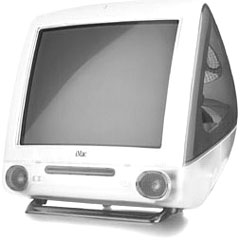 If you’re getting ready to buy a new machine and have to choose between Macs and PCs, pick iMacs because:
- They’re faster.
- They use USB peripherals.
- 10Base-T ethernet is built-in.
- They have a small footprint. This is especially important for a science lab, since you probably don’t want to give up your entire counter space for a CPU and a monitor. Given the size of my countertops, the ideal computer for size would be an SE/30.
- They can drive an external projector (get at least one DV+ model) in addition to the onboard monitor. These are great for presenting reports so you can face the class and have the projector show the picture.
- The software is integrated better. You can collect data, copy it to the clipboard, and paste it into the word processor usually without too many formatting problems.
- You can boot from a CD to repair the system.
- They only use one AC outlet. When using lab equipment, I run out of plugs with all the adapter gizmos I have to attach.
In conclusion, there are good reasons to pick Macs if you are setting up your lab without assistance from your IT department or the computer teacher. Primarily, you can do repairs and network them without highly paid assistance.
Personal PC Fix-it Stories
Here are a couple of more personal reasons why I prefer Macs to PCs. I have had occasion to work with and fix PCs from time to time, as my family sees me as the “computer wizard,” not the “Mac guy.” So even though they have PCs, they ask me for help because I’m all they have (sniff).
Once I installed an internal modem for my mother-in-law. It took two days of teeth-gnashing, a complete reinstall of Windows, downloading the latest drivers from the manufacturer, hours of research on their website, a couple of tech support calls, and one powerful headache. This is where I learned about IRQ conflicts.
My sister, on the other hand, lost her computer due to a power surge during a thunderstorm, and I talked her through a motherboard swap over the phone. Of course, she has a Mac, so all the cables and jacks fit in the only places they would work.
A Windows Nightmare
Just recently I had to install some beta software on a Windows machine to drive a test scanner used to collect student survey information. The first computer was too slow. After 15 scans, it got progressively slower and eventually stopped. With 400 surveys to scan, that was not going to be good enough. So I installed it on a newer machine with plenty of hard drive space. But the serial port was the wrong type. There was a serial port with the right number of pins, and the cable in the back ran to the proper slot on the motherboard, but try as I might, I could never get the computer to acknowledge the existence of the port. I tried control panels, reinstalling Windows, etc. Nothing worked.
Then I installed the beta on a third machine, and it had the right ports, plenty of RAM, and a big hard drive. What it didn’t have was Windows. Turns out the one copy of Windows that I legally own would not install, because it was not a Windows 95 Upgrade disk. I even tried wiping the drive and starting from there. No go. I had to install DOS to get the CD to work, and the Windows installer refused to install on my copy of DOS. So I went to a fifth machine that no one was using, and I finally got it to operate. This one was good enough. Of course, this machine had no functioning network card, so I had to copy everything to floppy disk.
That was not a good day.
Next time: In my next column, I will talk about how I obtained some computers for our department and the process I went through to “clean” these systems and prepare them for student use on our network.
Go to Appendix 1: Your Standard Mac vs. PC Flame War.
Keywords: #macvspc #macorpc #macvswindows #macorwindows
Short link: http://goo.gl/yYNPrb
