
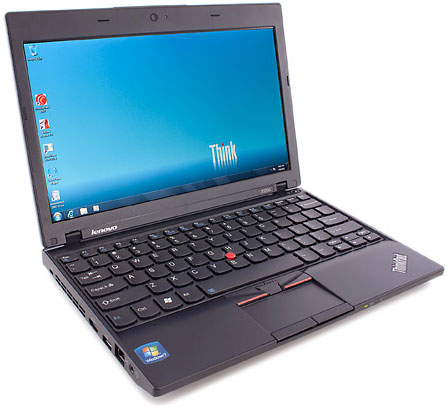
Back in February, my first generation 13″ MacBook Pro died of logic board failure, and I was forced to sell it due to the fact that I was starting dual credit courses at my local community college and needed a small, cheap, lightweight laptop that could follow me around and take a beating. I was able to get $400 for my MacBook Pro, and with that, I bought an 11.6″ ThinkPad X120e.
First Impressions
When I bought the computer, it took 3 weeks to come from Lenovo, which really miffed me as I needed it right away. Don’t waste time buying from Lenovo. Buy it from Walmart, which ships computers much faster.
When I got the laptop it came in a cardboard box with the word ThinkPad written all over it. Upon opening it, I found that it came well packaged, with a fully charged battery, and booted up to Windows 7 Home Premium fairly quickly (after I had configured it).
Lenovo did not include anything the computer did not need – no restore disks or even a thorough manual (it did include a quickstart guide). I’ll give it 9/10 for packaging and product presentation, with 3/10 for Lenovo’s poor shipping times.
Performance
The ThinkPad’s dual-core 1.6 GHz AMD E-350 processor is no slouch, being able to play Flash videos at a fullscreen resolution (1366 x 768) with good frame rates and able to run up to 15 Firefox tabs with relative speed. However, it is not a graphical powerhouse, receiving a lowly 3D Mark 11 score of only P256, whereas my gaming PC with a Xeon E3-1230 and a Radeon 7850 gets a score of P8562. It gets a Windows Experience Index score of 3.8 with the processor being the bottleneck. It can play games at lower resolutions with good framerates if you use OpenGL or DirectX 9.
The 6-cell battery lasts about 4 hours and takes about 1.5-2 hours to charge, which is great for a laptop its size (you can extend its usage time by buying more batteries, which cost about $50 on eBay). I’ll give it 5/10 for the gaming/ graphic performance, 8/10 for desktop application performance, and 8/10 for its battery.
Look and Feel
The laptop is a solid charcoal black with the “usual” ThinkPad design (kinda brickish). It weighs about 3 pounds and has an excellent “chiclet” keyboard for its size that feels better than some of the keyboards on 17″ laptops.

ThinkPad’s signature TrackPoint cursor controller.
The TrackPoint, a staple feature of all ThinkPads, is a very usable and good replacement for its small trackpad, which I find hard to use. The screen is bright, but it is somewhat washed out with a narrow viewing angle.
The only truly annoying thing about this laptop is that the battery sticks out of the back by 1″ and can make buying sleeves hard. I’ll give it 8/10 here.
Conclusion
This is a well built laptop that makes a good, inexpensive college/high school laptop. It is fairly powerful for its size but lacks the graphical power that could sometimes be required for classes. It is excellent for typing notes and reports and has an inexpensive battery that can last up to 4 hours, which is about enough for school.
I like the size of this laptop (11.1″ x 8.2″ x 0.6″/1.2″), because it fits in most backpacks easily and takes up as much space as a notepad. All in all I’ll give it 8/10 with my recommendations.
Keywords: #thinkpadx120e
Short link: http://goo.gl/U5vECA
searchword: thinkpadx120e
