
By the early 1990s, the Macintosh was moving away from its black and white roots and into the world of full color. The last of the compact black and white screen Macs, the Classic II, ceased production in 1992. A few years after that, Apple closed out the last production run of grayscale PowerBooks. With these changes in hardware, color painting software became a requirement for Mac.
Limitations in Canvas 2
A problem that one encounters when working with Canvas 2.0 is in painting images. When one imports or creates an image, any attempt to paint on additional features to it were limited to a small area or frame around the image. You could not paint outside the frame. When using Canvas, it is often helpful to finalize design of images in MacPaint and then export them to a Canvas layer. There needed to be a program that would allow for painting images outside the frame.
Another problem that I encountered with Canvas 2.0 was the fact that images made in Canvas will not print using my StyleWriter 1500 printer. I have to convert the image to a .gif or other format before printing it out. I have only been able to print unconverted Canvas images off my ImageWriter II printer.
 UltraPaint 1.05
In 1990, Deneba Software, creator of Canvas, developed its masterpiece, UltraPaint. Copies of this application initially sold for $500. I bought my copy at Best Buy in 1996 for $15.
Unlike Canvas, UltraPaint is compatible with the StyleWriter 1500. However, UltraPaint would not work with the ImageWriter II and its color ribbon. It is odd that one program works with just one type of printer. Then again, this is Jurassic software running on Jurassic computers and printers.

Shown above is the color palette for UltraPaint. On the left is a rectangle. Within the rectangle, there is a smaller square. The small square illustrates the color that is selected for the pencil and line drawing tools. The larger rectangle illustrates the selected color for the paint brush and paint bucket tools.
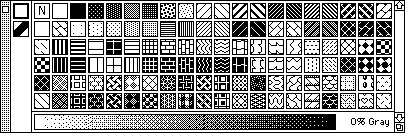
Shown above is the patterns palette for UltraPaint. There is a wide variety to choose from. These patterns can be applied to both the line drawings as well as the paint bucket type color areas. For grayscale images, you also have the option of controlling the level of shading by altering the bottom of the patterns palette.
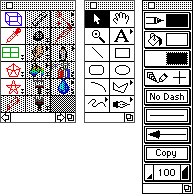
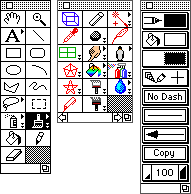 Shown to the left is the complete tool palettes for UltraPaint in paint mode. At first glance, it looks very complex. There are a number of tools that are available to the graphic artist. Yet the basics that were set up with MacPaint 1.0 in 1985 are still visible. The left palette contains tools that were used in MacPaint. These tools include the lasso, the hand tool, the paint bucket, the paint brush, eraser, and the line drawer.
In the right palette, you see tools that allow one to change the thickness and characteristics of drawn lines. These characteristics include thickness, the inclusion of a dash design, and arrow tips. One can also magnify or reduce the scale at which one views the UltraPaint drawing and select the colors that are to be used from the color palette.
 The center Palette has a number of new and useful tools for high end graphic users as well as those who like to do some fun work. For the serious user, there are various tools for drawing 3D shapes as well as tools like the “finger” and the “charcoal” that allow you to smudge lines of color the way an oil or acrylic painter would.
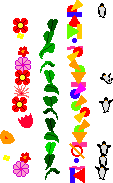
For those wanting to have some fun, there is an “anthropomorphic” tool that draws a string of flowers, animals, and other shapes. It is a great tool for borders. Some of those shape are shown to the right.
 Draw Mode
Like other drawing programs, such as SuperPaint, draw mode in UltraPaint disables some of the features that are available in paint mode. One can recover the use of these tools by switching to a “composite” mode. By cutting and pasting an image from another file, you can paint or otherwise alter the image that you import.
A Picture Created in UltraPaint
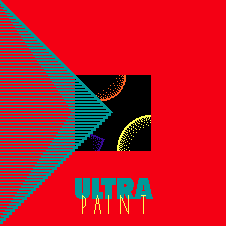
 To the left is a group of drawings imported to form a collage in UltraPaint (displayed at 50% of original size). Graphic artists will note the “impressionist” look of the colors. This is due to the fact that the images are being presented in 8-bit color, which has a 256-color pallette. A collage in 16-bit colors or 24-bit color (thousands and millions of colors respectively) would produce no exaggerated lines or pastel colors. Under the limitations of 256 colors, the Mac has to select color that most closely match the ones in the original image.
To get a better idea of this effect, go to your control panels file and open the Monitors control panel. Switch your colors from 8-bit to 4-bit (16 colors) and then view the picture. The world is quite bland when viewed with 16 colors.
Considering the Jurassic hardware and software, the image presented is quite advanced. These types of images were the state of the art when the graphical web arrived on the scene in 1994 – years after the creation of UltraPaint.
Update: UltraPaint was replaced by ArtWorks to mixed reviews. Deneba was purchased by ACD Systems in 2004. Capabilities of UltraPaint and ArtWorks were incorporated in Canvas 7, but Canvas is a much more expensive program. Canvas X 16 retails for $599.
Other Orphans
I need to mention a few early graphics programs that Low End Mac reader Jason Cutler pointed out to me after he read the Children of the MacPaint. They were left out as “orphans” by that article.
GraphicWorks and Cricket Paint
“GraphicWorks had a powerful spray-can tool, best in the industry during the late 1980s/early 1990s. It was like Canvas in that you had to first draw a frame for your bitmap (image) before you could do any painting on it.” In other words, no painting outside the box.
Jason added, “Cricket Paint’s claim to fame was ‘wet paint’ – you could draw something and modify it like it was in a draw layer, but once you click elsewhere on the page, the thing you were toying with became a permanent bitmap. Unlike SuperPaint, there was no draw layer.”
Still More Orphans
To add to the list of orphans, I referred to the The First Book of the Mac by Clara and Jay Rose (SAMS, 1991). Based on my reading, I left out Easy Color Paint, Desk Paint, Desk Draw, Pixel Paint, Lightning Paint, Adobe Illustrator, Studio/32, Aldus FreeHand, and Apple HyperCard. Of these programs, FreeHand and Illustrator are probably the best known, because they are still available. [This article was first published in 2001. FreeHand has not seen a new version since 2003.] They are also the most expensive of the litter (US$200-500).
At the other end of the spectrum, Lightning Paint is shareware/freeware and can be downloaded from a variety of software archives. HyperCard 1.x was given away by Apple to everyone who bought a Mac during the late 1980s. I still refer to my collection of HyperCard stacks when I need clip art or icon art for my files.
Future installments will discuss graphic file formats and early animation on the Mac.
Keywords: #macpaint #ultrapaint
Short link: http://goo.gl/zcW4uS
searchword: ultrapaint
