
Mac Daniel's Advice
Replacement Screen for a 5300
- 2000.03.27
Q. Any wise words of advice on where I might pick up a new display for a PowerBook 5300c? The display on mine got cracked from the back, and while it still works, there's a half-dollar sized blemish on the right side of the screen.
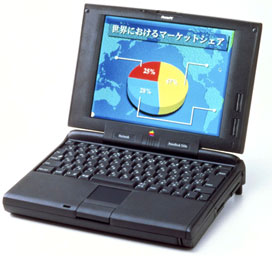
A. There are going to be several routes you can go here,
some cheaper than others. According to everything I've read from
the Macintosh Upgrade and Repair Bible and MacResQ, this is an
operation best attempted by an expert. If you opt to be a "do it
yourselfer," please proceed with much caution, as it would be a
pity to shell out a lot of money for a screen only to break it
during installation.
MacResQ has a great LCD exchange program, the details of which can be viewed on their website. For $85 plus the cost of the screen (which varies from US$99 to $799 depending on the PowerBook), they'll swap out the bad screen and FedEx your PowerBook back to you. They're running specials on the 5300cs and 5300ce screens right now. I would highly recommend looking into this option.
If you have a lot more guts and a lot more money to throw around, there are two options for "do it yourself" types. ShreveSystems lists a refurbished PowerBook 5300cs screen for $549 with no mention of professional installation. I would highly recommend calling them as well as perusing their website, as there have been times they've had parts not listed on their site.
You may also have some luck looking for a screen on eBay out of a PowerBook that is being sold for parts - or even a screen on its own, although I was unable to find any screens or dead PowerBooks with good screens in my recent searches.
Finally, I would highly recommend the PowerBook e-mail list that Dan Knight runs here on Low End Mac. They have swap days every Monday, so you might be able to pick up a good deal there.
Julie Fugett is a network administrator for an almost 100% Mac department at a large Midwestern university. Her favorite movie of all time is Tron, and she still can't come up with a decent name or theme for her personal website.
Join us on Facebook!, follow us on Twitter, use our Google+ page, or read our RSS news feed
Not sure if you should upgrade your old Mac or replace it? Check the Mac Daniel index to see if we've already addressed your problem.
Recent Mac Daniel columns
- OWC Legacy SSD Tested in Mystic Power Mac G4, Dan Knight, 2011.07.15. G4 Power Macs don't have built-in SATA support, and most SSDs are SATA devices. OWC's legacy SSDs work on the older Mac's IDE bus.
- OWC Mercury Extreme Pro SSD Legacy Edition Tested in Blue & White Power Mac G3, Dan Knight, 2011.06.24. The Blue & White G3 has a slow ATA/33 data bus. Will OWC's Legacy SSD outperform a fast hard drive with that bottleneck?
- OWC's Legacy SSD Tested in Mirrored Drive Door Power Mac G4, Dan Knight, 2011.05.18. G4 Power Macs don't have built-in SATA support, and most SSDs are SATA devices. OWC's legacy SSDs work on the older Mac's IDE bus.
- More in the Mac Daniel index.
Links for the Day
- Mac of the Day: Lisa, introduced 1983.01.19. The ancestor of the Macintosh had a mouse, a graphical interface, and a $10,000 price tag.
- May 21 in LEM history: 99: Not censorship - 01: USB and FireWire drives - 02: Hooked by a PowerBook - Printer sharing for Mac OS X - 04: Less frequent OS X uprades: Good or bad? - 07: I won't get an iPhone this year - Can 262,144 colors be considered 'millions'? - Most durable 'Book - 3 GB in a Mac mini? - 08: Quadra a great server for vintage Mac network
- Support Low End Mac
Recent Content on Low End Mac
- Flashback Removal Update for OS X 10.5 Leopard, Dropbox Pick of the Cloud Litter, and More, Mac News Review, 2012.05.18. Also Kodak Hero supports wireless printing from anywhere, WinOnX lets you run Windows apps on Macs, and free Mac Malware Remover.
- The MacBook Legacy: 2006 to 2011, Dan Knight, Mac Musings, 2012.05.16. Apple's original consumer Intel-based notebook, the MacBook filled an important niche until it was phased out in 2011.
- 17" MacBook Pro on the Way Out or Changing with the Times?, Dan Bashur, Apple, Tech, and Gaming, 2012.05.15. No other MacBook rivals its expansion options, but is that enough reason for Apple to keep the largest MacBook Pro around?
- More links in our archive.
Recent Deals
- Best Classic Mac OS Deals
- Best iBook G4 Deals
- Best 15" MacBook Pro Deals
- Best Mac Pro Deals
- Best 15" PowerBook G4 Deals
- Best 17" PowerBook G4 Deals
- Best MacBook Deals
- Best iPod shuffle Deals
- More deals in our archive.
About LEM Support Usage Privacy Contact
Follow
Low End Mac on Twitter
Join Low End Mac
on Facebook
Low End Mac Reader Specials
Macsales Add 2nd Hard Drive or SSD to Mac mini, MacBook or MacBook Pro. 1TB of Hard Drive or SSD Capacity from $64.99! Video Guides Make it easy - OWC DataDoubler - Macsales.com
Don't install Parallels to play poker online! Macpokeronline.com will show you how to download and play Poker on a Mac natively on your Mac in just minutes.
Favorite Sites
MacSurfer
Cult of Mac
Shrine of Apple
MacInTouch
MyAppleMenu
InfoMac
The Mac Observer
Accelerate Your Mac
RetroMacCast
PB Central
MacWindows
The Vintage Mac Museum
Deal Brothers
DealMac
Mac2Sell
Mac Driver Museum
JAG's House
System 6 Heaven
System 7 Today
the pickle's Low-End Mac FAQ
Affiliates
Amazon.com
The iTunes Store
PC Connection Express
Parallels Desktop for Mac
eBay

