Need for iMac 266 et al Profile Update
From Bill Brown:
Yo Dano,
 I
perused LEM's iMac 266 profile
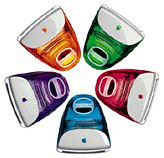
being it is the Mac of the day today. We have a couple dozen fruit
flavored early iMacs up here at the senior center, using 'em for
training and lots more. Several are 266s. We've upgraded all of ours
as well as many others belonging to our clients. 320 MB of memory and
Tiger is typical. Thus a review of your profile was to refresh my own
memory of what it is we have. I see a few nits in your profile for
the 266, as well as the 233 and 333, that you may want to clean
up.
I
perused LEM's iMac 266 profile
being it is the Mac of the day today. We have a couple dozen fruit
flavored early iMacs up here at the senior center, using 'em for
training and lots more. Several are 266s. We've upgraded all of ours
as well as many others belonging to our clients. 320 MB of memory and
Tiger is typical. Thus a review of your profile was to refresh my own
memory of what it is we have. I see a few nits in your profile for
the 266, as well as the 233 and 333, that you may want to clean
up.
On the advice to partition drives to less than 8 GBs or less,
specifically to 7.42 GB as reported by Disk Utility hasn't worked for
us. We partitioned several at 7.42 which never worked. We dropped to
7.38, which worked sporadically. We just said to 'ell with it and
partition at the first notch above 7.0. This always works. Getting
drives in and out of these things is too much of a hassle to probe
for the fine edge. All we are doing is downsizing 10 and 13 GB drives
to replace dead 6 GB drives. Our Tiger software load uses 58% of a
6 GB drive so we are phat partitioned at 7 GB. I suggest
you suggest partitioning closer to 7 GB when 7.42 GB doesn't
work.
We installed Tiger by removing the drive and connecting it
externally to an iMac G5 from which we did the Tiger install. We've
done this with a Mac mini as well - works perfect every time.
XPostFacto
is not the only way to get Tiger on an early iMac. You may want to
include our external on a Tiger supported Mac method as well.
Using the OEM 6 GB hard drive as a target, a minimal install of
Tiger and the iLife '05 suite is suggested for inclusion in your
profile. No languages, only the printer driver family you need. Use
Delocalizer
to strip the languages. Install only iTunes and iPhoto. iMovie, iDVD,
and GarageBand won't work on a G3, so don't load 'em. Install
Appleworks if you must have a word processor. iTunes will update and
work all the way to the current 7.5. We haven't gotten iPhoto 6 to
work on a G3, so stay with 5. After all the updates, run Delocalizer
again, as the updates put those pesky languages back on. We end up at
58% on a 6 GB drive, which is decent.
In maybe 4 dozen early iMacs, we have not found one that will not
accept a 256 MB memory card. With an OEM 32 or 64 MB memory card and
a 256 MB card added, Tiger runs satisfactorily. We no longer retain a
32 MB card, using 64s in all cases. This little jump gives a
noticeable boost in performance. A 128 or second 256 does even
better.
If people have a problem with a 256 MB memory card, it is likely
the finicky memory issue of that era. Try a different 256 card.
Interesting experience with some 32 MB memory cards. Typically,
these early iMacs come to us with one or two 32 MB memory cards
running MacOS 9.1 or 9.2.x. And About This Mac reports 32 MB for each
card. After installing Tiger, About This Mac reports one or both
cards as 64 MB. We know there were some finicky memory issues with
these Macs some time back. We are happy that some 32 MB memory cards
are really 64 MB, which MacOS 9 couldn't read or use accurately.
Don't toss a 32 until you know it is only a 32.
We have found two of these early iMacs, likely 333s, that would
accept and report a 512 MB card. We don't hold our breath looking for
these rarities. We have no idea if these two iMacs will accept two
512s. I believe the 512 cards were the larger, high profile cards for
the top slot only.
We were very confused and then pleasantly surprised that two of
these early iMacs came to us with accelerator cards in them.
Confused, because one reported at 466 MHz and the second at 400 MHz.
Not in an A - D iMac, thinks we. The 400 works with Tiger just fine,
really clipping right along. With Tiger, the 466 won't even give us a
startup pphongg. We keep it as our only Mac OS 9 iMac, where it clips
right along too. The give away is that the processor card has no
Apple decal on it telling you the speed.
Your profile may benefit from telling people that the flash
firmware chip is on this same little removable card that contains the
processor and the memory slots. From time to time, we receive a 233
that behaves strangely. We swap this card with one we know that has
had its firmware updated and all is well. So then we go back and
update the firmware on the flakey card and all is well. With the
passing of time, we tend to overlook this MacOS 8.6 era need to
update the firmware. The odd quirk here is that even without
the firmware upgrade, it will usually boot into Tiger looking just
fine - until it crashes. Very strange.
On WiFi: Yes, these early iMacs have no AirPort support, yet they
WiFi superbly. We routinely use an Edimax USB wireless gadget we
first heard about on LEM. Bought one from OWC, installed the
downloaded Mac driver, restarted, then plugged in the USB gadget. It
works. Better than AirPort of that era, this Edimax USB gadget does
b, g, or n flavored wireless, whatever your router is dishing out.
Even better, this gadget works plugged into the end of the keyboard
where almost nothing else works.
I trust you can find some nuggets here to revise the tray loader
iMac profiles.
Thank you Dan.
Bill Brown
Bill,
Wow, thanks for all the info. I'm updating the iMac profiles to
suggest partitioning at 7.25 GB or less just to play it safe, add a
note about the classic Mac OS sometimes misidentifying 64 MB RAM
modules as 32 MB, and with info about the firmware being on the
CPU/memory module.
You're the first to report success with 512 MB modules in any
tray-loading iMac. I used to have a pair of 333 MHz iMacs where one
would see a 256 MB module properly, but the other refused to. Weird,
but as I only have one of them these days, I can't go back and test
things.
Thanks for your many tips for iMac users!
Dan
The Road Apple Label
From Bill Brown:
Yo Dan,
You've been anguishing far to much over what should be little more
than a cute sideview on Macs. Yes, all Macs, every one of 'em lines
up on a slippery slope from the best to the least. For those that are
at the least end of the slope, well, the Road Apple label fits. So be
it. I'm glad you created it. I'm glad you use it.
But how many is enough without making the list both unmanageable
as well as overly condemning. A long and growing longer shopping list
of Road Apples becomes increasingly useless to the reader and your
purpose. We've lots of websites to go to to find growing condemnation
of the Mac. And they are much quicker and better at condemning lots
of Macs than you. So don't waste your time getting picky to make your
point. Control yourself Dan.
Long a tool of managing many kinds of log jams, contain yourself
to a to list of ten. In this case, ten Road Apples. No more than the ten
truly worst Macs ever foisted on the public. You know which ten they
are. That ten is your list. If a new Mac earns the title, than one
comes off. Ten Road Apples; no more.
Yes, there are weak Macs that don't make a to list of ten. Maybe one
even returns from the to list of ten replaced by a new Road Apple. This
to list of weak Macs is long, very long, and growing. Take a look at
these weak Macs. Do you see something common in them? I do. For the
most part, these weak Macs are consumer Macs, Macs created to the
hard reality of a price-point, Macs that make do. Yet they are Macs
that give huge numbers of us the Mac experience we seek; and our
pockets are not deep. Let this be also. There are Road Apples and
there are weak Macs. The rubble pile of Road Apples should be way
more than merely the weakest of the weak. The title Road Apple means
realy really bad! Designed bad and foisted upon us by the dark
side of Apple. Leave us our merely weak Macs without smearing them as
butt ugly.
Ten. Ten Dan. That's all. Ten Road Apples. The rest are merely
weak; the very stuff of Low End Mac.
Bill Brown
Bill,
One thing we did was separate out the worst from the less
compromised models, which leaves just 9 Macs with the Road Apple
label at present (LC, LC II, Classic II, Color Classic, Mac IIvx, Mac
TV, x200 Series, cacheless PowerBook G3, and the Core Solo Mac mini).
There are a couple of other Macs that may make the Second Class Macs
to the entire group, particularly the PowerBook 3400, 20th Anniversary Mac, and
"Kanga" PowerBook G3 - and perhaps one of them will round out our
Road Apple to list to 10.
Dan
Yo Dano,
Welcome back.
A coupla notes to help you sort your short to list for a tenth Road
Apple:
PowerBook 3400: Cheryl England, first editor of MacAddict, had one
of these; thought the world of it. Her review of it drove me to buy a
2400 which had the same chipset. Wonderful Macs. Professional
courtesy among editors says this one doesn't become a Road Apple.
20th Anniversary Mac: More than any Mac ever made, this was
strictly a designer statement. That it works at all is an engineering
credit. At $7000 each, Bill Gates even bought two. For a 6400 being
dressed for the senior prom, they tried hard to jam as good as
possible into this thing. Hey, it even had a PCI slot and will take a
G3 accelerator without using that. No Road Apple here.
"Kanga" PowerBook G3: The only G3 that didn't even make it to
MacOS X Beta. To little, to fast, with to little thought. A 3400 with
a new chip. Sorta like the LC II. Gawdawful pricey too. Cobbled,
hobbled, and not even a new case to show it off. Here is your tenth
Road Apple.