
2000: It is amazing how time flies when you move from New York to California. Soon after my previous article, I purchased a car and drove cross-country to California via the Bible Belt. While the Bible Belt is not my lifestyle of choice, I have always been fascinated by it.

After putting in my ten hours a day of driving, I decided to stop in some small town in Texas. Since I am always curious about small-town life, I promptly showered and got ready to go to the local bar. Bars normally tell me exactly what a small town is all about because when people get drunk they like to tell the truth a lot.
During the course of that evening, I happened to pass by a computer store that just happened to be an Apple retailer. To be perfectly honest, I don’t know which was more odd – seeing a computer store in a small town in Texas or the fact that it was an Apple store.
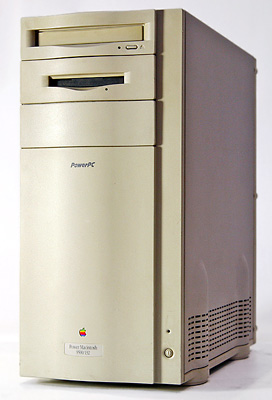 Before embarking on my next ten-hour drive, I stopped at the store the next morning and found the usual crop of Apple’s (then) current product line. In a far off corner I found the used Macs, and long story short they had a stripped down Power Mac 9500. The only thing it had in it was a 132 MHz 604e, and it cost $150.
I purchased it without even thinking because I finally wanted to run Mac OS X Server.* I have yet to get it running on my Power Mac G4 or PowerBook 2000 (a story for another time), but I knew that it would run on a stock 9500.
The 9500 stayed in my trunk for a long time, and then it just sat on the floor while I got my new apartment in order. Just recently I began work on my new network, and the first thing I decided to get running was Mac OS X Server. I added 128 MB of memory, a 200 MHz 604e CPU, a 1 GB hard drive, and a 6x CD-ROM.
Let me begin my review by saying that if Mac OS X Server were a person, I would advise it to see a psychiatrist. It has a Mac OS GUI running NextStep binaries that conform (mostly) to Unix rules. I am not saying that this is a bad idea. It’s just that it is overwhelming. I know nothing about NextStep, but I do know Unix and Mac OS. My first advice to anyone considering getting involved with OS X Server is to play with NextStep or OpenStep.
Installation was confusing because when I tried to boot off the CD, it would boot into Mac OS 9 and then promptly crash because it was trying to write data to the desktop that resides on the CD! So (in my mind) I had no choice but to install Mac OS 9 and then install OS X Server. My configuration on a generic 1 GB hard drive (which I use for testing like this) was a 200 MB HFS+ partition for Mac OS and 800 MB for OS X Server.
Once you start the installation of Server on top of the Mac OS, there really isn’t much interaction. Basically, you hit “next,” “agree,” and pick a drive. The installer did tell me that I could not install “on this computer,” but I promptly hit the “configuration” tab and checked the box that would allow me to install on unsupported systems.
Installation took about 45 minutes, and then I was up and running with the assistant. At first, Apple does try to make it easy for you to configure the things you need to get done. All you have to do is point and check what you want running. My initial configuration was Apple File Services (for file sharing), Apache Web Server (required by AFS), static IP address, and no remote console. This took about 5 minutes, and afterward, the assistant was kind enough to give me the URL and port so I could remote administrate my new server. Should you not have a pen and paper handy it will allow you to save that information to a text file.
Mac OS X Server’s networking and I get along very well. Unlike Microsoft, it makes very public what works where. As noted above, I knew right away what port (311) remote administration worked on, so I could configure my port forwarding on my router to allow port 311 requests in and what IP address to forward to. Apple’s TILS also contain a wealth of information that pertains to network configuration.
Some issues I have with Apple File Services is that you cannot remote mount UFS partitions. From a security standpoint, I would have to say that is a good idea because no one could ever mount your root drive. It is accessible via FTP and such, but it’s nice to know that if anyone ever gets my login password, they still can’t mess with root. However, I would like the ability to get into my UFS drives.
Performance is very good considering the speed of the machine. I copied a 137 MB file over a 10Base-T connection in 3 minutes from my server to my Power Mac G4. That is what I call impressive, and when I looked at the server processes, it didn’t even seem fazed that I was moving that much data.
Security out of the box does not seem to be much of an issue. Mac OS X Server goes out of its way to tell you that you might be doing something that might be a potential security risk – and that you better make sure what you are doing is right. There may be BSD level exploits out there, but I cannot think of any off the top of my head. Should you know any OS X Server exploits, please tell me, because I would like to know.
Basic configuration, other than the network, is extremely annoying. While trying to be helpful, OS X Server likes to tell me what is right and what is wrong. The first thing that took me an hour to configure was my screen resolution. When you go to “Computer Settings,” select “Monitor,” and “Colors & Resolutions,” it only brings up the recommended resolutions. When you click on it, there is no “All.” I knew the Mac OS had a habit of getting the recommended settings wrong, but not giving me access to “All” by default is very annoying.
After hunting on the web I found the syntax for changing this “Default”: defaults write Preferences NSEnableShowAllDisplayModes YES
Defaults, which is the equivalent of a win.ini file in the Microsoft Windows world is very easy to learn, but I still think it could have been implemented better. I am not saying get rid of it, just at least have a GUI application for simple preferences that script to the defaults. Whenever I change a default setting I don’t want to type “default write….”
Remote administration is simply blissful. I can get access to all users, files, shared files, file permissions, server load, and logged in users by just pointing my browser to my IP/URL using TCP/IP port 311. When you login to remote server admin even the password is encrypted, which is nice to know.
The fact that Mac OS X Server 1.2 does not support the new high-end hardware from Apple really disturbs me. Power Mac G4s can run it, but there is no FireWire support. Cubes can’t run it yet, which is really too bad because I would buy a few for the express use as servers – they take up so little space.
Mac OS X Server is still in an infant stage, and I have to treat it as such. Windows NT was like this when it first came on the scene. Apple has laid the groundwork, and it looks great. Now they just need to get the little things incorporated that people want.
I am going to use Mac OS X Server as my primary workhorse in my apartment. I have a lot to learn about this beast, and it is going to take awhile just like Windows NT did. Sure it’s easy to just install, run, and be done. I need to know what makes it tick especially when dealing with NextStep, Unix, and Mac OS rolled into one.
* This is the version of OS X Server that came out two years before the consumer version of Mac OS X shipped.
keywords: #macosxserver
