Miscellaneous Ramblings
Miscellaneous Ramblings Review
Contour Perfit Mouse
Charles W. Moore - 2001.01.03
Actually, I don't think there is a perfect input device for everyone. Some people prefer conventional mice, others like trackballs, and my personal favorite is the trackpad, although I don't find it a 100 percent adequate alternative to a mouse. My solution is to use both.
My favorites for the past couple of years have been the fairly
conventional MacAlly two-button mouse, and the more 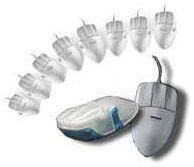 radical, joystick shaped, Anir Dr.
Mouse, both of which I use alternately to back up my Cirque Easy
Cat track pad.
radical, joystick shaped, Anir Dr.
Mouse, both of which I use alternately to back up my Cirque Easy
Cat track pad.
However, I had heard good things about the Contour Perfit Mouse, from Salem, New Hampshire-based Contour Design, and for some time I have been interested in checking it out. The Contour Perfit Mouse is somewhat unique in that it comes in a variety of sizes - five right-handed versions and three left handed versions - which Contour claims offers performance and ergonomic benefits that simply can't be achieved by any "one size fits all" mouse. The Perfit mouse is available in extra-small, small, medium, large, and extra-large for the right hand and small, medium and large for the left hand. It is designed to fit the hand so precisely that multiple sizes are necessary to maximize the total impact of the ergonomic design.
The Perfit Mouse is also designed to minimize biomechanical load
and reduce hand and arm deviations from the neutral pronation
position. The mouse's top surface is contoured to fit the palm of
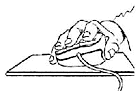 the hand to disperse pressure across the
palm during use, and the thumb side of the mouse is higher than the
other to minimize pronation strain. There is also a support
provided for the thumb, which allows movement of the mouse with
reduced Pinch Force, which is known to increase the risk of Carpal
Tunnel Syndrome.
the hand to disperse pressure across the
palm during use, and the thumb side of the mouse is higher than the
other to minimize pronation strain. There is also a support
provided for the thumb, which allows movement of the mouse with
reduced Pinch Force, which is known to increase the risk of Carpal
Tunnel Syndrome.
The Contour Perfit Mouse I tested for this review arrived just before Christmas, and my first impression on opening the box was that this is one humongous mouse, even larger then an old Info Mouse I have. It simply dwarfs the iMac "hockey puck" mouse, whose design may be considered a polar opposite in terms of engineering concept.
However, while the sizing instructions on Contour's Web page determined that my hand requires the "Large" size Perfit Mouse, there is an even larger one available for right handed users. I don't have an especially large hand, but I do have long fingers, and the critical measurement for determining the proper size of Contour Perfit Mouse is to measure from your first wrist crease to the tip of your middle finger.
My second impression, on trying the mouse out, was once again that it seemed almost clumsily large, but upon reading the instructions on proper hand positioning, I discovered that my initial inclination had been to hold the mouse incorrectly. The prescribed way it is to lay your hand more or less flat on top of the mouse, with the weight of your hand and arm resting on your palm, your fingers together rather than spread, with your index, middle, and ring fingers resting lightly on the Contour Perfit Mouse's three buttons. The buttons are elevated and shaped to reduce load on the fingertips.
The elevated wrist support reduces pressure on the wrist by
keeping it off the desktop, maintains a straighter wrist 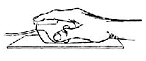 alignment, minimizes lateral deviation, balances
the hand in a neutral, tilted posture, and prevents static grip by
allowing the hand to rock freely.
alignment, minimizes lateral deviation, balances
the hand in a neutral, tilted posture, and prevents static grip by
allowing the hand to rock freely.
This posture allows mouse clicking pressure to come mainly from the whole finger being depressed from its base joint, which, once you get used to it, begins to feel quite correct and natural, as well as less stressful on the muscles of your fingers and wrists. From this perspective, the big mouse began to make "perfit" sense.
Programmable Contour OverDrive software enables customization of the Perfit Mouse and allows the user to have a "user definable" mouse Control Panel interface, as well as application-specific mouse settings, such as auto-scrolling (the ability to scroll applications with a mouse button), smooth scrolling (line by line), user-definable keystrokes using the mouse, double-click, option-click, control-click, and other button options.
Contour Design's James Golden provided me with abstracts from two studies that scientifically validate Contour's claim of the Perfit Mouse's ergonomic superiority. One study, entitled "Ergonomic Test of Two Hand-Contoured Mice." conducted by Wanda Smith, Bob Edmiston, and Dan Cronin of Global Ergonomic Technologies, Inc. in Palo Alto, California, tested the Contour Perfit Mouse in a shootout with the Microsoft Ergonomic Mouse.
These researchers determined that, "Although there were no significant performance differences between the two mice, significantly less muscle effort and postural deviation from neutral occurred with the Contour mouse. In addition, the Contour mouse was significantly more positively rated for ease of use, comfort, and design."
At the end of the test, participants in the study were asked to rate, on a seven point scale, 27 usability, comfort, and design features of each mouse. The Contour Perfit Mouse came out on top in 21 of the 27 categories and was rated "significantly better" in six categories. In nine comparative features ratings evaluated, the Contour Perfit Mouse was rated best in eight, "significantly better" in four, and the last category was a dead heat.
The researchers summarized: "In this study, the Contour mouse resulted in significantly less overall muscle effort than the Microsoft mouse for most of the test tasks. Finger abduction and ulnar deviation resulted in the highest muscle effort - almost twice that for hand extension and arm pronation. The average muscle effort for finger abduction, ulnar deviation, and arm pronation during Contour mouse use was significantly less than muscle load during Microsoft mouse use.
"In conclusion, this study appears to demonstrate that the Contour mouse met its design objectives of reducing biomechanical load and discomfort compared to the most commonly used ergonomic mouse without sacrificing user performance."
The second study was conducted by an independent research agency at "a major semiconductor manufacturer." This study compared ten different input devices, including seven mice, two trackballs, and a trackpad. Among five specific categories rated by the program participants, the Contour Perfit Mouse finished in first place in four of them, and fifth in terms of drag and click capability. In the overall rating, the Contour mouse finished first overall among people with medium and large sized hands, and a very close second among people with small hands, but it should be noted that the unit used for the test by all participants was a medium-size Contour Perfit Mouse. If proper sized mice had been used by everyone, it is very likely that the Contour mouse would have swept the field.
Yet another study entitled "A Joint Labor/Management Comparative Study of Various Non-Keyboard Input Devices in a Call Center Environment," by US West's Corporate Ergonomist, Jim Stewart and the Communication Workers of America's occupational safety and health director, David LeGrande, was presented at the 3rd Annual Applied Ergonomics Conference held in Los Angeles, California.
The ergonomic benefits of the Contour Perfit Mouse, Cirque Touchpad, and Logitech Mouseman were evaluated in this six week study conducted at the Albuquerque US West site. "A total of 66 subjects entered the study, and 61 completed all four phases of the study."
According to Stewart's research, "The Contour mouse groups responded most positively during the study period, including a positive assessment of smoothness of general effort required, accuracy and ease of use." Also, the Contour Perfit Mouse had the best ratings in "Comfort", "Ease of Use", "Accuracy", "Feel" and "Ease of Position" categories examined.
Some of the findings showed a 48% reduction in pain after 3 weeks of using the Contour Perfit Mouse compared to the original "Control" device, which was the Logitech Mouseman. The Contour Perfit Mouse users post-study results showed an increase in pain of 37% after taking the Contour Mouse away and giving the users back the "Control" device for a four week period.
You can read more about these studies and several others at http://www.contourdesign.com/perfit_why.htm
Contour's Perfit Mouse was also voted "The Best Ergonomic Product" at an exhibition of ergonomics products at the 13th Triennial Congress of the International Ergonomics Association in Tampere, Finland, where top ergonomists from all over the world came together to share their knowledge and experiences.
As noted, the Perfit Mouse has three buttons, which are Programmable using Contour Design's downloadable OverDrive (formerly UniMouse Overdrive) software that enables customization of the Perfit Mouse and allows the user to have a "user definable" mouse Control Panel interface as well as application specific mouse settings, auto-scrolling (the ability to scroll applications with a mouse button), smooth scrolling (line by line), user-definable keystrokes using the mouse, double-click, option-click, control-click, and a other button options. Contour Design says it is working on converting Contour Overdrive to be fully carbonized, and that by the time Mac OS X 1.0 ships, an extremely competent driver will be available.
Contour's Perfit Mouse is available in both USB and ADB versions for the Mac and supports System 7.0 or later. The the USB version comes in "Graphite & Ice" livery to match the Power Mac G4, the G4 Cube, and the iMac and iBook SE models in Graphite; it is available in all seven sizes at a MSRP of US$99.95. The ADB version sells for US$89.95. A USB Perfit Silver Millennium Mouse is also available.
In summary, I liked the Contour Perfit Mouse a lot, and I think I would be obliged to rate it as the most comfortable conventional form factor (as opposed to, say, Dr. Mouse's joystick style design, which I still think has certain advantages) mouse that I have used. I will definitely be adding it to my "rotation" of different mouse designs and configurations, which I have found to be a helpful method of avoiding repetitive stress on particular muscles and tendons. Indeed, Contour's James Golden agrees that, "Alternating is always a good thing. I have been there myself. We actually found that alternating tendon use is a critical element in solving this problem for many users.
It would be great to have a left handed Perfit Mouse in addition to the right handed one, as I have also been cultivating pointing device ambidexterity as another means of spreading the stress around.
My only real criticism of the Contour Perfit Mouse is that it is just a tad expensive, but it appears to be extremely high quality, and there is nothing else quite like it on the market. The scientific research indicates that it is an ideal choice for people who have mousing pain. I can comfortably recommended it without reservation.
A companion product to the Contour Perfit Mouse is the Perfit
UniTray LPG MouseTray, a sort of larger-than-life 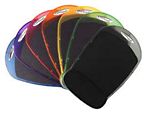 mousepad, which is appropriately sized for large
mice. Unfortunately, it is not appropriately sized for my computer
desk, but if you have room for it on yours, it is a very nice
mousing platform.
mousepad, which is appropriately sized for large
mice. Unfortunately, it is not appropriately sized for my computer
desk, but if you have room for it on yours, it is a very nice
mousing platform.
The UniTray has a slick, smooth surface which allows the Perfit Mouse, or indeed any mouse, to glide effortlessly and smoothly allowing optimum cursor control. Additionally, a low profile gel wrist support provides extra comfort for the base of your hand and has a Lycra cloth surface which is removable and washable, and which is level with the mousing surface, so if you drag the mouse down low, it won't get blocked. The gel pad is height adjustable, via a spacer, which allows you to customize the palm support height.
The UniTray sells for a suggested retail price of $19.95, or $9.95 if purchased direct with a Contour Design Mouse product.
For more information, visit http://www.contourdesign.com.