
The littlest Mac has become a powerhouse.
Apple updated the Mac mini last week, and while the entry-level 2.5 GHz dual-core i5 model is only about 5% faster than last year’s “better” Mac mini, the $200 more expensive model has made the leap from a 2.5 GHz dual-core i5 to a 2.3 GHz quad-core i7.
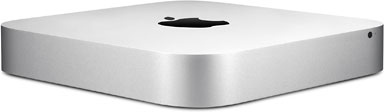 How much more powerful is that? Almost 60% more powerful than the 2.7 GHz dual-core i7 build-to-order version of the 2011 Mac mini, and about 25% more powerful than last year’s 2.0 GHz quad-core i7 Mac mini Server. All that power for $799.
And that’s just the most obvious difference for this year’s Ivy Bridge models.
Memory is a bit faster, 1600 MHz vs. 1333 MHz. And 4 GB of system memory is standard, even on the entry-level $599 model (it had 2 GB last year). And Intel HD Graphics 4000 is definitely a step up from the 3000 graphics on last year’s entry-level Mac mini and the 2011 Mac mini Server – but perhaps not as good as the AMD Radeon HD 6630M in last year’s “better” model. Benchmarks will tell.
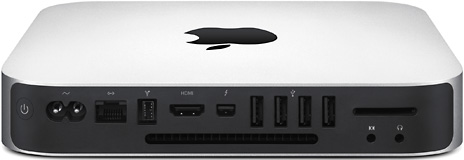 The ports on the back look the same, but those USB ports are now USB 3, which has 10x the bandwidth of USB 2.0. That means USB will no longer limit external hard drive performance.
Fusion Drive
In addition to the normal hard drive options and SSD options, Apple introduced something new to Macs last week. It’s called Fusion Drive, and it combines a 128 GB SSD with a 1 TB hard drive to tweak performance. Mac OS X 10.8.2 Mountain Lion treats the two drives as a single virtual drive, installs the operating system and included apps on the SSD, reserves 4 GB of space on the SSD for hard drive caching, and uses the hard drive to store everything else – at first.
As you use Fusion Drive, it learns how you work. Which apps you use most often. Which files you access again and again. And sometimes it decides to move those apps and files from the hard drive to the SSD. It’s completely transparent to the user, and it should speed things up far more than the 4 GB cache alone would.
Speaking of which, 4 GB is huge compared to caches found in the world of hybrid drives, which combine flash memory (up to 64 MB) and a hard drive in a single mechanism.
Fusion Drive Questions
This technology raises some questions. For a long time now, I’ve partitioned my hard drives so I can boot a recent version of the Mac OS and the previous version – and sometimes more than one. You can’t do that with the new Macs that support Fusion Drive, since it requires OS X 10.8, but will that be an option down the road?
My second question is about earlier models, such as the 2011 Mac mini, that also support SSD and hard drive. Will OS X 10.8.2 let them work together as a Fusion Drive, or is it limited to just the newest hardware?
Mac mini Server
Last year, the Server was a completely different model. It was the only way to get a quad-core i7 on a Mac mini. This year the server is the same quad-core i7 model consumers get, but with two hard drives (or one or two SSDs) and OS X Server installed.
The other difference is that you can’t get the Server with Fusion Drive, perhaps because it’s a new, unproven technology. Not that you couldn’t add OS X Server to the consumer model – it’s just a click away in the app store. Then again, servers need to be very, very reliable, so it’s probably best not to use Fusion Drive there until the technology has proved itself.
The Value Equation
Apple had done a great job clearing the channel of the 2011 Mac mini, and refurbished units were rare at the online Apple Store. They usually sold out the day Apple posted them. So we can’t do our usual value comparisons against last year’s models, which is a good thing for Apple retailers.
One of my three workhorse computers is a 2.0 GHz Core 2 Duo 2007 Mac mini with 3 GB of RAM, a 320 GB 7200 rpm hard drive, and Mac OS X 10.6 Snow Leopard. It’s a great little computer, but I run a lot of apps, and it would definitely be happier with more memory (but 3 GB is this model’s maximum), so it’s nice to see Apple making 4 GB standard even on the base model this year. Better yet, it officially supports 8 GB and 16 GB memory upgrades. And a 2.5 GHz dual-core i5 provides a lot more power than my 5-year-old Mini.
I can’t think of anything to complain about on the $599 model except that Apple doesn’t offer any hard drive options. It’s the stock 5400 rpm 500 GB drive. Period.
The $799 2.3 GHz quad-core i7 model offers an amazing amount of power, supports the same memory upgrades as the entry-level model, but it also gives you the options of SSD and Fusion Drive instead of the stock 5400 rpm 1 TB hard drive. No word from Apple which brand of drive that is, but my hope is the Western Digital Scorpio Blue, a 5400 rpm drive that holds its own against 7200 rpm drives. It’s the drive I’d put in my Mac mini if I had to upgrade.
For power users, the $799 quad-core model has it all over the $599 dual-core model when it comes to power and drive options. For the average home and office user, the $599 model is probably powerful enough, but for power users, we’re looking at a real powerhouse for $799.
keyword: 2012macminivalue
