
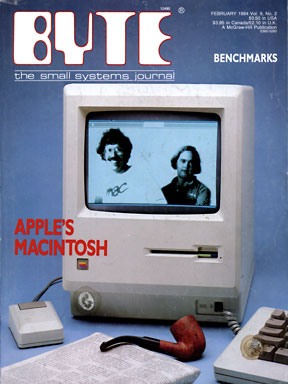
1999 – I have an issue of BYTE magazine from many, many years ago with a cover story on benchmarking (along with one on a new computer from Apple called Macintosh). It’s a topic the computer industry has followed with keen interest for decades.
 Benchmarking allows you to compare two or more items (computers, printers, operating systems, hard drives, applications, etc.) using the same test.
Ideally, benchmarks are created in such a way that they are not biased toward one of the products being tested. Also ideally, the products being tested have not been tweaked to perform better when running the benchmark than when doing real world tasks.
A favorite benchmark for the Macintosh community was BYTE magazine’s BYTEmark. This was the famous test that showed that the G3 delivered over twice the integer performance of the Pentium II at the same clock speed.
Windows NT 4.0 vs. Linux 5.2
Why in the world am I writing about Windows and Linux in Mac Musings?
Quite simply because Linux is now getting the Macintosh treatment.
By that, I mean that some reviews and benchmarks are being deliberately handled so the Microsoft product is the hands-down winner. You can do this in Photoshop, for instance, by picking just the right settings for certain filters. Change those settings just a bit and the Mac wins. Make different changes and Windows wins.
But most readers don’t know that.
Benchmarks have to appear as objective, whether they are or not. That’s probably part of the reason Mindcraft™ labels their comparison of Windows NT 4.0 and Red Hat Linux 5.2 as a white paper, a term that tends to imply objectivity.
In reality, Microsoft commissioned the study and probably would not have allowed publication of results that didn’t show Windows NT as the winner.
Although the benchmarks themselves appear objective, the problem is that the systems tested are not comparable: the Windows NT server was tweaked for optimum performance, but the Linux server was not (see NT Beats Linux . . . Maybe). In fact, some have commented that Mindcraft chose the worst possible settings at times.
Another problem is that Mindcraft didn’t test over the 10 Mbps or 100 Mbps wiring common in most offices.
How do I know? Quite simply because their peak performance summary shows Windows NT capable of a 286.7 Mbps throughput – nearly three times what 100Base-T can handle. Of course, Red Hat Linux could also saturate a 100Base-T network, providing peak throughput of 114.6Mbps.
Unless you have Gigabit ethernet, either Windows NT 4 or Red Hat Linux 5.2 can serve up data faster then your network can handle it.
Mindcraft’s performance analysis also shows that Linux and Windows NT are evenly matched with 1 to 32 clients. Unless you have more than 32 active clients (not just connected, but moving data to and from the server), a highly optimized Windows NT server and an unoptimized Linux 5.2 server provide comparable performance.
And things look a lot worse on the web side. The tweaked NT server provides about twice the performance of an unoptimized Linux server.
Of course, we also want to see how realistic the results are. With 288 active threads, Windows NT serves web content at 22.4 MBps. Red Hat Linux peaks at 5.9 MBps with 160 threads.
Now go and convert megabytes per second to megabits per second. Windows is serving up web pages at almost 180 Mbps – twice the speed of 100Base-T and far faster than any commonly known Internet connection. Fine for offices with Gigabit ethernet, but for those connecting from the outside world, so what?
Unoptimized Linux, meanwhile, trucks along at 47 Mbps. That’s half the bandwidth of 100Base-T, almost five times the bandwidth of 10 Mbps ethernet, and far, far more than most internet connections are able to handle – even the fastest cable modems peak at about 30 Mbps.
Truth in Testing
Be sure to read the fine print at the end of the white paper. It provides all sorts of revealing information.
Not only did Microsoft fund this study, it also helped Mindcraft set up the Windows server for optimum performance. As already mentioned, the Linux server was not optimized at all.
Further, what was tested wasn’t a simple single processor system with a regular hard drive, but a four processor system using RAID drives. Windows NT had been optimized for such an environment, while Linux had not:
- “We started the tests using Red Hat Linux 5.2 but had to upgrade it to the Linux 2.2.2 kernel because its Linux 2.0.36 kernel does not support hardware RAID controllers and SMP at the same time.” (In other words, RAID support and multiprocessing [SMP] support are very new features for Linux.)
The big difference is that Microsoft Windows NT is a commercial product with a huge corporation to back it up. When they are funding a report, they will provide all the technical assistance needed for Windows to perform at its best.
Linux, a freeware open-source operating system, has no such infrastructure. To optimize Linux, you have to learn it, not simply depend upon someone else to tweak the settings for you. Comments in the Mindcraft white paper show they were not willing to invest the required time and effort into learning Linux. Instead, they complained that they couldn’t get the help they wanted from the volunteer Linux community, although the kernel source code did contain hints on tuning and configuring Linux.
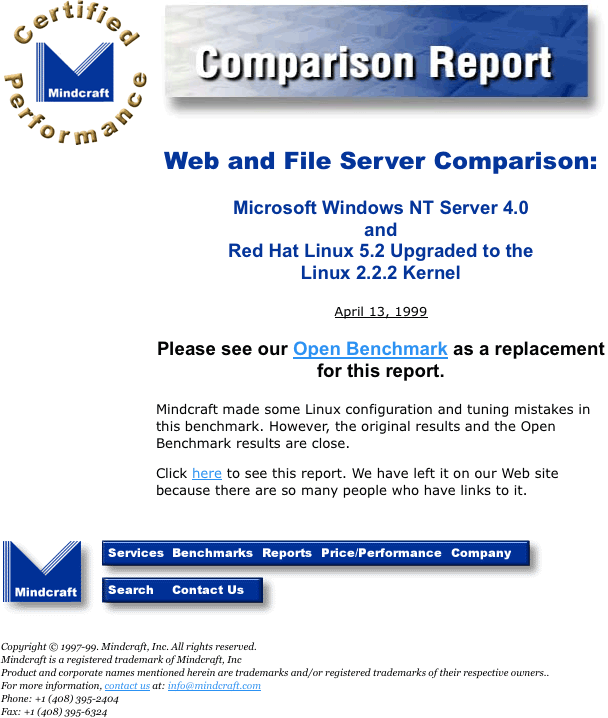
Update: Mindcraft has published updated results using their Open Benchmark while also leaving the original white paper online. This is what the page for the white paper now looks like:
Conclusion
You’ve seen it before with the Mac. You’ll see it again with Mac OS X Server, despite the fact is has already been called the fastest web server under $5,000.
With Linux running on a multitude of hardware platforms and Intel working with Apple to port OS X to Merced, Microsoft is running scared. Even if the Department of Justice doesn’t break up Microsoft, its stranglehold of the personal computer industry is being challenged by two powerful upstarts.
While the Mac OS and Linux combined might only be 15% or less of the installed base (the Mac OS is about 12%), that number continues to grow. And it can only grow at the expense of Windows.
Between the evangelistic Mac users preparing to leap into the Unix-derived Mac OS X and the technical gurus adopting Linux in the nerve centers of businesses, we can confidently predict that the Windows market share and installed base will slowly erode.
And when we do get some objective benchmarks showing tuned Linux, Mac OS X, and Windows NT performance, the Mindcraft report will be clearly seen for what it is: Microsoft propaganda in the guise of an objective study.
Further Reading
- Web and File Server Comparison: Microsoft Windows NT Server 4.0 and Red Hat Linux 5.2 Upgraded to the Linux 2.2.2 Kernel, Mindcraft, 4/13
- NT Faster Than Linux in Tests, Slashdot, 4/13
- NT Beats Linux . . . Maybe, ZDNet, 4/15. A study commissioned by Microsoft found that, “Highly tuned NT beats a barely tuned, if that, Linux. But, there’s more to it….”
Keywords: #benchmarks
Short link: http://goo.gl/H42ZUQ
