
A big screen will absolutely spoil you.
My first computer was a Commodore VIC-20 with 22 rows of 23 columns (or vice versa) of text. Then came a Commodore 64 with 25 rows of 40 characters – and 320 x 200 color graphics.
My next stop was an 8 MHz MS-DOS Zenith Z-158 PC with 320 x 200 CGA graphics, which I eventually upgraded to 640 x 350 EGA video.
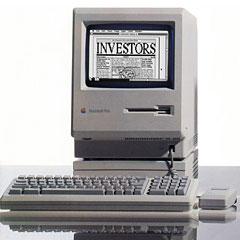
Then I got my first Mac. It was just a little “platinum” Mac Plus with 1 MB RAM, a chunky keyboard, a blocky mouse, and a 512 x 342 pixel 9″ screen. But with the right cable and software, I could use it with my HP DeskJet. And with ATM (Adobe Type Manager), I could use Postscript fonts on screen and on the printer. Gorgeous output, albeit very, very slow.
I did some impressive research and writing on that 9″ monitor. I eventually got a Brainstorm upgrade, allowing my Mac Plus to run at 16 MHz.
And then I got a job as a book designer (page design, not covers). Our stndard workhorse was a Mac IIci with 8 MB RAM, an 80 MB hard drive, and an Apple Two-Page Display. This allowed us to see two book pages side-by-side at a large enough size to read the text (about 120-125% on Quark or FrameMaker).
Needless to say, this spoiled me. I found myself less drawn to the Plus with its tiny little screen. And it was slow.
Not too much later, I graduated to a Centris 610 with an Apple 14″ color monitor – 640 x 480 pixels and 16-bit color (thousands of colors, in Apple parlance). Much better than the Plus – and twice as fast as the IIci at work.
Sure, the screen was a bit small, but it was color. I could live with it.
Over time we upgraded computers at work until all the designers had Power Macs and 20″ color monitors. This was the life, running at 1152 x 870 pixels. (A few older monitors “only” supported 1024 x 768.)
With the rise of the Internet, I learned to surf with Netscape filling half my screen and whatever file I was copying data to (Web Checker, email, spreadsheet, web pages under construction, etc.) in the other half. What a great way to work!
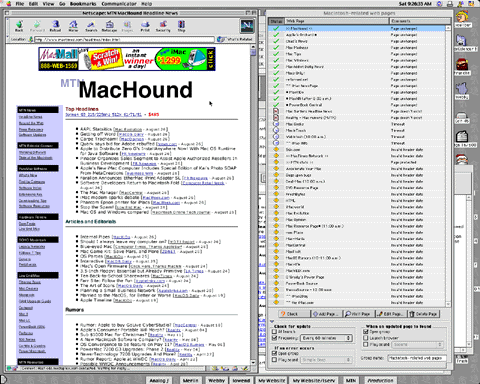
In fact, I ended up running my Apple Multiple Scan 20 at 1280 x 960 (twice the height and width of my home screen), then 1280 x 1024. Now I have a Sony 20″ monitor (Multiscan 500PS) that is even sharper at that setting.
It spoils you.
Just look at how much I can see at once (reduced to fit):
At home, I recently bought a Umax SuperMac J700 and a Nokia 447Z 17″ color monitor. It’s a very nice combination, but the monitor gets fuzzy past 1024 x 768.
That’s a lot of pixels, right? Not when you’re used to 20% more width and 25% more height. All the windows that fit side-by-side at work overlap at home.
It just isn’t the same.
My advice: Don’t play around with bigger monitors. They’ll seduce you, just like faster computers. They’ll spoil you with more pixels, more information, more room to multitask.
Unless your budget permits, steer clear of the large monitors.
Sooner or later, they’ll get you.
2014 update: Since first writing this way back in 1998, screen size and resolution have continued to increase. For quite a while, my primary monitor was a 19″ 1280 x 1024 Dell flat panel display, which I now use with my 13″ MacBook (running OS X 10.9 Mavericks) for the additional workspace in addition to its 1280 x 800 display. At home, I’ve had a couple Cinema Displays and now have three 22″ 1600 x 1200 pixel Dell flat panel monitors – one with a dual 1.25 GHz MDD Power Mac G4 running OS X 10.4 Tiger, another with a 1.8 GHz single CPU Power Mac G5 running OS X 10.5 Leopard, and the third with my 2007 Mac mini running OS X 10.6 Snow Leopard. I just love having so much screen space for my work!
Keywords: #livinglarge #joyofpixels
Short link: http://goo.gl/vH9gNo
searchword: livinglarge, joyofpixels
