Mac Musings
What's at Stake in the iPhone Keyboard Lawsuit?
Daniel Knight - 2007.08.07
Did Apple invent something new with the iPhone's virtual keyboard, or did they steal the idea from someone else?
According to SP Technologies LLC of St. Petersburg, Florida, the touchscreen keyboard on the iPod infringes on their patent.
I am not a lawyer, but I can pop over to Patentstorm to read the abstract, claims, description, and full text of US Patent 6784873, which was filed on August 4, 2000 and issued on August 31, 2004.
What Does It Cover?
Virtual keyboards have been around as long as the Macintosh - the Key Caps deck accessory was part of Macintosh System 1.0 released with the original Macintosh in 1984. The Key Caps DA could be moved but not resized.
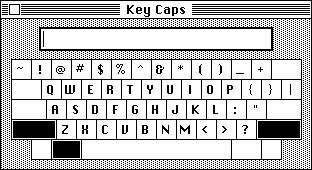
The Key Caps DA in Mac System 1.0.
That was the first step toward the iPhone's keyboard, although it required a mouse to click the keys. The next step forward came with Apple's Newton MessagePad (1993-98), which had a virtual keyboard (of a fixed size that appeared in a fixed location, although the user could move it) in addition to handwriting recognition. Just use your stylus to choose keys.
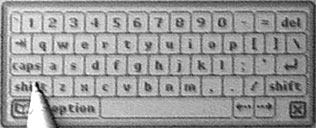
Newton's virtual onscreen keyboard.
The Palm line of PDAs also has a virtual onscreen keyboard, which is also operated by a stylus. Again, we have a fixed size keyboard in a fixed position on the screen.
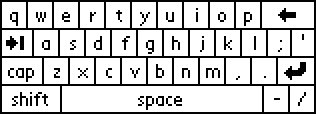
The Palm's virtual onscreen keyboard.
In short, there's plenty of prior art for virtual onscreen keyboards on computers and PDAs. So what did SP Technologies patent?
The Abstract
There's no better way to tell you than to share the abstract from their patent application:
Method and medium for computer readable keyboard display incapable of user termination
A method and medium for a computer readable input area. The input area is created by a computer program on a display capable of receiving touchscreen input. The computer on which the input area in used is at least a 32-bit system. The input area may contain a keyboard which is an image map. External programming may selectively access the input area through a dynamic link library. The input area has no task bar and may not be minimized, maximized, or deleted. Therefore, the input area becomes an integral component and provides the user with a constant and reliable method of inputting information into the computer program.
Prior art covers the first two sentences. The third one strikes me as odd: Why shouldn't the patent apply to 8-bit or 16-bit systems?
Sentences four and five also touch on prior art. There's nothing new about using an image map to display a virtual keyboard and making the code that supports its use available to any program being run.
Sentences six and seven are perhaps the most important ones, as they state that the virtual keyboard has no task bar and cannot be resized or removed from the screen by the user.
The Issue SP Technologies Is Addressing
The problem with prior art, according to SP Technologies, are that the virtual keyboard can be moved around the screen, can be resized, can be minimized (in Mac parlance, put into the Dock), and can be closed before the user is finished with data entry. The patent covers a virtual keyboard of fixed size in a fixed location that cannot be closed by the user.
The goal of the patent is to provide a consistent input system on screen-based computers so the user will always know where the virtual keyboard will appear - and won't be able to close the keyboard accidentally by clicking on a close button.
The virtual keyboard is under software control. The user doesn't have to close it when done "typing".
One of the inventors, Peter V. Boesen, is an Iowa doctor, and the specific need he was addressing was onscreen keyboards in tablet computers that could be resized, minimized, or closed before a doctor was finished entering data. One goal of the patent was to create a system where data being typed could not be lost by accidentally clicking a close button.
The iPhone's Virtual Keyboard
There's little question in my mind that the iPhone's virtual keyboard is very similar to what SP Technologies patented. It has no task bar. It cannot be resized, minimized, or closed by the user. It is under software control.
But beyond that, it's different. The iPhone keyboard is displayed in two different sizes, depending on the orientation of the iPhone. Further, the iPhone keyboard has an innovation not anticipated (and probably not needed) when SP Technologies applied for its patent - the iPhone zooms in on the key you are about to click, making it both easier to read and easier to touch.
Is SP Technologies a Patent Troll?
The folks at Patent Troll Tracker label SP Technologies a patent troll. Having read much of the patent, I have to disagree. The iPhone's virtual keyboard has some innovative features, but it also does exactly what this patent covers. It's in a fixed location and of a fixed size (relative to the screen' orientation), and it's under software control rather than user control.
Dr. Boesen, an ear, nose, and throat specialist for 21 years, has 11 patents, most of which have to do with hearing and voice communication. The earliest of these was applied for in May 1999 and received in July 2000. The most recent was applied for in Sept. 2002 and received in July 2005.
The law firm of McKee, Voorhees & Sease, PLC in Des Moines, Iowa, which specializes in intellectual property, technology, and patent law, represents Dr. Boesen. Attempts to contact Dr. Boesen via personal email and email to the law firm have not received a response.
The big question, in my mind, is whether anyone has licensed this patent and implemented it. If so, is there a chance someone at Apple saw that implementation and copied it for the iPhone?
Reverse Engineering
Computers live in a strange world where some things can be patented or copyrighted - and others can't. It's legal to reverse engineer something, to build a device that produces the same output from the same input, as long as you're not copying the original device. But it's somehow a different thing to come up with a fixed size onscreen keyboard that doesn't have a close button.
At least that's what this lawsuit is over.
Dr. Boesen appears to have a legitimate patent addressing a very real need on Tablet PCs running Windows. One question is whether it should apply to a completely different computing platform where there's no room for resizing, moving, minimizing, or letting the user close the keyboard before hitting Return. Another is whether such a virtual keyboard is an obvious solution, in which case no patent would apply.
Time will tell.