
With careful use, you may two years out of your vintage PowerBook battery, but with improper care, it could give out in less than a year. It’s worth the time and effort to take proper care of your PowerBook battery.
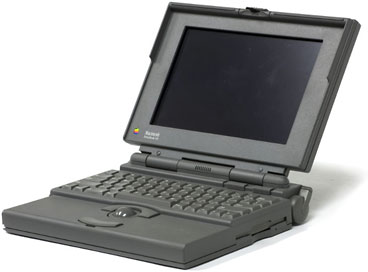 This article was originally written and published by MacintoshOS.com in 1996, during the days of the Classic Mac OS (Mac OS 9.2.2 and earlier) and 680×0- and PowerPC-based Macs. Most tips should apply to most PowerBooks (and iBooks) when running the Classic Mac OS. Some tips do not apply to MacBooks or Mac OS X.
The first section of this article helps you get more running time from your battery. The second part has tips on increasing battery life.
Part 1: Running Time
The biggest drain on your PowerBook’s battery comes from networking, using the modem, a spinning hard drive, floppy disk access, and the backlighting that makes the screen so easy to read.
Getting the Most Battery Time in the Field
Make sure the battery is fully charged. Best yet, make sure it is properly conditioned (using Battery Amnesia or a battery conditioner) so it can provide the longest possible duty cycle.
Turn off unnecessary extensions and control panels so the system will boot more quickly. (Extensions Manager is one of Apple’s truly great utilities. Create one set for use with a power adapter and another for battery use.)
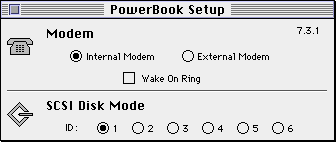 Turn off the modem when you don’t need it, and when the modem is on, disable features such as “ring on incoming call” and “fax receive” unless you need them.
Set a short delay for spinning down the hard drive.
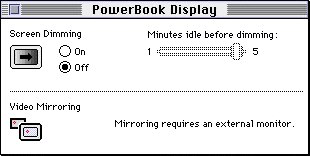 Choose a short delay to dim the screen.
Turn down backlighting or turn it off when conditions permit.
Turn off AppleTalk unless you need it.
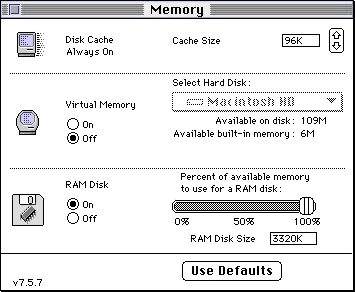 Turn off virtual memory. (RAM Doubler should be okay if you have 8 MB or more physical RAM, and RAM Charger can make more efficient use of the memory installed in your PowerBook.)
If you have enough RAM, use a RAM Disk. This can greatly reduce hard drive access. Warning: Contents of a RAM Disk are lost at shut down, so be sure to back up. (Consider using ramBunctious, which can create disk-based volumes that are used to create a RAM Disk. Disk-based volumes can be backed up to your hard drive on the fly, but to conserve battery life, we suggest using the Save at Quit or N Minute Saves options to avoid the ongoing hard drive access of the Write-through option.)
Use the Sleep setting any time you won’t be using your PowerBook for a few minutes, but Shut Down your PowerBook instead of letting it go to sleep when it will be unused for a while. Sleep mode greatly reduces power consumption, but shutting down drops that to nothing. (Weigh this against how long until you next use it and restart time.)
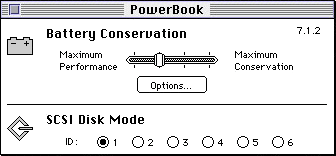
Select Reduced Speed or Allow Processor Cycling in the PowerBook control panel. (Options may vary depending on your PowerBook and Mac OS version.)
Avoid using floppy disks.
Avoid using spell check, since this accesses the disk heavily.
Avoid using QuickTime, which also uses the disk heavily.
Avoid using external SCSI devices unless they have their own power.
If you must use a mouse, make sure it is a low-power one.
Other Tips
- Always carry your charger, and have a spare battery handy for longer trips.
- Condition your battery regularly (see next section)
- Jeremy Kezer has several PowerBook-specific shareware programs that can help with battery use and energy management. (Please pay your shareware fee!)
Part 2: Charging Time
Apple uses three different types of batteries for PowerBook computers:
- Sealed Lead Acid, similar to a car or motorcycle battery (Portable, PowerBook 100)
- Nickel Cadmium (NiCad – PowerBook 140-180)
- Nickel Metal Hydride (NiMH – PowerBook Duo and 500 series)
Each type of battery requires a different recharging technique to ensure maximum battery life:
- Recharge sealed lead acid batteries before they become depleted. Never fully discharge the battery. Lead acid batteries should be kept fully charged. This is not a risk, since lead acid batteries do not suffer from the memory effect. a lead acid battery becomes fully discharged, it may experience sulfation. This destroys the battery, making it unable to hold a charge.
- Only recharge nickel cadmium batteries when they are depleted. BTI, a leading manufacturer of PowerBook batteries, suggests a full drain and recharge cycle once or twice a month. Nickel cadmium batteries are subject to memory effect. If a NiCad battery is partially discharged and then recharged, it will begin to “remember” the level it was discharged to and will no longer accept a full charge. The only way to recover the battery’s full capacity is to fully discharge it, then fully recharge it. (You may need to do this several times for a severely abused battery.) This can be done in the computer (Battery Amnesia is very helpful here) or, more conveniently, using a battery conditioner that will drain and recharge the battery.
- Only recharge nickel metal hydride batteries when they are depleted. Fully discharge and recharge the battery approximately every 30 days. NIMH batteries are also subject to memory and should be treated the same way as nickel cadmium batteries.
How to Fully Discharge NiCad and NiMH Batteries
The best way to fully discharge NiCad or NiMH PowerBook batteries is to use your PowerBook normally, but to ignore the low-power messages. Be sure to save your work frequently. When the computer goes to sleep automatically, recharge the battery completely before using that battery again.
As an alternative, look into Jeremy Kezer’s Battery Amnesia program. (Be sure to pay your shareware fee!)
PowerBook Battery FAQ
How long does it take to recharge a PowerBook battery?
Allow plenty of time to recharge a battery. It may take 6-8 hours to completely charge a battery on some PowerBook models – and even longer if you are using the computer while charging the battery.
When you use the power adapter to run the computer and recharge the battery simultaneously, the battery may not be completely recharged during your work session. It’s a good idea to leave the adapter plugged in overnight occasionally to assure that the battery is fully charged.
In addition to safely draining your battery, a battery conditioner will usually provide a faster charge than your power adapter.
I used to be able to work for two hours on a single charge, but now I get about 45 minutes. Why?
It is normal for a battery to gradually decrease it’s capacity and service time. This is characteristic of any rechargeable battery. If you this change was not gradual, your battery may be suffering from memory effect.
Through troubleshooting, I have come to the conclusion my PowerBook battery is bad. How can I safely dispose of this battery?
No PowerBook battery should be thrown in the trash. Apple batteries should be returned to Apple via your local dealer for recycling or proper disposal. You can take failed batteries to an Apple authorized service provider, who will return the failed batteries to Apple. If the batteries are physically damaged, do not attempt to return them to Apple. For damaged Apple and any other brand of PowerBook batteries, dispose of them according to your local ordinances.
My PowerBook will not run off the battery at all. Should I buy a new battery – or is there something else I can do?
When a PowerBook battery goes bad, it gradually provides less operating life. If your PowerBook suddenly will not work with its battery, this could be a problem with the battery — or the motherboard. If possible, try your battery in another PowerBook or try a known good battery in your PowerBook to help isolate the issue.
If you are not in a position to try a known good battery or verify your battery with another PowerBook, there is one thing you can try. Reset the power manager of your PowerBook (instructions for resetting the power manager very by model and are documented in the user manual). Then charge the battery overnight. If your PowerBook still won’t longer work with its battery after this process, it may be the fuse and/or battery on the motherboard. This can cost less than $5. For more information, download the PDF PowerBook RUI (Repairs, Upgrades, and Installation) guide.
Keywords: #memoryeffect #powerbookbattery
Short link: http://goo.gl/UbvIdH
searchworld: powerbookbatteryguide
