
This article contains frequently asked questions (FAQ) regarding the PowerBook 2400c, with answers to those questions. An archived version of this article is available on Apple’s website. We have added corrections and updates.
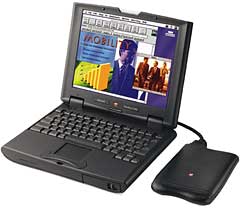 At this point, the only real upgrade option is to upgrade RAM or replace the hard drive yourself. The US version can also be modified to support CardBus – see the link below. There are some good take-apart guides online, such as this one by Kevin Omura and this one by Kim Brennan. Computer Repair Resources also has a PDF repair guide for the 2400c.
- Got a PowerBook 2400c? Join our PowerBook Duo and PowerBook 2400c Club on Facebook.
Questions Answered in This Article
- The bottom of the PowerBook becomes very warm. Is there a problem with the PowerBook?
- Is the processor upgradable?
- What is the battery Life?
- What screen resolution does the PowerBook 2400c active matrix display support?
- How much video RAM is included in the PowerBook 2400c?
- How many memory slots does the PowerBook 2400c have?
- How do you add memory to the PowerBook 2400c?
- Is the hard drive user removeable on the PowerBook 2400c?
- Is it true that you can use the power adapter from a PowerBook 1400 and 3400?
- Does the PowerBook 2400c series have the CardBus feature?
- The latch is different, will there be a better latch?
- What about Simulscan (also known as video mirroring)?
Question 1: The bottom of the PowerBook becomes very warm. Is there an issue with the PowerBook?
Answer: There is no issue with the PowerBook. However, you should avoid prolonged physical contact with the bottom of the computer. If the computer is used for long periods, the bottom surface can become very warm. While the temperature may not feel hot to the touch, if you maintain physical contact with the bottom of the computer for a long time (for example, if you rest the computer on your lap), your skin may be irritated.
If your computer has been used for a long time, avoid direct contact with the metal plate supporting the I/O ports as it can also become hot.
Question 2: Is the processor upgradable?
Answer: No, the processor on the PowerBook 2400c is not upgradable.
Editor’s note: While Apple never offered a processor upgrade for the 2400c, NewerTech and Vimage did offer G3 upgrades, although they have long since been discontinued.
Question 3: What is the battery Life?
Answer: Average battery life ranging from 2 – 4 hours depending upon work environment.
Question 4: What screen resolution does the PowerBook 2400c active matrix display support?
Answer: The PowerBook 2400c offers 800 x 600 resolution.
Question 5: How much video RAM is included in the PowerBook 2400c?
Answer: The PowerBook 2400c ships with 1 MB of VRAM.
Question 6: How many memory slots does the PowerBook 2400c have?
Answer: The PowerBook 2400c comes standard with 16 MB of memory and one expansion slot. The maximum with a standard SO DIMM is 48 MB, and the maximum with a custom SO DIMM is 80 MB.
Editor’s note: Users have determined that the 2400c can support up to 112 MB of RAM.
Question 7: How do you add memory to the PowerBook 2400c?
Answer: The PowerBook 2400c is meant to be upgraded only by trained Apple or other authorized professionals. Please refer to your Owners Guide for further information.
Question 8: Is the hard drive user removeable on the PowerBook 2400c?
Answer: No, the hard drive is not user removeable.
Editor’s note: Yes, it is. Warranty and Apple service ended long ago. See the guides linked above.
Question 9: Is it true that you can use the power adapter from a PowerBook 1400 and 3400?
Answer: Yes, the 36 Watt power adapter connector, which is similar to the one previously used on the Duo product line, allows users to utilize a 45 Watt power adapter for the PowerBook 2400.
Question 10: Does the PowerBook 2400c series have the CardBus feature?
Answer: The PowerBook 2400c does not support CardBus. Although Apple had originally considered including this technology, the final design did not include it. There are no plans to make the PowerBook 2400c CardBus-compliant now or in the future.
Editor’s note: Although the US version didn’t support CardBus, the Japanese version did. There is a simple mod to make the US version CardBus compatible.
Question 11: The latch is different, will there be a better latch?
Answer: Apple feels this latch design, while different than previous designs, will be the best functional alternative, and has no plans to change it at this time.
Question 12: What about Simulscan (also known as video mirroring)?
Answer: Simulscan (formerly termed Video Mirroring) is possible if the presentation display is capable of a resolution of 800 x 600 at 60 Hz. No other Simulscan combinations are possible without purchase of extra external additional hardware, purchased from a third party.
Keywords: #powerbook2400 #powerbook2400c #powerbook2400cfaq
Short link: http://goo.gl/scbiVg
searchword: powerbook2400cfaq
