The first Power Mac G3 was introduced on
November 15, 1997 as a replacement for the Power Mac 7300 desktop, 8600 minitower, and 9600
tower. The new G3 CPU was significantly more efficient than the
PowerPC 603e and 604e. Macworld's SpeedMark found it to be about
22% more powerful than the 604e at the same CPU speed.
The beige G3 came in desktop and minitower configurations that
looked very much like the Power Mac 7300 and a shortened Power Mac
8600. The G3 has a 66 MHz system bus vs. 40-50 MHz in earlier Power
Macs and uses 233 and 266 MHz CPUs.
This was the first time Apple's top-end Macs shipped with IDE
drives as standard, rather than the SCSI drives Apple had supported
since 1986. The 16.7 MBps IDE bus was considered fast at that time,
and the stock IDE drive held its own against SCSI drives in the new
Power Mac G3.
The new design was not without its teething pains. Models with
Rev. 1 motherboards and Rev. A ROMs don't support drives in slave
mode, although OS X overcomes that limitation. However,
OS X has its own restrictions on the beige G3, the biggest
being an inability to boot OS X from a partition over
8 GB in size, and that had to be the first one on the
drive.
Maximum RAM is 768 MB, so it can be a decent OS X machine.
Mac OS 8.0 through 10.2.x are fully supported, and 10.3-10.4 can be
installed using XPostFacto. OS X 10.2 and 10.3 are probably
the best versions for the G3 Power Macs.
Faster
The speed bumped second generation Power Mac
G3 used 300, 333, and 366 MHz G3 CPUs, although the 366 MHz
model was fairly rare. And where the original G3 had supported a
512 KB level 2 cache, 1 MB was an option on the newer
model.
Other than offering more power, the 1998 model has the same
limitations as the original Power Mac G3.
All-in-One
Apple designed the Power Mac G3
All-in-One for the education market. It replaced the 225 MHz
and 250 MHz Power Mac 5500 and provided
three PCI slots for expansion.
The built-in 15" display supported resolutions to 1024 x 768,
and the 233-266 MHz speed makes it a great machine with the classic
Mac OS and a decent performer with OS X 10.2 or 10.3. (It has
the same restrictions on OS X installs as the other beige
G3s.)
Blue & White G3s
Even after the roaring success of the colorful iMac, which was the best
selling personal computer model month after month in 1998, nobody
expected that Apple would redesign the Power Mac with a colorful
plastic enclosure - but they did.
The Blue & White Power Mac G3 had
the expected hardware improvements: faster CPUs (300-450 MHz), a
faster system bus (100 MHz), faster IDE busses (33 MBps and 66 MBps
vs. 16.7 MBps), room for more RAM (1 GB), more internal drive
bays, and one more PCI slot.
Innovations include a 66 MHz PCI slot for the ATI Rage 128 video
card, an optional DVD-RAM drive, USB and FireWire ports, and no
internal floppy drive. (There's also an ADB port for legacy mice
and keyboards.)
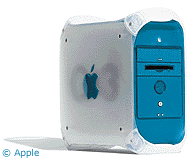 But the biggest
innovation was probably the case itself. The motherboard was
connected to one side, which came down like a drawbridge when you
needed to work inside the computer. This clever design was used
through the entire range of G4 Power
Macs.
But the biggest
innovation was probably the case itself. The motherboard was
connected to one side, which came down like a drawbridge when you
needed to work inside the computer. This clever design was used
through the entire range of G4 Power
Macs.
The Blue & White G3 is a far better OS X machine than
the beige G3s, as it has a faster system bus, a faster drive bus,
and doesn't have the 8 MB partition issue that earlier G3s had
with IDE drives. The Rage 128 is a nice enough video card, and it's
trivially simple to upgrade to a modern PCI Radeon video card.
Although Mac OS X 10.4 is fully supported, the general consensus
is that 10.3.x is more appropriate for the hardware.
Curiously, the Blue & White has two ATA busses that run at
different speeds - and by default it uses the faster one for the
optical drive. The ATA33 bus normally used for hard drives doesn't
support drives over 128 GB in size, but the ATA66 bus (normally
used for the CD-ROM, DVD-ROM, or DVD-RAM) does.



