Memory Upgrades

Quadra 605, LC 475,
Performa 475/476

Low End Mac Reader Specials

TypeStyler For Mac OS X is Now Shipping! Download The Free Fully Functional 60 Day Tryout at www.typestyler.com

OWC: Mercury On-The-Go FW800+USB2 up to 1.0TB. Bus Powered, no external power supply needed. Macworld ‘Editor’s Choice’, CNET ‘Very Good’ Starting from $99.97, 500GB $159.99. Click here

Poker Mac Don't install Parallels to play poker online! Poker Mac will show you how to download and install a native Mac poker application such as Full Tilt Poker Mac.

Laptop Hardware Provided by TechRestore - Overnight Mac & iPod Repairs.

Compare products like desktop computers, apple laptops, apple macs, and LCD Monitors side by side! All the information and reviews to make the best purchasing decision for new mobile phones, sat nav systems, or MP3 players. The Ciao online shopping community makes searching products easy for you.

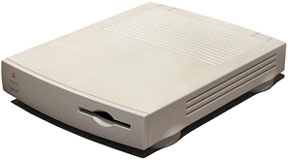
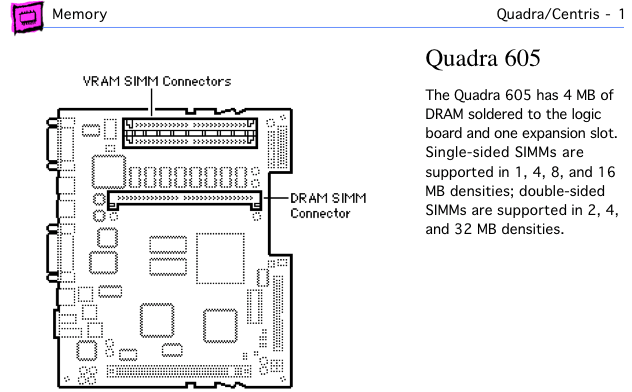
The Quadra 605 (and its twins, the LC 475 and Performa 475/476) has 4 MB of RAM soldered to the motherboard and a single 72-pin SIMM socket for memory expansion.

With the rear of the computer away from you, you will see a SIMM socket just behind the fan, running from the front of the computer to the rear. This can be filled with a 1 MB, 2 MB, 4 MB, 8 MB, 16 MB, 32 MB, 64 MB or 128 MB SIMM. The 72-pin SIMM must be 80ns or faster. (Apple has not certified the 605 with 64 MB or 128 MB SIMMs, since they were introduced after the computer. Field reports indicate they work.)

To add memory, simply put the new SIMM in the RAM socket.

VRAM

The Quadra 605 ships with 512 KB VRAM, two 256 KB VRAM SIMMs. You can upgrade this to 1 MB by replacing the 256 KB VRAM SIMMs with 512 KB VRAM SIMMs.

<go to memory upgrade index or 605/475 page>

Entire Low End Mac website copyright ©1997-2009 by Cobweb Publishing, Inc., unless otherwise noted. All rights reserved. Advice presented in good faith, but what works for one may not work for all. Please report errors to .
  LINKS: We allow and encourage links to any public page as long as the linked page does not appear within a frame that prevents bookmarking it.
  Access our RSS news feed at http://lowendmac.com/feed.xml.
  Email may be published at our discretion; email addresses will not be published without permission, and we will encrypt them in hopes of avoiding spammers. If you prefer your message not be published, mark it "not for publication." Letters may be edited for length, context, and to match house style.
  PRIVACY: We don't collect personal information unless you explicitly provide it. For more details, see our Terms of Use.
  Low End Mac is an independent publication and has not been authorized, sponsored, or otherwise approved by Apple Inc. Apple, the Apple logo, Macintosh, iBook, iMac, eMac, iPod, iPhone, PowerBook, MacBook, MagSafe, Mac Pro, Apple TV, and AirPort are registered trademarks of Apple Inc. Additional company and product names may be trademarks or registered trademarks and are hereby acknowledged.

Channels
 Power Macs
 iMac Channel
 iBook/PowerBook
 MacInSchool
Computer Profiles
 iMac
 Power Mac
 PowerBook/iBook
 Performas
 Mac Clones
 Older Macs
 LisaNeXT
Editorial Archive
Mac Daniel's Advice
Email Lists
LEMchat (uses AIM)
Online Tech Journal
Consumer
 advice, reviews
 guides, deals
Software
Apple History
Best of the Web
 Best of the Mac Web surveys
Miscellaneous Links
 Used Mac Dealers
 Video Cards
 Mac OS X
 Mac Linux
 Macspeak
 RAM Upgrades
About Low End Mac
Site Contacts

Open Link

Support LEM

Affiliates

The Apple Store
.mac
iTunes Store
Club Mac
MacMall
iResQ
ExperCom
eBay
Amazon.com
PayPal
PCMall
PC Zone
Crucial Memory

Our advertising is handled by BackBeat Media. For detailed price quotes and advertising information, please contactat BackBeat Media (646-546-5194). This number is for advertising only.