
The Mac IIvx, Mac IIvi, and Performa 600 were odd ducks, running a 16 MHz motherboard when most of Apple’s other machines were already faster than that. Since the IIvi had a 16 MHz 68030 CPU, that wasn’t a bottleneck, but the IIvx and Performa 600 had 32 MHz CPU, which were hobbled by the 16 MHz data bus.
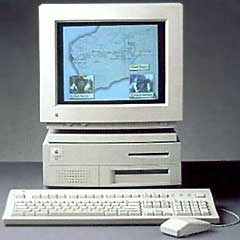 Like the Mac IIsi and Mac LC, all three of these models had memory soldered to the motherboard. In this case, 4 MB. Any memory upgrade is added to this 4 MB.
You can also upgrade video memory (VRAM) from 512 KB to 1 MB.
Looking at the motherboard with the connectors to the rear, you will see four SIMM sockets in the front center of the board. If your IIvx/IIvi/Performa 600 has more than 4 MB of RAM, they already have memory in them which must be carefully removed so as not to damage the clips that hold the SIMMs in place.
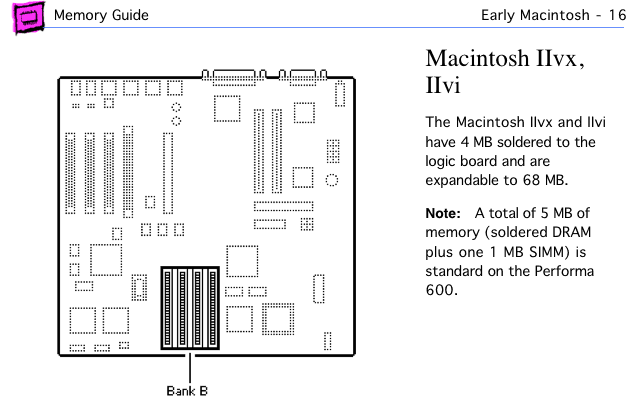
Mac IIvi/IIvx page from Apple Memory Guide.
The IIsi supports 256 KB, 1 MB, 2 MB, 4 MB, and 16 MB SIMMs, leaving several upgrade options. With Bank A soldered in place, there is only one place to install memory.
The IIvx and IIvi uses 30-pin SIMMs rated at 80ns or faster.
- A 5 MB configuration has four 256 KB SIMMs.
- An 8 MB setup uses four 1 MB SIMMs.
- A 12 MB configuration requires four 2 MB SIMMs.
- For 20 MB, install four 4 MB SIMMs.
- We’re unsure whether these models support 8 MB SIMMs, but suspect they do. Four 8 MB SIMMs would give you 36 MB of memory.
- For 68 MB, install four 16 MB SIMMs.
After installing memory and reconnecting your drives, boot your Mac with extensions off (hold down the shift key) and check “About This Macintosh” under the Apple menu. If it doesn’t give the expected number, you should reseat your memory.
Once you know the upgrade is a success, pop on the lid and enjoy the extra memory. I suggest you increase the size of the disk cache for better performance.
VRAM, Where More Memory Means Less Speed
The IIvx and IIvi have two VRAM sockets, which are normally filled with two 256 KB VRAM SIMMs. To upgrade to 1 MB VRAM, these would be replaced with 512 KB VRAM SIMMs.
Keywords: #maciivi #maciivx #performa600
Short link: http://goo.gl/pYufmB
