
There have been alternatives to the Apple keyboard since the Mac Plus era. Macs introduced from 1984 through 1986 were plagued with a particularly thick, clunky keyboard.
In 1987, Apple introduced two new keyboards with the Mac II and SE. The standard keyboard had a similar layout to the Mac Plus keyboard, but it was not nearly as thick – and the keys were far more responsive. But for the long term, it was the Apple Extended Keyboard (then $229!) that set the standard: It had everything from the Mac Plus layout plus a host of special keys.
In an era where PCs were moving from 10 function keys to 12, the Mac offered 15. (Until the iMac arrived in 1998, every extended keyboard that Apple offered had 15 function keys. For details on the iMac keyboard, see The iMac’s Keyboard’s Missing Keys.)
The Best
Apple’s Extended Keyboard was without a doubt the finest keyboard ever made for the Macintosh. We have a few at work that are ten years old and working fine.
Apple replaced the original Extended with the Extended Keyboard II, which has exactly the same layout as the original. The biggest visual difference is that shape of the power key. On the original, it looked like just another key. On the II, it was flat and square.
The Extended II was also an excellent keyboard, albeit expensive. I’d rate it the third best ADB keyboard ever made for the Macintosh, at least among ones I’ve used.
AppleDesign Keyboard
Not too many years ago, Apple started shipping a keyboard with every Macintosh instead of selling it separately. Of course, they couldn’t raise the retail price $229 to cover the price of the Extended II. Instead, Apple introduced the AppleDesign Keyboard.
The new keyboard had the same layout as the earlier models, but it could be sold for $85 – or provided standard with desktop Macs. It was also a bit smaller than the earlier extended models.
However, the AppleDesign Keyboard didn’t have the same tactile response as the Extended or Extended II. By contrast, it felt soft or mushy.
Enter MicroSpeed
I don’t know just when MicroSpeed started building and selling the KB105M. Even before Apple started including the AppleDesign Keyboard as a freebie, I had my dealer order a KB105M for evaluation. After all, we were paying about $160 for the Apple Extended Keyboard II – there had to be a reasonable alternative.
Since we were standardized on the extended design, two things were crucial: an exact duplication of Apple’s layout (which most third-party ADB keyboards don’t have) and responsiveness equal to Apple’s.
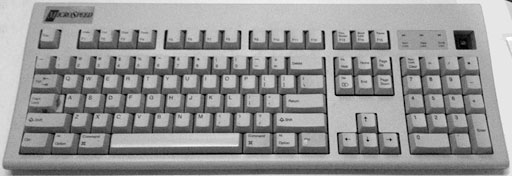
At the time, the MicroSpeed was about $80. It had exactly the same layout as Apple’s keyboards. So we bought one on 30-day trial (with a 70-plus Mac network, we’re on very good terms with our dealer). I asked for volunteers to use it for a full day of work.
For almost two weeks, the keyboard moved from desk to desk. User feedback was consistent: The MicroSpeed KB105M is an excellent keyboard. Anyone using the original Apple Extended Keyboard said the MicroSpeed was a close second. Anyone using the Extended II said the MicroSpeed was a better keyboard.
Based on that response and the price, we have been buying a MicroSpeed KB105M with each new Power Mac. The mushy AppleDesign keyboards have been relegated to use on servers, because there nobody needs to do much typing on them. And it also gives us spares, just in case a keyboard dies.
I’ve also purchased a couple MicroSpeed keyboards for home. I’m currently using one on my Umax SuperMac J700, which shipped with a very nice keyboard – but not as nice as this.
Conclusion
The MicroSpeed KB105M is the finest keyboard currently made for Macs. It comes with a warranty, which I’ve had no need to use. And prices have dropped to around $60, making it less expensive than the Apple Design Keyboard.
But the KB105M isn’t just well built and reasonably priced, it also has 4 ADB ports. After using one to connect the keyboard to your Mac or clone and one for the mouse, you still have two free ADB ports for adding a trackball, touchpad, sketch tablet, or whatever other ADB devices you may desire.
Two word summary for the MicroSpeed KB105M: Highly recommended.
If you spend a lot of time at the keyboard, the KB105M makes a great replacement for a dead Apple keyboard, a working AppleDesign Keyboard, and almost any third-party ADB keyboards.
Manufacturers and distributors: Interested in having your product reviewed? Please read our review policy.
Keywords: #adbkeyboard #microspeedkeyboard #microspeedadbkeyboard #mackeyboard
Short link: http://goo.gl/rxpQnk
searchword: microspeedkeyboard
