
The greatest obstacle to third party mice is the quality of Apple’s mice. Although the early Lisa/Macintosh mouse was a rather chunky affair, it was good enough – and the Mac market was small enough to attract little competition. Also, Apple’s mouse came free with the computer.
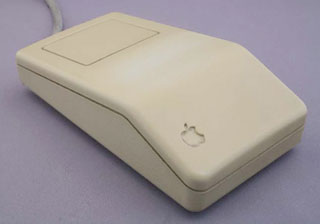 In 1987, Apple brought the mouse introduced with the Apple IIGS in 1986 (left) to the Mac with the new Mac II and SE. The new mouse, along with two new keyboards (a compact one with similar layout to the Mac Plus keyboard and an extended keyboard with 15 function keys), used the Apple Desktop Bus (ADB) to connect to the computer. Until the iMac, which led the switch to USB, every Macintosh and PowerBook that worked with an external mouse or keyboard used ADB.
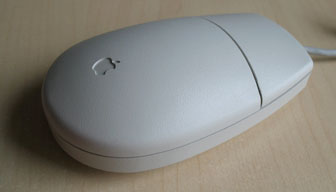 Not only was the ADB connection new, but the mouse had been redesigned. Still rectangular, it was not nearly as thick as the old mouse. Some years later Apple redesigned the mouse again, giving it the familiar oval shape we see today (right).
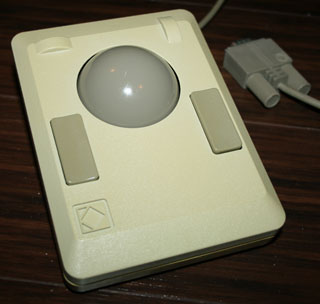 One of the earlier alternatives was the Kensington Turbo Mouse (left), which (despite its name) was a trackball with a large, well weighted ball. Users soon discovered they could replace the trackball with an 8-ball.
But trackballs have never been as popular as mice. And mice are also much more popular than touchpads (or mush-pads). Most PowerBook users I work with ask for a mouse as their first accessory.
A few years ago, Kensington decided to tap into the mouse market, first with their Thinking Mouse, which had four buttons like later versions of the Turbo Mouse. Kensington has since added Mouse-In-A-Box, a one-button mouse, and later the Kensington Mouse, the two-button model. (My first Kensington mouse was a Mouse-In-A-Box, purchased to replace a wrecked Apple mouse.)
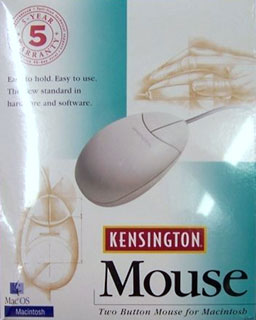 All three mice share the same basic design. They are thicker than Apple’s mouse, with the ball positioned just front of center for better control. They have a very smooth rolling action. And the Kensington mouse fits my hand better than any other mouse I’ve worked with.
Except for the one-button model, all Kensington input devices ship with the MouseWorks control panel. This lets you define each button and combination of buttons separately.
By default, the left button acts just like the lone button on the Apple mouse. It clicks. And, unless you’re left-handed, I can’t see any reason to change that.
I know several people who use the second (right) mouse button for contextual menus under Mac OS 8. That’s a feature I still haven’t embraced, so my right button does a double-click. By moving my pointer finger just a fraction of an inch, I can choose either button.
It’s remarkable how quickly using a two-button mouse becomes second nature. I use the Kensington Mouse at work, but have their Mouse-In-A-Box at home. I keep trying to click the right button at home, so that probably means I’ll be investing $60 in a new mouse soon.
More than Two Buttons
As with the Turbo Mouse and my older Logitech Trackman three-button trackball, you can do more than program two keys on the Kensington Mouse.
First, you can control tracking. You can set the cursor to move more slowly when you move the mouse slowly, more quickly when you zip the mouse.
And MouseWorks lets you define chords, combinations of buttons. Of course, in the case of the Kensington Mouse, the only chord is pushing both buttons at once. I’ve been experimenting with that but haven’t yet found a particularly useful setting.
Before Mac OS 8, I would have picked click-drag, which treats the mouse button as depressed until you click it again. But OS 8 has sticky clicking, so I find myself using click-drag less often.
I haven’t yet tried using it for contextual menus, but that might be a good way to learn about them. I’m used to command-clicking URLs in my email to visit pages in Netscape Communicator. This could simplify that by making it a mouse-only command.
Update: Over the years, I eventually settled on setting up the second (right) button as Cmd-click, which pulls up contextual menus.
Conclusion
I’ve worked with many different mice over the years, both Mac and DOS/Windows (I’m a Mac convert from 1990, when I got a Mac Plus and sold my Zenith PC clone). There have been some nice mice, particularly the Logitech 3-button one I had on my clone, but none have a better feel or smoother action than the Kensington Mouse or Mouse-In-A-Box. (I haven’t tried their four button mouse, not can I fathom the need for four buttons, but performance should be identical to these models.)
And that second button on the Kensington Mouse makes it a real winner. It’s worth investing in even if your Mac mouse is working perfectly.
Manufacturers and distributors: Interested in having your product reviewed? Please read our review policy.
Keywords: #adbmouse
searchword: kensingtonmouse
