Network Administration Tools for Mac OS X Users
- 2007.06.25 - Tip Jar
Low End Mac Reader Specials
Memory To Go Special: New 2008 iMac 2GB $42 / iMac Intel Core2 DUO & MacBook Pro 2GB $36 - 1GB $20. MacPro 8 Core Memory 4GB kit $154 / 2GB kit $94 -- Free shipping available.
Download Typestyler, still the Ultimate Styling Tool for Internet, Print and Video Graphics. Works great in Classic with a Native OS X Version on the way. Free Tryout: www.typestyler.com
LA Computer Company: Specials on AppleCare, iMac's, Apple Batteries and Apple A/C Adapters. Also Great prices on Used Apple Computers. Call 1-800-941-7654 Click Here.
OWC: OWC Mercury On-The-Go FW400/800/USB2/eSATA Portables High Performance A/V Rated, **Bus Powered** **Up to 500GB in the Palm of your Hand** Macworld Editor's Choice, CNET 'Very Good' - from $75.99!
Mac users can finally play Party Poker for Mac. Not only that, they can also learn how to play PokerStars for Mac.
Laptop Hardware Provided by TechRestore - Overnight Mac & iPod Repairs.
Compare products like desktop computers, laptops, and LCD TVs side by side! All the information and reviews to make the best purchasing decision for a new cell phone GPS products or MP3 players. The Ciao network makes searching products easy for you.
New iMac 800Mhz Memory 4GB $90, 2GB $45 - Click to Maximize your Macs...
When people in the IT field hear the term Network Admin, they usually think about Cisco and routers. Cisco is used by a lot of big corporations and is also used in the military,where I work. (In home-based networks, you can to pick any brand of network device out of a hat, because you really don't know that you're going to deal with.)
There are basic tools that you need no matter what size your network. Networks today are mostly platform independent, and the Mac is a great system that interacts very well with a lot of platforms, thanks mostly to the TCP/IP protocols.
This week we're going to go over the basic tool used to install, configure, diagnose, and troubleshoot networks.
Up-to-date Firmware
The first thing you want to do is make sure that the firmware on your network devices is up to date. In common consumer equipment, you go to the manufacture's website, download a firmware file to your computer, and then upload it to the device using your web browser.
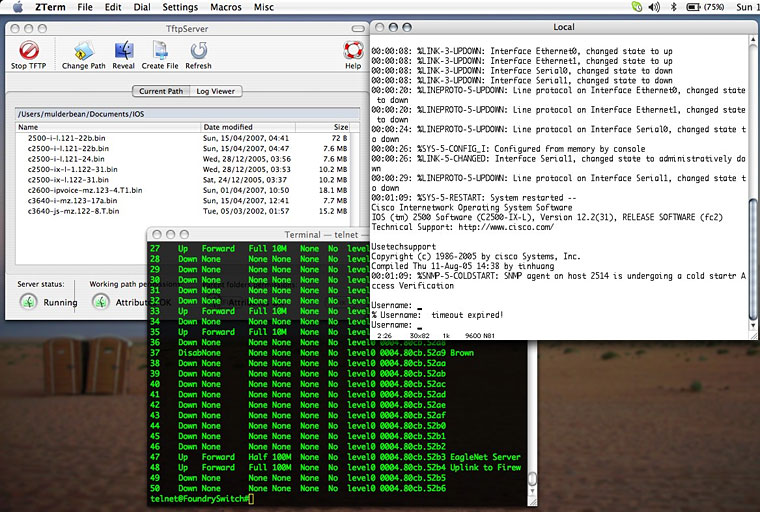
Enterprise equipment, like Nortel and Cisco, will require using a TFTP (Trivial File Transfer Protocol) server to upload the firmware or IOS (Internetwork Operating System) to the device. Mac OS X has a built-in TFTP in the command line, but I use an open source program called TftpServer.
This program is fairly easy to use: You start off by telling it where your source folder containing the firmware is, and then you simply make sure the server (service/daemon) is running and that the permission are okay - and your ready to go. Simply point the device you're upgrading to the IP of your Mac, and it will find the files you have in the directory. TFTP is very simple; you have to tell it specifically what file you need, and then it will read and write it.
When doing a backup on a device's firmware (thus sending it to your Mac via TFTP), you must click "create file" and name it exactly as the one on your device. Give example on Cisco device
Serial Connections
Next, you want to access your device to finish the installation process and fully configure it. Once again, most consumer devices are configured using a web browser, while enterprise equipment uses the serial connections. The common serial connections you will encounter are 9-pin RS232 and Cisco's RJ45. Cisco uses a RJ45, which is the same connector used in most ethernet installation, but it's actually a serial cable - and by using a rollover cable and an RJ45-to-RS232 adapter, it's fully compatible with any computer's RS232 serial port.

Most Macs today don't have legacy serial ports, so you will need to pick up a USB-to-serial adapter like the IOGear GUC232A. IOGear provides the drivers for Mac OS X, so all you will need now is a good terminal app. A terminal emulator is a command line shell that in the old days was a physical dumb video terminal connected to a big mainframe. Yes, it's very similar to Mac OS X terminal but it uses the serial connection for its input and output.
Terminal Emulation
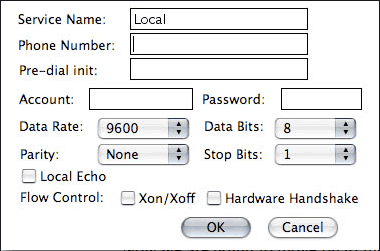
The long-standing king in the Mac world for that past 10-15 years is Zterm. You start off by selecting your interface (in our case it would be the USB-to-Serial adapter), set up the basic settings (like the terminal set to vt100) and connection to Data Rate: 9600, Data Bits: 8 Parity: none, and Stop Bits: 1. I haven't had any problems access devices using these settings.

Now we're going to move on to the diagnose and troubleshooting stages of Net Admin. Once your devices are up and running, you can almost always connect using your web browser and either Telnet or SSH through the Mac OS X terminal. My favorite app continues to be Apple's Network Utility, which you can use to find out info on any network interface you have on your Mac. This way you can see the capabilities of your wireless card (to see whether it is 802.11a, b, g, or n) and also to see if your wired connection is running at 10, 100, or 1000 Mbps.
Unlimited number of pings is great when you want to make sure you have a solid connection. Ping sends out a packet and tells you how long it took to reach its destination and come back again. Traceroute is great when trying to find out how many hops or how much equipment is between you and the destination.
Home Networks
Next week we'll be going over administrating a home network, along with answering any question that might come up from this week's article.
As an update to my current status I am still in the US Army and am
currently residing in Iraq. I have with me my PowerBook G4 667 MHz DVI and a Black MacBook Core2 2 GHz while still
working with networks both LAN/WAN and, of course, my own LAN in my
living area for the soldiers in my unit.
If you find Joe's articles helpful, please consider making a donation to his tip jar.
Recent Mac Fallout Shelter articles
- My Newton: Why I won't buy an iPhone or iPod touch, 09.07. The iPod touch and iPhone sound wonderful, but I love the handwriting recognition, fax support, and email abilities of my Newton MessagePad.
- Apple's secret battery reset utility for WallSteet and Clamshell iBooks, 07.05. If your old 'Books battery isn't taking a charge like it used to, Battery Reset 2.0 could help recover its useful life.
- Replacing Lombard with a TiBook: Which one is enough?, 04.19. Nice as the Lombard was, it has a new owner. The new 'Book should have FireWire, G4 power, and run Tiger nicely. How much TiBook is enough?
- Safe and secure file backup and off site storage, 03.28. How to create an encrypted disk image with your important files and store it somewhere safe from theft and computer damage.
- More in the Mac Fallout Shelter index.
Links for the Day
- Mac of the Day: Mac LC III, Feb. 1993 - The first LC without compromise: 25 MHz 68030 CPU, 32-bit memory, up to 36 MB of RAM.
- List of the Day: G4 'Books an email list for G4 iBooks and PowerBooks.
- September 8 in LEM history: 99: Big sound from the little iMac - Ethernet alternative to USB drives - 00: Building a back-to-school bundle - 03: 17" 1.25 GHz iMac G4 - My Mac Plus revisited - 06: Inside your notebook's battery - Andy Hertzfeld, software wizard - OS X is a pleasure to use - MacBook random shutdown - Core2 7% faster
Recent Content on Low End Mac
- Anticipation: New iPods Now, New Macs Later, Kev Kitchens, Kitchens Sync, 09.05. The season of new iPods is at hand, but new Macs may wait until 2009.
- Buy a MacBook Now or Wait?, MacBook touch Patents, Samsung X360 Takes on MBA, and More, The 'Book Review, 09.05. Also 20 years of portable Macs, data backup and preservation, universal U-Charge battery charger for Mac 'Books, bargain 'Books from $150 to $2,699, and more.
- Listen to Just the Music with the V-Moda Vibe Earbuds, Tommy Thomas, Welcome to Macintosh, 09.05. Well built, the noise canceling earbuds will let you hear all the nuances of your music without letting through background noise.
- Source of iPhone 3G Problems, Army Uses iPods as Field Translators, Gains with Business, and More, iNews Review, 09.05. Also UK bans iPhone ad as 'misleading', iPhone password easy to bypass, GM to offer radios with USB in 2009 models, weather tracking software, and more.
- Macs Gain Ground in August, Consumers Most Likely to Buy Macs, LaCie USB Speakers, and More, Mac News Review, 09.05. Also migrating Time Machine to a new drive and two new keyboards from Logitech.
- Best iPod touch Deals, Low End Mac Deals, 09.05. Refurb 8 GB, $199; new, $284; refurb 16 GB, $299; new, $370; refurb 32 GB, $399; new, $453.
- Best 15" MacBook Pro Deals, Low End Mac Deals, 09.05. Used 1.83 GHz Core Duo, $999; 2.16, $1,125; new, 2.2, $1,450 after rebate; refurb 2.4, $1,699; 2.5, $1,999; 2.6 Santa Rosa, $1,849; rebates on new.
- Best iMac G4 Deals, Low End Mac Deals, 09.05. Used 15" 700 MHz CD-RW, $279; 800 Combo, $300; 1 GHz $390; 17" 800 MHz SD, $439; 1.25 GHz, $449; 20", $569.
- Overclocking a Mac mini Got Me Hooked on Souping Up Macs, Adam Geller, My First Mac, 09.04. Stories of hot rodding iBooks, G3 iMacs, and PCI Power Macs on the cheap.
- Apple Will Not Abandon Optical Drives, the Mac Drought, Purposeful Mac Acquisition, and More, Dan Knight, Low End Mac Mailbag, 09.04. Also Mac OS X 10.5 on a G4-upgraded Blue & White G3 and problems using a flat panel display with a Quadra 700.
- Only Leopard Runs Routine Maintenance Tasks after Startup or Waking from Sleep, Charles W. Moore, Miscellaneous Ramblings, 09.04. Mac OS X 10.5 runs routine system maintenance scripts as soon as possible after starting up or waking up your Mac. Earlier versions of OS X do not do this.
- Best Mac mini Deals, Low End Mac Deals, 09.04. Used 1.25 GHz G4 SD, $549; 1.42 Combo, $409; new 1.83 Core2 Combo, $569 after rebate; 2.0 SD, $769 after rebate.
- Tomorrow's Solid State Drives and Notebooks, Dan Knight, Mac Musings, 09.04. Flash drives are great but have some shortcomings. Some thoughts on building better SSDs and notebooks to use them.
- Best 12" PowerBook G4 Deals, Low End Mac Deals, 09.04. Used 867 MHz Combo, no APX, $490; 1 GHz, $550; SuperDrive, $625; 1.5 GHz w/o APX, $660; w/APX, $675.
- Best 17" PowerBook G4 Deals, Low End Mac Deals, 09.04. Used 1 GHz, $779; 1.33 GHz, $799; 1.5 GHz, $859; 1.67 GHz, $910.
- 11 Mac Browsers Compared, Simon Royal, Mac Spectrum, 09.03. The latest versions of Internet Explorer, Opera, Safari, Shiira, iCab, Radon, Firefox, Netscape Navigator, SeaMonkey, Flock, and Camino tested in Leopard.
- Save Internet Radio, USB and Hard Drives, Hardware Manufacturers vs. Linux, and More, Dan Knight, Low End Mac Mailbag, 09.03. Also Mac won't book after cleaning, newer versions of OS X improve wake from sleep, downgrading to OS 8.6, unreadable pages on Low End Mac, and more.
- Another Free POP3 Provider, Recharging a Dead PRAM Battery, Current Kanga Value, and More, Charles W. Moore, Miscellaneous Ramblings, 09.03. GMX email now available in US, Panasonic UJ-841S drive won't burn discs, restoring a dead PRAM battery in a Pismo, and thoughts on Kanga value today.
- Best eMac Deals, Low End Mac Deals, 09.03. Used 700 MHz Combo, $120; 1.25 GHz SuperDrive, $150; 1.42 GHz, $349.
- Best Mac OS X 10.5 'Leopard' Deals, Low End Mac Deals, 09.03. Mac OS X 10.5, single user, $99; 5 users, $140; 10.5 Server, 10 users, $395; unlimited, $850.
- Best MacBook Air Deals, Low End Mac Deals, 09.03. Refurb 1.6 HD, $1,499; new, $1,690 after rebate; refurb 1.8, $1,699; new, $1,919 a/r; refurb 1.6 SSD, $2,099; new, $2,294 a/r; refurb 1.8, $2,299; new, $2,400 a/r.
- Psystar Strikes Back, Countersues Apple, Frank Fox, Stop the Noiz, 09.03. Psystar is trying to paint Apple as a monopoly and force it to license the Mac OS.
- More links in our archive.
About LEM | Support | Usage | Privacy | Contacts