
What’s 12″ long, consumes up to 10 amps of 5-volt power, and is without equal in Macintosh history? If you were thinking the World’s Noisiest Hard Drive, you’re close, but the real answer is the amazing Radius Rocket series of NuBus cards.
Originally designed as a Macintosh accelerator for any Mac with a NuBus slot, these battleships took on a life of their own. RocketShare software allowed one Macintosh to contain several Rocket computers, and several PDS cards called Boosters were available to expand the Rocket even further.
Skylab was prototyped, aiming to have 14 Rockets working together to solve the toughest publishing and video tasks.
Much has been written about these cards, both on Low End Mac (A Lesson in Xtreme Mac’age and Global Community) and elsewhere (The Unofficial Authoritative Radius Rocket FAQ).
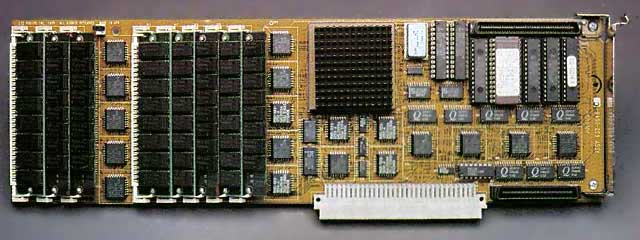
A Rocket contains most of the critical components of a Quadra packed onto a single NuBus card. Eight 30-pin SIMM slots; a 25, 33, or 40 MHz MC68040 chip; a memory controller; and even a special PDS slot all find their home on this space heater of an expansion board.
Two major versions were available, the Radius Rocket and the Rocket Stage II.
Hardware That Could Blast-Off!
 The Rocket was available in Rocket 25i, Rocket 25, and Rocket 33 versions, the 25i using a 68LC040 chip to reduce cost. Radius Rocket Stage II was available only in 40 MHz and came with a Radius SCSI II Booster expansion daughter card preinstalled.
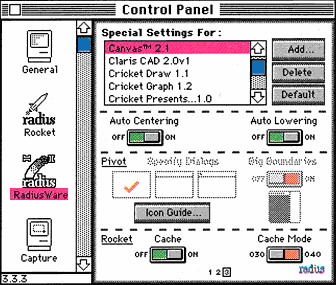
Rocket cards can be used as CPU upgrades with RocketWare software – or with optional RocketShare software to create a multiprocessor environment. According to documentation, the Rocket Stage II is only compatible with RocketShare and cannot be used as a standalone accelerator.
Boosters
What other NuBus card has its own line of PDS Expansion cards? Called “Radius Private Bus” cards (Boosters in Rocket parlance), these components measure about 4″ square and connect to the two connectors on the top and bottom of the case-end of Rocket series cards. Their position is specially selected to allow them access to the world outside your Mac. The Rocket doesn’t have any external connections, so this leaves room for the Booster.
Three Boosters were documented to have existed: a PhotoBooster with twin 66 MHz AT&T DSP chips for Photoshop acceleration, a SCSI II booster that supported 10 MB/s connection to external SCSI peripherals, and a PhotoBooster Stage II that did both. I’ve only seen verification of the first two; the last may be vaporware.
A PhotoBooster on a Rocket card is accessible by the host Mac and by the Rocket when running under RocketShare, but multiple PhotoBoosters on multiple Rockets are not supported.
I don’t know if the SCSI II booster is accessible to the host or if it supports booting the Rocket. I suspect the former to be unsupported and the latter to be supported.
With all this power available to simply slip into your NuBus slots, and with RocketShare to boot the Rocket(s!) separately, it seems like we’re all set. We can expand our Macs to the sky.
Unfortunately, once the novelty of RocketShare has worn off, trying to find a practical use for this technology proves difficult. Perhaps having two or more Quadras in one Mac was insanely great when a Quadra 800 cost $5,100; but today that Quadra might even be cheaper and easier to find than the Rocket.
Oftentimes it will be better to have two 68k Macs instead of one with RocketShare. Let’s imagine some circumstances where the Rocket still shines.
Dance the Night Away
This might be news to some (and old hat to others), but 68k Macs are quite capable of playing MP3s. MPEGDec Mac can decode stereo MP3s on as little as a 50 MHz 68030 and is functional on as small a Mac as 33 MHz the LC III+.
What’s this got to do with Rockets? Well, playing MP3s is fairly hard work even for the Quadra 840AV, and to be able to accomplish any work on the Mac at the same time requires rather low playback quality settings. Wouldn’t it be nice if you had two Macs with all the same hardware so that you could play your MP3s and work without ever having to get up and switch computers?
That, of course, is where the Rocket excels! The Rocket can run MPEGDec to keep the tunes flowing while the host Mac keeps working uninhibited. RocketShare’s awesome AppleTalk-over-NuBus hack even means that you needn’t store your MP3s in a Rocket Disk file; you can mount them using File Sharing.
The Radius Rocket isn’t without its compatibility flaws, and audio problems have been noted for years. However, those problems seem to stem mostly from applications (such as games) that play many different sounds repeatedly. MPEGDec only plays one very long sound file, so these problems should be minimized.
Another option that may help maximize compatibility would be to let the host Mac play the MP3s while the Rocket runs the real application software. This would introduce the potential for lag on the host to affect the Rocket, but I suspect that would not be a huge problem either.
Experiments are necessary to determine which setup is best.
Run! It’s a Swarm!
An application that may be quite fun but has dubious practical value is High Performance Computing. Several CPUs in a single box is exactly what HPC is all about. Two applications of this principle come to mind: distributed AfterEffects rendering and web server clustering.
Adobe AfterEffects, for those who are not familiar with it, is a video animation and composition toolkit with a strong mathematical foundation. After laying out the edits using a preview mode and becoming satisfied with them, the After Effects user has to wait for a lengthy rendering process that painstakingly applies the edits to every frame in the movie. This sounds like an easily parallelizable process, and it is. AfterEffects includes a built-in network rendering facility where a “master” workstation sends pieces of the job out to any number of “slave” Macs that render them and return the result to the Master, which assembles all the pieces.
Since the Rocket cards can communicate with each other and the host Mac via AppleTalk, the application of Rockets to speed AfterEffects rendering is obvious. Some large host Mac could attach to a NuBus expansion chassis holding several Rocket processors. When render time comes, the host can network-render across the Rockets. This was the basic idea of the failed SkyLab project. It was exciting – but not practical because even ten Rockets together would be slower than a cheap used Power Mac.
Another clustering application for Rockets would be multiple-webserving. A host Mac could connect to the Internet and run IP routing software as well as a DNS server (MacDNS comes to mind). Each Rocket would boot and run webserver software like NetPresentz. This whole shebang would have one hostname, and each time it was resolved it would return the IP address of a different Rocket. That’s called round-robin DNS and is the simplest method of load-leveling between webservers. These Rockets then could respond to many more queries than any 68k Mac could alone. Unfortunately, this plan is also impractical because of the raw power of newer, cheaper computers – but they still can’t take away the coolness.
Scanning the Horizon
My last and most practical application of Rocket technology is creating a Photoshop workstation to control a vintage film scanner. Several models of older high-end scanners are available cheaply now and still create better images than new gear of comparable price.
One thing almost all older film scanners have in common, though, is that they’re v-e-r-y s-l-o-w. Some can take up to two minutes to scan an image at highest quality.
Do we want to just sit there smoking cigar after cigar and playing solitaire? No!
Enter the Rocket with SCSI II Booster. Two copies of Photoshop can be loaded on the Mac – one for the Rocket and one for the host. Make the host a NuBus Power Mac such as the 8100 with a G4 card and Thunder IV video for maximum enjoyment. Now connect the scanner to the Rocket’s SCSI II Booster port, launch Photoshop on the Rocket, and scan away.
Once the first image has scanned, save it to the host Mac’s hard drive via File Sharing. Start scanning the next image and transfer back to the Host. Since the Host Mac operates independently from the Rocket, you’ll be able to work on prepping the first image while the second one scans in the background.
All that time wasted waiting for the scanner has become valuable time for image retouching.
Return to the Launch Pad
Three ways to accomplish a task better, all thanks to the Radius Rocket.
- The 68k Mac user can enjoy one of the best conveniences of modern computing, music.
- Those who are more dedicated to fun over practicality will enjoy clustering.
- Even those who are only interested in getting the job done can put the Rocket to work.
Not a bad legacy for such an ingenious but ultimately impractical device.
To learn more about the online legend that the Rocket has garnered, check out these links:
- Rocket Technical Overview, Joaquin Menchaca, DarkNerd
- Rocketeer, an email list for Radius Rocket users.
- Rocket Science 101, b.b., My Turn, 2000.10.30. Hands on tests with one or two Rockets in various Macs and Power Macs.
- Rocket Review by David Emmons, Low End Mac
- Radius Rocket in Mac II, HyperArchive, 1992.02.11. Some very helpful info on the Rocket (does not cover Stage II)
Keywords: #radiusrocket
Short link: http://goo.gl/NGQkvy
searchword: radiusrocket
