
2000 – These instructions were written specifically for installing Mac OS 8.1 on a large group of Power Mac 6100s. However, they can easily be adapted to almost any situation where you may be updating the Classic Mac OS. This was written when the I was the IT Manager at Baker Publishing.
Background
In October 1996, Apple released the last update to System 7.5, bringing it to version 7.5.5. That was the last time we updated every Mac in the company to the same version of the Mac OS (ranging from a Mac Plus and Mac II through Power Mac 7500s and 8500s).
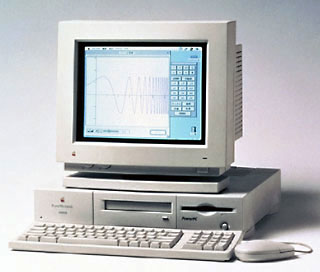 Then as now, the computer we had the most of was the Power Mac 6100/66, some with DOS cards, but most without, and over two dozen 6100s in all. These machines were mostly purchased during the first half of 1995 when we moved to a new IBM AS/400-based accounting system. The typical configuration was 16 MB of memory, whatever size hard drive Apple was providing at the moment, and no CD-ROM. Our local dealer was kind enough to pull the CD-ROM drives that we didn’t need at the time and give us a significant credit for them.
Today, all of the 6100s have been upgraded to 40 MB of memory, but only a handful have CD-ROM drives.
Over the past years, we’ve been slowly retiring older Macs. We hope to be 100% PowerPC at work by mid-2000, moving our Quadras to our retail stores to replace Mac II series machines in use there.
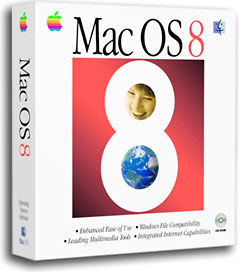 We’ve finally reached the point where we can update our entire installed base of Macs to Mac OS 8.1. We’ve also reached the point where some current apps, including our versions of FileMaker Pro and Microsoft Word, don’t work with System 7.5.5.
Fortunately, we found an incredible deal on Mac OS 8.1 CDs from Small Dog Electronics – just $15 per copy. We purchased enough copies to update all of our Quadras, Power Macs, and PowerBooks.
The Process
The basic upgrade process is quite simple: Run Norton Disk Doctor on the hard drive, install Mac OS 8.1, run Disk Doctor again, and then run Norton Speed Disk. (I borrowed my oldest son’s external CD-ROM drive for use with Macs that didn’t have CD drives.)
Installing Mac OS 8.1 on a Power Mac 6100 via CD-ROM – even a 24x one – is a very slow process. Not only is this because Mac OS 8.0 followed by the 8.1 updater is big, but in part because the installer insists on putting Netscape Navigator 3.01, Microsoft Internet Explorer 3.01, and Claris Emailer Lite on each and every computer.
Not only is installation slow, but the installer requires about 120 MB of free drive space. If that’s not available, the installation aborts late in the process.
There had to be a better way.
The better way was to do a full Mac OS 8.1 installation on a hard drive that you can share on the network (or use a Zip 250, Jaz, or ORB drive, if you have one of those) and work from that.
- Do not boot from this installation. You need to leave it alone so it will prompt for ID, network settings, etc. after you copy it to a new Mac.
As with any upgrade, the most important thing is having a backup just in case anything goes wrong. We automatically back up all our Macs daily, so that was not an extra step at work.
Then you want to make sure that the hard drive is in perfect shape. We use Norton Disk Doctor, but you may prefer TechTools or Disk Warrior.
Normally you could install Mac OS 8.1 over System 7.5.5, but we’re not doing that – not only does it take too long, but it puts a lot of unwanted software on the computer (many of our users are not allowed Internet access, so Internet Explorer and Netscape need to be removed).
But before copying a new System Folder to the 6100, we need to copy all third-party extensions and preferences for use with Mac OS 8.1. You could do this manually, but Marc Moini’s Clean-Install Assistant (CIA) can do it effortlessly. Be sure to have a copy of this invaluable program on your drive before you go any further.
Another step you may want to take before going any further is to add any additional system files (we always use a Hosts file for TCP/IP) to your Master System Folder – and moving unwanted Control Panels and Extensions to their respective “disabled” folders.
Installing from a Remote Volume
At this point, we boot the computer from the Mac OS 8.1 CD, then run DriveSetup to install the current drivers to the hard drive. Then we run CIA to move all the “extra” files in the System Folder to temporary storage.
If you have ATM or ATM Deluxe on your computer, be sure to pull that from the old System Folder – CIA will not do this.
Now rename your old System Folder (Old System Folder is a good name) and copy the Mac OS 8.1 System Folder from the shared drive on your network (or your Zip 250, Jaz, or ORB drive). Be sure to copy the Assistants folder and the Internet folder from your master to the computer’s hard drive.
When you’re finished copying, use CIA to put all the extra files from your old System Folder into the new System Folder. Note that a few preferences may not copy – manually open the old Preferences folder and drag those few items to the Preferences folder in your new System Folder. (If you have System 7.5.3, you will need to delete the System 7.5 Update file from the System Folder.)
At this point I copy ConvertAICK and Mac OS Setup Assistant from their original locations to the Startup Items folder, replacing aliases that point to contents on your master disk. The easy way to find the originals is to open the Startup Items folder, select the two aliases, and type Cmd-R, which tells the Mac OS to find the originals.
Next drag ATM to your new System Folder. It will automatically go into Control Panels.
Open your new System Folder and “bless” it by double-clicking on the System file.
Now you’re ready to restart your computer, booting from the new System Folder.
If you’ve done everything correctly, you’ll be walked through a series of help screens to set up user ID, network settings, etc. Most of the data should already be there, thanks to the old preferences you’ve copied over using Clean-Install Assistant.
Once you’ve finished that and assured yourself the old Mac is working reliably, you can trash the old System Folder, boot from your utilities CD (Norton, TechTool, Disk Warrior), and run another pass of diagnostics. Once that’s done, I suggest optimizing your hard drive (I use Speed Disk).
You now have a clean new system with all your old settings – if you’re updating several computers, this method can save a lot of time over doing a fresh install from CD each time. I figure it saved me over an hour per system, so that really adds up with fifty copies of Mac OS 8.1 to install.
Keywords: #macos8 #macos81
Short link: https://goo.gl/72Tqes
