
Rather than have six separate pages for the remaining case studies, all of which are quite brief, I’m combining them all on a single page.
Case Study #3: PowerBook 170
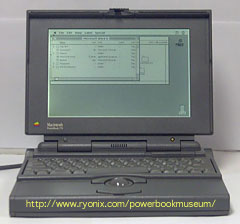 How productive can you be on a PowerBook 170 with just 6 MB of RAM? Although a 25 MHz CPU wasn’t slow in its day, the fact that the CPU also manages the screen and modem makes it about as slow as an LC. Virtual memory, while possible, makes it much, much slower. But with only 6 MB of RAM, how else can you run Eudora Lite, FileMaker Pro, Microsoft Word 5.1a, and AT/Axcess (terminal emulation for an IBM AS/400)?
Daily use shows the system is stable; the user also finds himself far more productive, because RAM Charger lets him keep more applications open at once.
Case Study #4: Power Mac 7600
- A coworker tested RAM Charger 8 on his Power Mac 7600, which is used heavily with Photoshop, Quark XPress, and several other applications. Because several of the programs he uses heavily don’t benefit from RAM Charger, he took it off his system after a two week trial.
Case Study #5: PowerBook 150
My wife uses a PowerBook 150 with 4 MB of RAM. With System 7.5.5 and RAM Doubler (virtual memory is simply too slow on a 68030-based Mac, especially one with a slow laptop hard drive), there was just enough RAM to run ClarisWorks or FileMaker Pro. RAM Charger helps, though she rarely needs to run more than one application at a time.
Her favorite games, Shanghai and Solitaire Royale, run without a hitch.
Case Study #6: Macintosh LC II
My son Brian has an LC II with 10 MB RAM. He uses ClarisWorks for homework – but it seems mostly used to play games. Favorites are Monopoly, SimCity 2000, and Realmz. He doesn’t really need RAM Charger with 10 MB of RAM, but installing it on his LC II shows that it’s stable with games, a type of software I don’t have much time for.
For Christmas we installed a 25 MHz 68040 accelerator in his LC II. Now it does some things faster than my 20 MHz Centris 610! This has not introduced any problems with RAM Charger or any of his programs.
Case Study #7: Macintosh LC
My son Nathaniel has a Macintosh LC with 10 MB RAM and a Sonnet Presto 25 MHz 68040 accelerator. Everything runs fine (mostly games).
Case Study #8: Mac IIfx
In February 1998, I replaced my venerable Mac II with 8 MB of RAM with a Mac IIfx with 16 MB. I moved all the software over (including NetPresenz and Macjordomo), then added EIMS (Eudora Internet Mail Server). This machine is dedicated to serving my personal research web site and several email lists.
The system is as stable as the old Mac II, just sitting there and quietly doing it’s thing.
Conclusion
RAM Charger works seamlessly in most situations, and it keeps track of problems so you can make the necessary adjustments. Recommended!
Other Case Studies
- Mac II, System 7.5.5, 8 MB RAM
- Power Mac 7600, Mac OS 8, 48 MB RAM
Go to the RAM Charger review.
Keywords: #ramcharger
