
Bong! . . . 🙂 . . . Welcome to Macintosh!
Funeral Fit for a Plus
 A few weeks ago, my first ever Mac Plus (one I acquired just a few months ago) died. It was just sitting there, proudly displaying After Dark’s famous Flying Toasters, when the screen went blank and started making a rapid clicking noise.
After a few weeks of trying to find the problem, it turned out to be a part on the analog board that went out, and it took the motherboard with it.
I’d grown quite fond of the Mac Plus. I loved it’s boxy keyboard and boxy mouse.
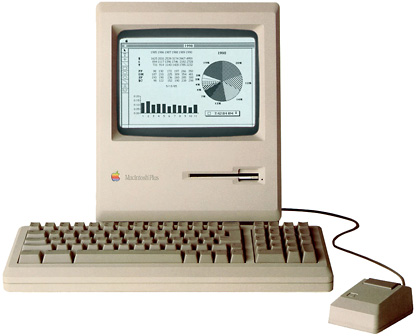 The Mac Plus has a certain charm that other Macs don’t have. I think it’s because it was the last design to use the original Mac case, but it had the expandability that the 128K and 512K lacked.
I have another Plus, but it was still sad to see this one go. I thought the only decent thing to do was to have a funeral for my friend.
On August 28th, we had that funeral.
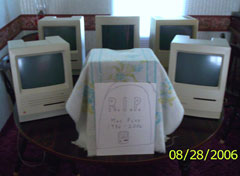 In this picture, you’ll see the other Macs that attended the service. The SE and Classic shown on both sides of the deceased were the honorary pallbearers. In the back, from left to right, you’ll see the Classic II, Color Classic, and the other Plus. It was a sad thing to see. There were nothing but blank screens on their faces.
My iMac isn’t pictured, but he watched the service from across the living room. The Mac that’s covered up is the dead Plus.
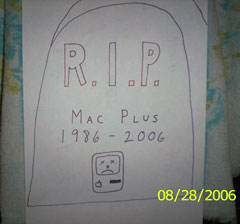 I even made up a grave marker. In the picture, you’ll see a close-up of it.
R.I.P Mac Plus – 1986-2006.
If you’d like to give your condolences, or if you have a story about how you joined the Apple world, please email me at thomas (at) lowendmac (dot) com.
In every Welcome to Macintosh column, I’ll include a new story telling how one reader grew up with Apple, so keep ’em coming!
Recycling and Reusing Old Macs
Which brings me to this week’s story. It comes from Brian C. Bettenhausen. This is a great story, because it shows what all of us can do with older Apple IIs, Macs, and PCs no longer being used:
“When I was in elementary school, which was a private school, we had Apple IIs of various models and kinds. The last year I was there, we just got a bunch of these brand new Apple Macintosh Pluses. They were awesome; I loved them. I went off to Jr. High and didn’t see a computer for 4 years. Then I went to High school, and lo and behold, there were Mac Pluses again. It made me feel for a while that Macintoshes were never upgraded.”
“When I was 13, my parents bought me a PC computer. I remember sitting there staring at it on the floor, trying to figure out why the game didn’t just start when I put the disk in. So I tried what we used to do with the Apple IIs way back when, because this looked like an ‘old’ computer. I put the disk in the drive and rebooted. Hmmm. No luck. So we called a friend of my parents, who started saying all these commands. I thought he was on crack.
“Since that point, I went and purchased a Color Classic in High School to use because of how ClarisWorks just worked. I had a PowerBook Duo 230 for school that worked really well – until a bully was picking on me and I knocked him unconscious with the laptop. The screen had to be replaced; the kid’s parents paid for the repair.
 “After I got done with High School, and thanks to a group I found on the Internet called Freecycle, I obtained hundreds of Macintoshes every year and loaded them up with the most current version of the OS they could run fast and stable. Then I install dozens of educational games and other freeware and office programs, even some abandonware like After Dark (I miss those toasters on my current Windows XP machine).
“I’m also a PC certified technician, Cisco certified, Novel & Microsoft certified. Then, last year, while giving out over 300 computers to local grade school students, one of the teachers offered to pay for me to become a certified Apple technician if I would work for the school helping with IT stuff during the summer. Because of district rules, you had to be Apple certified, as they didn’t want just any idiot doing it.
“Every year I get flooded with emails and phone calls close to Christmas from school teachers in my district and surrounding districts asking about who I am selecting this year for my ‘Secret Santa’. It started in 2001 for my nephew-in-law, who is deaf. I installed a bunch of specialized speech-to-text programs for him so he could take mainstream advanced courses, as he is rather intelligent and his parents got tired of him being in ‘special’ courses.
“The teachers from the program questioned me about what I used, and I provided them with copies of the software for their own use. Then I started getting phone calls from parents who had copies of it – they couldn’t get it to run on their PCs. So I told them they needed a Mac. I offered them copies of the Mac emulator software at the time called Fusion. I made a fully working copy ready to go on CD. I loaded it with everything they would ever need and made it self booting.”
“When I went to install it on most of these machines, I found that because of the money a lot of these parents have to continuously spend on specialized child care, etc., they didn’t have the top of the line PCs needed, and my college was getting rid of all it’s 603e machines. They were getting rid of 700 in total and were going to sell them until I stepped in and asked for them to donate them.
“I created a 501c3 nonprofit just for this. I recruited a bunch of high school kids who needed community service, we pulled a lot of parts from each machine to double up on hard drives, double the RAM, and sell the rest of the parts so that we could buy dial up modems for all these machines, because we assumed worst case scenario. Everyone had a phone, even if they didn’t have DSL or Cable.
“A total of 500 ended up being given for Christmas of 2003, because not only did we have the 700 the school donated to us in the beginning, the high school students who helped also started talking to their respective schools and got a bunch of dead machines we also brought back from the dead.
“In 2004 I started including mainstream students, not just elementary and junior high anymore, but also high school students.”
“Again, I relied on the feedback of the student helpers to fill me in, as well as their teachers. As the students get selected, their respective school is informed that they will be getting a refurbished computer absolutely free, to notify the parents to make arrangements with me. I warranty all machines for one year and even offer to train anyone on how to use it if anything is too complicated for them.
“And Internet access, you may ask? Well, The Junior College has been gracious about providing that for everyone, as long as they don’t need email.
“This year I had not only schools donating their end of life machines, I also had large corporate offices calling me with both their PCs and Macs – to the point where the company I work for has a large 3-car garage full of storage just for my computers. I can now take requests on what machine someone wants: PC or Mac, tower or desktop, even laptops in very rare situations.
“As for my personal computer setup, I’m still on the PC camp for the most part. I have an iMac 20″ Intel that I use for the basics, but I have a dual processor Core 2 Duo machine running a lot of emulators for me, so I can basically copy the entire emulator and spin it off onto whatever computer on the fly before it gets delivered.
“I build a new PC from scratch every 6-9 months. The computer department at my local college selects a student every May to get my old machine. Again, refurbed with a one year warranty. He also has the option of getting a Mac if he likes. I replace mine yearly.”
Short link: https://goo.gl/falKVu
