
I couldn’t believe it – a US$19 USB extended keyboard! At that price, it was worth a try. From the photo (below), it looked like a match for the Apple Extended Keyboard layout, or at least very close.
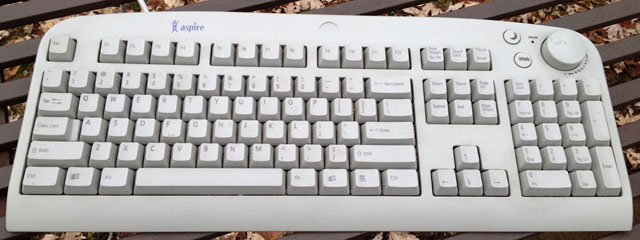
The Aspire keyboard is a nice one. It’s a bit narrower than the Macally iKey I usually use at work. The key layout is almost identical to the Apple Extended (which the iKey mimics perfectly). A few keys have different labels, particularly the ones we know as F13, F14, and F15.
At first glance, the only difference in key layout is that this has a double-sized + key on the numeric keypad – and no = key there. Not a big deal, since I don’t often use the numeric keypad.
A few minor points. The Aspire keyboard has no lights to indicate Caps Lock, Num Lock, or Scroll Lock. And it has no power key for turning on the Mac, so you have to use the power button on the computer. Also, unlike other USB keyboards I’ve used to date, it only has a single USB port, which is on the right side of the keyboard. This isn’t a big deal for right mousers, but it could be a drawback for those who prefer to mouse on the left.
The Aspire keyboard also has a couple neat features: a volume knob and a couple extra buttons. The volume knob doubles as a mute switch when you push it down. The extra buttons are for sleep mode (crescent moon) and web access (it says Web). Unfortunately, the Mac doesn’t recognize the knob or buttons, nor have I been able to locate any drivers that will add that capability. (There’s also a key that seems to have a calculator on it. I’m not sure what that’s for.)
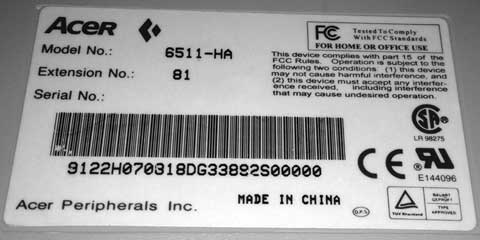
Acer 6511-AH keyboard reviewed here, not to be confused with other Acer Aspire keyboards.
Too bad, because for $19 (shipped!), it’s much nicer than Apple’s current USB keyboard.
For regular typing, it’s excellent. But there’s a fly in the ointment: The Aspire keyboard, like all Windows keyboards, has the Alt key where we expect the Command key and the Windows key where we expect the Alt/Option key.
It’s infuriating.
I’ve searched the web high and low for a driver that would allow remapping those keys to the locations Jobs intended, but the closest I came was MS Natural Driver, which is specifically designed for the Microsoft Natural Keyboard.
I’ve written the author of that program. We’ll see if anything comes of that.
If not for that, I could probably live with the Aspire keyboard. It has a good feel, a good layout, and an excellent price. The 6′ USB cable is great if your computer is on the floor. The slightly smaller size (in comparison to the Apple Extended, iKey, or MicroSpeed keyboards I’m used to) is also a benefit.
I could even live with the fact that the special keys and volume knob are unusable on the Mac. Sooner or later someone’s bound to write a USB driver that can access them and remap the Alt and Windows keys.
But I can’t retrain myself to swap the Command and Option keys.
It’s been suggested I use ResEdit to change that, but then I’d have a problem when I use the iKey or Apple’s USB keyboard. If this were my only keyboard, that would probably be an option. But it isn’t my only keyboard, so I don’t want to go hacking into the OS with ResEdit to change those keys around.
Update: Mac OS X 10.4 Tiger introduced a keyboard option to swap these keys to where Mac users expect them to be.
It’s really a shame Microsoft decided to be so innovative in placing the Windows key between the Alt and Control keys. Apple has been putting the Command key (equivalent to the Windows key) right next to the space bar since 1987 – but Microsoft does love to innovate.
If anyone knows of a program that can swap the Alt and Windows keys, please email me. It would make this $19 keyboard a serious option for Mac owners underwhelmed with Apple’s compact keyboard. (Yeah, the Aspire is beige, but maybe you could paint it….)
Update, December 1999
A great big thank you to Robert Hiller, who posted Using a Windows USB Keyboard on a Mac on ResExcellence. This ResEdit hack swaps the Alt and Windows keys for Cmd and Opt in the Classic Mac OS, letting you use a Windows keyboard as though it was made for the Mac.
- WARNING: Whenever you use ResEdit, be sure to work on a copy of the file you’re modifying – and keep the original on hand for later use.
With Hiller’s hack, I’m very comfortably typing on the Aspire keyboard, using Command keys, and just working the way I would with my Macally keyboard.
Note that because this modifies your System file, when you plug in a Mac keyboard, the Opt and Cmd keys will be backwards. To fix that, just swap in your original copy of the System and restart the computer.
This hack doesn’t just give Mac users an inexpensive alternative to Mac USB keyboards, it also makes it easier to share a USB keyboard between Mac and Windows machines using a MoniSwitchUSB or other KVM switch.
Update: It’s December 2014, and I’m still using this keyboard over 15 years after first publishing this review. I have it connected to my Power Mac G4 running OS X 10.4 Tiger and remapping the Cmd and Opt keys to Mac standard. I’ve definitely gotten my money’s worth out of this keyboard!
Manufacturers and distributors: Interested in having your product reviewed? Please read our review policy.
Keywords: #aceraspirekeyboard
Short link: aspirekeyboardreview
