Low End Mac Reader Specials
TypeStyler For Mac OS X is Now Shipping! Download The Free Fully Functional 60 Day Tryout at www.typestyler.com
OWC: We Make DIY Upgrading Easy! Maximize your Apple MacBook / MacBook Pro. Up to 8.0GB Memory, up to 1.0TB HD & More. Easy Guide + Free, Detailed Installation Videos. Click here
Don't install Parallels to play poker online! Poker Mac will show you how
to download and install a native Mac poker application such as Full
Tilt Poker Mac.
Laptop Hardware Provided by TechRestore - Overnight Mac & iPod Repairs.
Compare products like desktop computers, apple laptops, apple macs, and LCD Monitors side by side! All the information and reviews to make the best purchasing decision for new mobile phones, sat nav systems, or MP3 players. The Ciao online shopping community makes searching products easy for you.
One More Thing
Introduction to Emulation on the Mac
- 2008.01.02
Popularity: ![]()
![]()
![]()
![]()
Bookmark in del.icio.us
Suggest to Slashdot
For years now, our PC brethren have been able to enjoy the simple pleasures of vintage games consoles through a process known as emulation, and article upon article can be found through a Google search relating to how to do this on a Windows machine.
When it comes to emulation on the Mac, for the most part we have it just as good as our virus riddled friends, but there is a dearth of information on the subject.
I have written a series of articles to address that, and playing old and long since abandoned games is one of the many things I love doing on my MacBook.
Due to the sprawling complexity of the emulation scene, I will deal with every aspect of it across a series of articles. This one will serve as an introduction to the wonderful world of console emulation on the Macintosh.
The Mac Has No Games?
"The Mac has no games!" your PC owning friends exclaims with an expression of cutting ridicule. I have to give a hearty "lol" to that statement, because through emulation you can potentially increase the Macs gaming library by thousands of titles.
In this series I will focus on emulation software that was built to run in OS X, as this is the easiest and most efficient way of playing old games on a Mac. There are other more convoluted methods that I will mention here and will discuss in more detail later.
The basics are as follows. To enable playing an old video game on your Mac you need two elements, emulation software and a ROM image file of a specific game. From within the emulator, you locate and load up the ROM image file stored on your hard drive, and from there you should be presented with a window proudly displaying the title screen of the chosen game. To play the game, you can use the keyboard, with the joypad layout of the emulated console mapped to the keys. In some cases the emulator will allow you to connect a USB joypad to provide an even more accurate recreation of playing the console. The steps described here are essentially the same for every emulator, and they all use the same principles.
Copyright
There is a thorny issue with regard to downloading the ROM images themselves. For instance, Nintendo have been known to email websites that host archives containing thousands of NES ROM images. In the eyes of a video game company, downloading a ROM image of Super Mario Bros. 3 is tantamount to stealing the original game from a store.
It took a few years before the wide use of console emulation registered on the radars of game giants like Nintendo, and ironically, as a result of the rise in popularity of console emulation Nintendo now provide a ROM download service for the Wii. The Wii console itself comes equipped with built in emulators for consoles like the MegaDrive, NES, SNES, and N64. Of course, Nintendo want you to pay for the ROM images, and to them its no more than "money for old rope".
The bite is for an old NES game such as the legendary Mario 3, you could end up paying £3 or £4. Quite a lot for a 19-year-old game you could pick up for half that on eBay, and that would be for a real cartridge!
A general rule of thumb is that you can download the ROM files of games you already own the real life versions of, while games you don't own you need to delete after 24 hours. I'm not sure how watertight this would be in a court of law, but it seems reasonable to me. [Editor's note: Strictly speaking, unless you own the game that the ROM file came from or that game has been released to the public, you are violating copyright law if you download ROM images. The 24 hour thing is an urban legend. We do not condone breaking copyright law. dk]
Emulators and Windows
There are other forms of video game emulation on the Mac that involve more modern games that appeared on the PC for both the DOS and Windows platforms. For a long time all but the oldest DOS games were nigh on impossible to play on a Mac. With the PowerPC reigning supreme at Apple for more than a decade, anything Wintel related was isolated from Mac users (or just emulated slowly! Virtual PC anyone?), and this was especially true of the games.
The advent of Intel chips nestling inside Macs has changed this dramatically. Theoretically, if it runs on a Windows PC, there will be some way to run it on an Intel Mac. To do this you would install Windows XP either using Boot Camp or via virtualisation software such as VMWare Fusion. This would cover running new PC games, as well anything that can run under Windows XP, making for a sizable collection of titles spanning many years.
There are certain defunct game consoles that do not have an emulator with an OS X edition. This is true of the original PlayStation, the Dreamcast, Sega CD, and several more obscure systems. With Windows XP in your arsenal, your covered here as well.
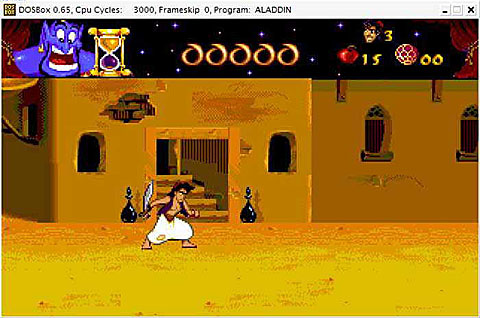
On the subject of playing old DOS games that may not be supported in XP, there is a solution that doesn't require you to leave the comforts of our beloved OS X: its called DOSbox. DOSbox is an MS-DOS emulator designed specifically to run old DOS games not supported in Windows. It's available as a universal binary, meaning you can use it on your PowerPC Mac and still enjoy those formerly PC restricted classics. Performance is better on an Intel Mac due to the fact that DOS ran on x86 processors throughout its lifespan. Its a great way to play Doom 1 & 2, Wolfenstein 3D, Monkey Island, Sensible Soccer, Elite, and many more besides.
That just about covers the current state of vintage game playing on
the Mac. In the next article I will introduce you to the options
available to allow play of old console games within OS X for
popular 8- and 16-bit systems we all loved during our childhood.
Recent One More Thing articles
- The Roots of the Mac OS, 01.12. Mac OS X has long, deep roots going back through the Classic Mac OS, the Lisa Office System, and work at Xerox PARC.
- My experiences with Mac OS X, 12.24. Frustrated with Windows, the author plunged into Mac OS X Panther in 2005, and he's never regretted the switch.
- The roots of the Mac OS, 12.21. Mac OS X has long, deep roots going back through the Classic Mac OS, the Lisa Office System, and work at Xerox PARC.
- My 13 years using Windows, 12.20. It started with Windows 3.1 in 1992 - and ended with frustration at Windows XP in 2005.
- More in the One More Thing index.
Links for the Day
- Mac of the Day: Power Mac G5 Quad, Oct. 2005 - With two 2.5 GHz dual-core G5 CPUs, the G5 Quad was the most powerful PowerPC Mac ever and introduced PCI Express.
- Group of the Day: Mac Network deals with all aspects of Mac networking.
- November 21 in LEM history: 00: OS upgrades, downgrades - AltiVec vs. Pentium III - 01: Saved by the clones - Computer of the future - 02: Apple Education: Let's get to it - 03: Panther lets Macs and PCs work together, - Lombard SCSI bug - 05: 3 survivors from the 1970s - Real world battery life inadequate - Windows to Mac file transfer with Zip disks - $99 alternative to Microsoft Office - 06: Parallels 1.0 far more polished than beta
- Support Low End Mac
Recent Content on Low End Mac
- Apple's Tablet an End Run Beyond Netbooks, Frank Fox, Stop the Noiz, 11.20. Whatever Apple has planned will leverage existing technologies while going beyond what its competitors can offer.
- NASA Chemical Sensor for iPhone, Smartphone Death Match, iPhone Earrings, and More, Ian R Campbell, 11.20. Also mobile phone dangers, new apps, GPS solution for iPod touch, new iPod and iPhone cases, and more.
- Apple #4 in Reliability, Apple Tablet a Gadget for All?, HP's i7 Notebook Outdoes Mac Rivals, and More, The 'Book Review, 11.20. Also Flash 10.1 improves video on Hackintosh netbooks, thin-and-light notebooks impress, Windows XP finally on the way out, and more.
- i5 iMac Benchmarked, Mac mini 'Shouldn't Be Overlooked', Twitter Client for Classic Mac OS, and More, Mac News Review, 11.20. Also why Apple leaves the low end to others, 10.6.2 fixes video playback problem in 27" iMac, 3D Leopard and Snow Leopard performance, and more.
- Replacing the Hard Drive in a Clamshell iBook, John Hatchett, Recycled Computing, 11.19. Yes, it is one of the most difficult Apple notebooks to disassemble and reassemble, but a 10 GB hard drive just will not do.
- IBM Model F: A Great Old Keyboard with an Outdated Layout, Tommy Thomas, Welcome to Macintosh, 11.19. Although it used a different technology than the revered IBM Model M keyboard, the Model F was a great keyboard in its own right.
- Soft Touch Keyboards, Wireless Mouse Options, Loving SeaMonkey 2, and More, Charles W. Moore, Miscellaneous Ramblings, 11.18. Also the future of browsing with PowerPC Macs and the multiple mouse input bug introduced with OS X 10.5.8.
- More links in our archive.
Recent Deals
- Best eMac Deals, 11.18. Used 1 GHz Combo, $100; SuperDrive, $269; 1.25 GHz Combo, $119; SD, $319; 1.42 GHz Combo, $289; SD, $498.
- Best Mac OS X 10.6 and Mac Box Set Deals, 11.18. "Snow Leopard", single user, $25; 5 users, $45; Mac Box Set, single user, $139; 5 users, $180; Server, $414. Shipping included.
- Best Xserve Deals, 11.18. Used 1 GHz dual G4, $649; 2.3 dual G5, $795; 3.0 4-core Xeon, $1,899; refurb 2.26 4-core, $2,499; new, $2,888; refurb 8-core, $2,999; new, $3,449; more.
- Best 15" MacBook Pro Deals, 11.17. Used 1.83 GHz, $750; 2.16, $800; 2.33, $900; refurb 2.4, $1,299; 2.53, $1,449; 2.66, $1,699; 2.8, $1,899; new 2.53, $1,579; 2.66, $1,799; more.
- Best Power Mac G4 and AGP Video Card Deals, 11.17. Used 400 MHz, $50; 933 MHz, $80; 500 dual, $60; 867 dual, $90; 1 GHz dual, $150; 1.25 GHz dual, $225; 1.42 GHz, $499.
- Best Mac OS X 10.5 Deals, 11.17. "Leopard" upgrade, $80; single user license, $135; 5 users, $173; Mac Box Set, 5 users, $230; Server, 10 users, $340; unlimited, $850. Shipping included.
- Best Mac mini Deals, 11.16. Used 1.42 GHz G4 mini, $379; 1.66 GHz Core Solo, $419; 2.0 Core 2, $450; new 2.26 GHz nVidia, $580; 2.53 GHz, $769; Server, $990.
- Best iBook G4 Deals, 11.16. Used 12" 1.07 GHz Combo, $210; 1.33 GHz, $298; 14" 1.33 GHz, $398; 1.42 GHz, $479; SuperDrive, $498.
- Best iPod shuffle Deals, 11.16. Used 1 GB, $35; 4 GB, $65; refurb 1 GB, $39; 2 GB, $59; new 2 GB, $55, 4 GB, $75. New and refurb prices include shipping.
- More deals in our archive.
About LEM | Support | Usage | Privacy | Contacts
Navigation
Used Mac Dealers
Apple History
Video Cards
Email Lists
Favorite Sites
MacSurfer
MacMinute
MacInTouch
MyAppleMenu
InfoMac
Macs Only!
The Mac Observer
Accelerate Your Mac
RetroMacCast
PB Central
MacWindows
The Vintage Mac
Museum
DealMac
DealsOnTheWeb
Mac2Sell
ramseeker
Mac Driver Museum
JAG's House
System
6 Heaven
System 7 Today
the pickle's Low-End
Mac FAQ
Abandonware
Petition
Mac vs. PC Info
Affiliates
The Apple
Store
Mac
Connection
B&H
MacMall
TechRestore
ExperCom
Crucial
Memory
batteries.com
Advertise
MacMinute
MacInTouch
MyAppleMenu
InfoMac
Macs Only!
The Mac Observer
Accelerate Your Mac
RetroMacCast
PB Central
MacWindows
The Vintage Mac
Museum
DealMac
DealsOnTheWeb
Mac2Sell
ramseeker
Mac Driver Museum
JAG's House
System 6 Heaven
System 7 Today
the pickle's Low-End
Mac FAQ
Abandonware
Petition
Mac vs. PC Info
Mac Connection
B&H
MacMall
TechRestore
ExperCom
Crucial Memory
batteries.com