
For months now, the Beige Power Mac G3 has been the most popular profile on Low End Mac, indicating to us that it’s the hottest low-end Mac out there. We recently rated it a Low End Mac Best Buy – but with reservations if you plan to run Mac OS X.
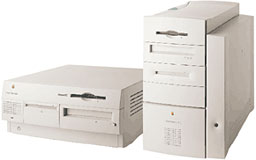 We picked up a beige 266 MHz Beige Power Mac G3 in January 2002 as our testbed machine for learning Mac OS X – and seeing how well (or poorly) OS X does on a slower, older Mac with poorly supported graphics acceleration.
Before doing that, we wanted to run the usual benchmarks. The CPU runs at 267.28 MHz with a 512 KB level 2 (L2) cache running at half that speed and a 66.82 MHz system bus, half as fast as the L2 cache. The computer has 288 MB of RAM installed. The installed hard drive is a Quantum Fireball SE 4.3A.
This is by far the most comprehensive set of benchmarks we’ve published yet, ranging from Mac OS 8.1 through 9.2.2 and covering various disk cache sizes with virtual memory on and off to see which settings provide the best performance.
Speedometer 3.06
The system was tested on 2002.01.21 using a full install of Mac OS 8.1. The computer was attached to a 12″ mono monitor and tested in 8-bit video mode at 640 x 480 resolution. Results are relative to a Mac SE or Classic, which rates 1.0. Numbers are rounded off to one or two decimal places.
Keep in mind that Speedometer 3.06 is written for the old 68K Macs and runs in emulation on Power Macs.
The first set of numbers compares performance at different cache settings with virtual memory disabled.
cache     CPU  graphics disk   math
 96 KB   134.8   51.4   8.87   637.9
128 KB   134.8   51.4   9.14   637.9
256 KB   134.8   52.7   9.14   637.9
512 KB   134.8   52.1   9.14   638.5
The cache setting should have little influence on non-disk tests, which these numbers bear out. With this particular setup, cache size makes only a small difference in performance – even disk performance beyond the 128 KB mark. At least as far as Speedometer 3 is concerned, a 256 KB or 512 KB disk cache seems optimal under OS 8.1.
There are several claims about virtual memory (VM). One is that setting VM to 1 MB more than physical RAM (in this case, setting it to 289 MB) provides the best balance of speed and efficient memory use. Others claim the best results come when VM is set to a multiple of 32 MB. Still others, that making VM double installed RAM is best.
The following results are for VM off, on at 289 MB, on at 320 MB, and on at 576 MB, all using a 256 KB disk cache.
test      CPU  graphics disk   math
 off     134.8   52.7   9.14   637.9
289 MB   134.8   51.4   9.03   637.6
320 MB   125.1   51.4   9.25   637.1
576 MB   125.1   49.5   9.03   635.0
These figures give some credence to the argument that some VM settings are better than others. The graphics score takes a reduction with VM enabled, and the CPU score drops 7% at the 320 MB setting, while the disk score is better at 320 MB with VM on than with VM set to 1 MB above RAM. Going to 576 MB VM reduced everything except the CPU score. Best overall results with Speedometer 3 and OS 8.1 are with VM disabled.
We next updated the Beige G3 to Mac OS 9.0, turned off virtual memory, restored the disk cache to 256 KB, ran Norton Utilities and Speed Disk on the drive, and began our next round of OS benchmarks, using various versions of OS 9.x as well as testing with VM on (at 320 MB) and with the default (a massive 8 MB) disk cache. Here are our results:
OS/cache       CPU     gr.   disk   math      OS/cache         CPU    gr.    disk   math
OS 8.1/256    134.8   51.4   8.87   637.9     OS 8.1/256VM    125.1   51.4   9.25   637.1
OS 9.0/256    134.8   50.8   9.25   637.1     OS 9.0/256VM    125.1   50.8   9.48   636.2
OS 9.0/def    134.8   50.7  12.04   637.1     OS 9.0/defVM    125.1   48.9  11.67   636.7
OS 9.1/256    134.8   51.4   9.19   631.0     OS 9.1/256VM    125.1   50.8   9.54   630.1
OS 9.1/def    134.8   51.4  11.76   631.5     OS 9.1/defVM    125.1   51.4  11.85   630.1
OS 9.2.2/256  125.1   51.4   9.14   633.3     OS 9.2.2/256VM  125.1   50.1   9.36   631.9
OS 9.2.2/def  134.8   50.7  11.76   631.5     OS 9.2.2/defVM  125.1   48.9  11.49   631.9
This Mac performs as well on the disk benchmark without VM on OS 9.0 as it did on 8.1 with VM on – and sees still better disk performance when VM is enabled. The default 8 MB disk cache under OS 8.5 and later really boosts disk performance. Under 9.0, overall best disk performance comes with the default cache and VM off.
Moving from 9.0 to 9.1, we regain the graphics performance lost going from 8.1 to 9.0, although math performance drops about 1%. Upgrading to Mac OS 9.2.2 surprisingly drops the CPU score without VM to match that with VM enabled – I retested to make sure it wasn’t a fluke.
Next we go full circle and test the various disk cache and VM settings under Mac OS 9.2.2. The first set of tests is run with VM off.
cache     CPU  graphics  disk    math
128 KB   134.8   50.7    9.42   633.3
256 KB   125.1   51.4    9.14   633.3
512 KB   134.8   51.4    9.25   631.0
default  134.8   51.4   10.40   630.7
The low CPU score at 256 KB seems spurious, but repeated tests confirm the result. Looking at all the results here, the edge goes to the default 8 MB disk cache for top graphics, disk, and CPU scores.
This set of test compares performance with a 256 KB disk cache and various virtual memory settings.
test      CPU  graphics  disk   math
 off     125.1   51.4    9.14   633.3
289 MB   134.8   50.1    9.08   632.4
320 MB   125.1   50.1    9.36   631.9
576 MB   134.8   50.1    8.43   632.4
All things considered, we’d give VM off a small edge here. It has the best score in two benchmarks and takes second place for disk performance. Overall, though, results are quite close except for the 8.43 disk score with VM set at 576 MB.
Based on these two sets of results, we can expect the best overall performance with VM disabled and the default cache, but which VM setting will provide the best overall results with an 8 MB disk cache?
test      CPU  graphics  disk   math
 off     134.8   51.4   10.40   630.7
289 MB   134.8   51.4   10.40   631.0
320 MB   134.8   51.4   11.67   629.8
576 MB   134.8   51.4   11.49   632.4
If you are going to use virtual memory under Mac OS 9.2.2, you’ll get the best overall results by setting VM to the next multiple of 32 greater than the amount of physical RAM installed in your computer. Your next best bet is to set VM at twice physical RAM.
Speedometer 4.02
The system was tested on 2002.01.21 under a full install of Mac OS 8.1. The computer was attached to a 12″ mono monitor and tested in 8-bit video mode at 640 x 480 resolution. Results are relative to a Quadra 605, which rates 1.0. Numbers are rounded off to one or two decimal places.
The first set of numbers compares performance at different cache settings. (Because Power Macs don’t support 1-, 2-, or 4-bit video, Speedometer 4 was unable to test the graphics.) Virtual memory was disabled for these tests.
cache    CPU  graphics disk    math
 96 KB  21.05   n/a    3.46   746.2
128 KB  21.05   n/a    3.53   745.6
256 KB  21.05   n/a    3.54   745.5
512 KB  21.04   n/a    3.55   745.3
The cache setting should have little influence on non-disk tests, which these numbers bear out. As above, with this particular setup, cache size makes no significant difference, except that the disk score is a bit lower with a 96 KB cache. As with Speedometer 3, we’d call a 256 KB or 512 KB disk cache optimal under Mac OS 8.1.
There are several claims about virtual memory. One is that setting VM to 1 MB more than physical RAM (in this case, to 289 MB) provides the best balance of speed and efficient memory use. Others claim the best results come when VM is set to a multiple of 32 MB. Still others, that making VM double installed RAM is best.
The following results are for VM off, on at 289 MB, on at 320 MB, and on at 576 MB using a 256 KB disk cache.
test     CPU  graphics disk    math
 off    21.05   n/a    3.54   745.5
289 MB  21.03   n/a    3.57   745.0
320 MB  21.04   n/a    4.72   745.5
576 MB  21.02   n/a    3.56   744.6
These figures give some credence to the argument that some VM settings are better than others. While Speedometer 4 measures an insignificant difference between no VM and VM set at 289 MB, changing that setting to 320 MB dramatically boosts the disk score by one-third! However, all three tests were lower at the 576 MB setting. Because of the significantly improved disk score at 320 MB, we’d call that the best setting for OS 8.1 and Speedometer 4.
We next updated the Beige G3 to Mac OS 9.0, turned off virtual memory, restored the disk cache to 256 KB, ran Norton Utilities and Speed Disk on the drive, and began our OS benchmarks. Here are our results:
OS/cache       CPU    disk    math    OS/cache         CPU    disk    math
OS 8.1/256    21.05   3.54   745.5    OS 8.1/256      21.04   4.72   745.5
OS 9.0/256    21.03   3.55   745.2    OS 9.0/256VM    21.00   3.71   743.7
OS 9.0/def    21.03   4.59   744.7    OS 9.0/defVM    20.99   4.56   743.2
OS 9.1/256    20.95   3.54   741.9    OS 9.1/256VM    20.91   3.77   743.2
OS 9.1/def    20.95   4.61   742.1    OS 9.1/defVM    20.92   4.57   741.2
OS 9.2.2/256  21.03   3.47   745.2    OS 9.2.2/256VM  20.99   3.60   743.7
OS 9.2.2/def  21.03   4.51   745.4    OS 9.2.2/defVM  20.99   4.49   743.3
Where OS 8.0 saw a 33% boost in hard drive performance with VM enabled, OS 9.0 saw a much smaller 4.5% improvement at the same 256 KB setting. Under Speedometer 4, there is virtually no difference between the disk scores when using the default 8 MB disk cache.
There is a very small drop in CPU and math performance (0.4%) going to OS 9.1; it’s certainly nothing you’d ever notice.
Next we go full circle and test the various disk cache and VM settings under Mac OS 9.2.2. This group of results shows the effect of the disk cache with VM off.
cache     CPU  graphics disk    math
128 KB   21.03   n/a    3.61   744.3
256 KB   21.03   n/a    3.47   745.2
512 KB   21.02   n/a    3.53   744.8
default  21.04   n/a    4.09   744.5
Speedometer 4 doesn’t find a significant difference in CPU or math scores whether the disk cache is big or small, so we’ll give the win to the 8 MB default cache setting because of the better disk score.
The next group of benchmarks measures performance with a 256 KB disk cache and various VM settings.
test     CPU  graphics disk    math
 off    21.03   n/a    3.47   745.2
289 MB  21.00   n/a    3.47   743.9
320 MB  20.99   n/a    3.60   743.7
576 MB  20.99   n/a    4.47   743.1
Speedometer 4 finds an insignificant difference among CPU and math scores under Mac OS 9.2.2, so we’d have to give the nod to VM set at 576 MB because of the significantly better disk score.
Based on these two sets of results, we can expect the best overall performance with VM disabled and the default cache, but which VM setting will provide the best overall results with an 8 MB disk cache?
test     CPU  graphics disk    math
 off    21.04   n/a    4.09   744.5
289 MB  20.99   n/a    4.08   743.3
320 MB  21.00   n/a    4.54   743.4
576 MB  20.99   n/a    4.49   743.2
If you are going to use virtual memory under Mac OS 9.2.2, your optimal setting will be the next multiple of 32 greater than the amount of physical RAM installed, although that barely edges out double physical RAM as far as Speedometer 4 is concerned.
MacBench 5
The system was tested on 2002.01.21 using a normal installation of Mac OS 8.1. The computer was attached to a 12″ mono monitor and tested in 8-bit video mode at 640 x 480 resolution. The disk cache was set to 256 KB for all tests. Results are relative to a 300 MHz Beige Power Mac G3, which scores 1000.
Virtual memory was turned off. Graphics tests could not be run on this setup, since the monitor does not support 800 x 600.
test      CPU    math    disk
 96 KB    829     893     387
128 KB    831     893     646
256 KB    833     893     646
512 KB    829     893     731
  1 MB    831     893     731
Unlike the Speedometer tests, where a 128 KB cache was just 2-3% faster than a 96 KB cache, that seemingly small change made a 67% improvement under MacBench 5. Growing the cache beyond 256 KB also improved performance under MacBench 5, which uses a larger test file than either version of Speedometer. For MacBench 5 and Mac OS 8.1, a 512 KB or 1 MB disk cache seems to provide the best overall results.
There are several claims about virtual memory. One is that setting VM to 1 MB more than physical RAM (in this case, to 289 MB) provides the best balance of speed and efficient memory use. Others claim the best results come when VM is set to a multiple of 32 MB. Still others, that making VM double installed RAM is best.
The following results are for VM off, on at 289 MB, on at 320 MB, and on at 576 MB using a 256K disk cache.
test      CPU    math    disk
 off      833     893     646
289 MB    777     890     624
320 MB    777     890     619
576 MB    781     892     625
MacBench 5 finds a measurable (7%) reduction in CPU performance with VM enabled in OS 8.1, along with a small (3%) decrease in drive performance, and no significant change in math performance (well under 1%). Although some claim disk performance improves when VM is used, MacBench 5 belies that claim. Among these settings, running with VM off seems optimal for MacBench 5 and Mac OS 8.1.
We next updated the Beige G3 to Mac OS 9.0, turned off virtual memory, restored the disk cache to 256 KB, ran Norton Utilities and Speed Disk on the drive, and began our OS benchmarks. Here are our results:
OS/cache      CPU   math   disk     OS/cache        CPU   math   disk
OS 8.1/256    833    893    646     OS 8.1/256VM    777    890    619
OS 9.0/256    831    890    630     OS 9.0/256VM    805    889    630
OS 9.0/def    830    890    990     OS 9.0/defVM    801    890    995
OS 9.1/256    820    886    630     OS 9.1/256VM    799    886    630
OS 9.1/def    817    886    999     OS 9.1/defVM    787    885    995
OS 9.2.2/256  828    890    622     OS 9.2.2/256VM  804    884    603
OS 9.2.2/def  830    890    984     OS 9.2.2/defVM  804    884   1000
Perhaps the biggest improvement in OS 9.0 is the 3% higher CPU score when VM is enabled, showing an improvement in the underlying VM mechanism. Curiously, we see a 3-4% drop in the CPU benchmark going from 9.0 to 9.1 but almost no change (under 0.5%) in the math score.
Next we go full circle and test the various disk cache and VM settings under Mac OS 9.2.2. The following tests were run with VM off and various disk cache sizes.
test       CPU    math    disk
128 KB     829     889     549
256 KB     833     893     646
512 KB     831     891     706
  1 MB     830     890     826
default    828     890     946
As before, the best CPU score was obtained with a 256 KB disk cache, although the range of CPU scores is very tight (about 0.6%), as is the range of math scores. All things considered, the best overall performance goes to the setting with the best disk score, and a larger cache always provides a better drive score.
This set of results was obtained with a 256 KB disk cache and various VM settings.
test       CPU    math    disk
 off       833     893     646
289 MB     803     884     598
320 MB     777     890     619
576 MB     801     884     625
Looking over these results, we find that MacBench 5.0 has the best overall scores with VM disabled.
Based on these two sets of results, we can expect the best overall performance with VM disabled and the default cache, but which VM setting will provide the best overall results with an 8 MB disk cache?
test       CPU    math    disk
 off       828     890     946
289 MB     800     884     946
320 MB     803     884     972
576 MB     800     884     977
If you are going to use virtual memory under Mac OS 9.2.2, these tests indicate that you’ll achieve the best results by setting VM at the next multiple of 32 higher than the amount of physical RAM installed in your Mac or double the amount of physical RAM installed – it’s pretty much a toss-up this time around.
Conclusion
Each benchmark works differently, but these tests indicate that the disk cache should be set to at least 128 KB for decent results and 512 KB for better ones. As for virtual memory, the results are a mixed bag. We have turned conventional wisdom on its head – setting VM to 1 MB over installed RAM and to twice installed RAM are both generally inferior to using a VM setting that is the next multiple of 32 higher than your installed RAM under Mac OS 8.1.
Looking at all the results under OS 9.2.2, using the “next multiple of 32” again provides the best overall VM performance, followed closely by setting VM at twice physical RAM. The old advice to set VM to 1 MB beyond physical RAM only applies if scratch space on your hard drive is extremely limited. Whenever possible, set VM to a multiple of 32 MB.
In the end, if you can run with virtual memory disabled, you may lose some efficiency in the use of available RAM, but you will more than make up for it with the best performance your Mac can manage. Buying enough memory so you can avoid using VM is the best way to squeeze the most performance out of your Mac.
Keywords: #beigeg3
searchword: beigeg3benchmarks
