
The end of the Classic line in the North American market, the Color Classic (a.k.a. Performa 250) shared the motherboard design of the LC II – equally limited in RAM expansion, constricted by a 16-bit data bus, and able to use 16-bit PDS cards designed for the LC. The only significant difference is the presence of a socket for adding a 68882 math coprocessor.
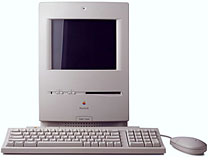 The Color Classic’s claim to fame is a tiny, remarkably crisp 10″ (9″ viewable) 512 x 384 pixel color monitor – and Apple IIe emulation using a PDS card. (The 512 x 384 pixel display matched the format of the 12″ monitor designed for the LC and LC II, which accepted the same Apple II card.)
“In many ways, the Color Classic is the compact Mac everyone’s been waiting for since, well, since 1984.” (MacUser, April 1993)
Nice as it was to have color, the pedestrian performance due to the 16-bit motherboard earns the Color Classic the Compromised Mac label. Yet despite poky performance, the Color Classic is a perennial favorite: it’s cute, and with some surgery it can support 640 x 480 on the internal display. (The Colour Classic II, with a 33 MHz CPU on a 32-bit bus and room for 36 MB of RAM, is what the Color Classic should have been. Since the CCII and Performa/LC 550 share the same motherboard, you can easily upgrade your Color Classic to Colour Classic II levels with a 550 motherboard.)
The Color Classic had an internal microphone above the screen and a readily accessible motherboard: just open the rear panel and slide out the board for upgrades. You can control volume and contrast using controls on the front of the computer – no need to open control panels.
Unlike other compact Macs, the Color Classic can be shut down with the power key on the keyboard. The Color Classic is also turned on with the keyboard power key.
The Color Classic was the first Mac with a built-in color monitor, although the unusual 512 x 384 pixel format size meant many games would not run properly, if at all. However, it is possible to hack the circuitry to support 640 x 480 or add a video card that allows use of a larger external monitor. (This was the first compact Mac since the SE/30 to offer an expansion slot.)
- Got Mac? If it’s a Color Classic or Colour Classic II, original or modified, please consider joining our Color Classic group on Facebook.
Details
- Performa 250 introduced 1993.02.01; discontinued 1994.05.01
- Color Classic introduced 1993.02.10 at $1,390; discontinued 1994.05.16
- code name: Slice
- Gestalt ID: 49
- model no.: M1600
- upgrade path: no official upgrade path, although some have successfully installed 550 and 575motherboards
Mac OS
- requires System 7.1 (with System Enabler 401) to 7.6.1
- addressing: 24-bit or 32-bit
Core System
- CPU: 16 MHz 68030
- FPU: 68882 (optional)
- Performance: 1.7, relative to SE; 0.25, Speedometer 4; 3.9 MIPS
for more details, see benchmark page - ROM: 1 MB
- RAM: 4 MB, expandable to 10 MB using two 100ns 30-pin SIMMs
Performance
- 0.25, Speedometer 4
- see Benchmarks: Mac Color Classic for more details
Graphics
- VRAM: 256 KB, expandable to 512 KB for 16-bit color, stock VRAM supports 4-bit/16-color mode on Color Classic hacked to support 640 x 480 (8-bit color with VRAM upgrade)
- VRAM: accepts one 100ns VRAM SIMM, 256 KB standard, can be upgraded with single 512 KB VRAM SIMM, other specs unknown, VRAM SIMM appears to be specific to early Macs
- 10″ color screen, 512 x 384 pixels
Drives
- floppy drive: 1.4 MB double-sided
- Hard drive: 40, 80, or 160 MB
Expansion
- ADB ports: 2
- serial ports: 2 DIN-8 RS-422 ports on back of computer
- SCSI ports: DB-25 connector on back of computer
- expansion slot: LC PDS slot
Physical
- size (HxWxD): 14.5″ x 9.9″ x 12.6″
- Weight: 22.5 lbs.
- PRAM battery: 3.6V half-AA most common, although some use 4.5V Rayovac 840
- power supply: 100W
Accelerators & Upgrades
- Extreme Systems Impact ‘030 (32 MHz 68030)
- MicroMac Thunder (32 MHz 68030), optional 16 MHz 68881 FPU
- MicroMac Thunder Cache (32 MHz 68030), 32 KB cache, optional 32 MHz 68882 FPU
- MicroMac ThunderPro (32 MHz 68030), optional 32 MHz 68882 FPU
- MicroMac ThunderCache Pro (32 MHz or 50 MHz 68030), optional 68882 FPU
- MicroMac 640 x 480 video upgrade
- Sonnet Technologies Presto 040 LC (25 MHz 68040 or 68LC040), incompatible with extra VRAM, discontinued
- Sonnet Presto Plus (33 MHz 68LC040 or 68040, Ethernet, and 32 MB additional RAM)
- Colour Classic II (rare) or LC 550 motherboard (33 MHz 68030), although port cover will no longer fit after installing LC 550 motherboard
Cautions
- Serial port normally restricted to 57.6 kbps; throughput with a 56k modem may be limited. See 56k modem page. For more information on Mac serial ports, read Macintosh Serial Throughput.
Keyword: #colorclassic #performa250
Short link: http://goo.gl/lBxqLX
searchword: colorclassic
Online Resources






