
Because the original Macintosh had a new operating system, software companies had to rewrite their programs or develop new software to work with the Mac operating system and take advantage of the mouse and the powerful graphical user interface (GUI) that the Mac OS provided. This meant there was a relatively small amount of software available for the Macintosh when it was first released.
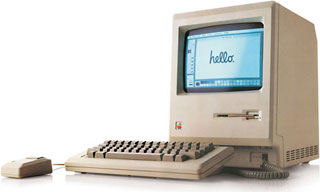
Apple wanted people to be able to use their Macs right out of the box. Since the Macintosh was geared towards the average consumer, Apple needed to provide a way to allow its customers to accomplish useful tasks on their Macs. This led Apple to bundle MacWrite and MacPaint with their computers for several years.
What you may not know is that MacWrite introduced several new GUI features that are now common in every respected word processor.

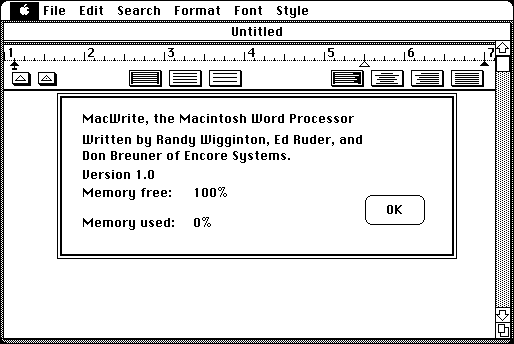
The toolbar in MacWrite 1.0.
Like any modern word processor, MacWrite features a toolbar. It has two buttons for setting indentations within the onscreen ruler. There are also three buttons for adjusting spacing between lines. Lastly, there are four buttons for adjusting paragraph alignment.

The toolbar in Microsoft Word 5.1a.
Take a look at the toolbar in your favorite word processor. You’ll notice that most or all of the buttons present in MacWrite are also present in your favorite word processor’s default toolbar. If you happen to use AppleWorks or ClarisWorks, you’ll notice that your toolbar is similar to MacWrite’s.

The toolbar in AppleWorks 6.2.9.
Many text-based word processors – that is, ones without graphical interfaces – featured an onscreen ruler. A series of keyboard commands was used to set tabs and indentation marks on this ruler.
MacWrite took this concept one step further. Instead of using the keyboard to set indentation, the user could click on the indentation triangle in the toolbar and drag it to the desired location on the ruler. A triangle could be removed by just dragging it off the ruler. Utter simplicity!

The Find dialog box in MacWrite 1.0.
MacWrite featured a Find command to make finding a specific string of characters (a word or phrase) easy. The Change command can be used to search for a specific character string and automatically change it to whatever the user typed into the “Change to” box.
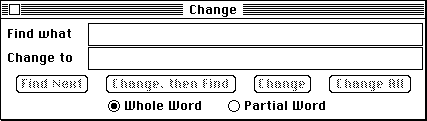
The Change dialog box in MacWrite 1.0.
The Insert Ruler command under the Format menu allows the user to insert a new ruler anywhere in the document. Margin, spacing, and justification adjustments made on the new ruler only affect the text below it.
The Show Header and Show Footer commands allow the user to customize the header and footer that will appear on every page except for the title page. (The page marked as the title page doesn’t contain the header and footer.) The three small icons at the top of the header and footer window can be dragged into the text body to insert the page number, date, and time.
The Set Page # command allows the user to change the page number of a specific page.
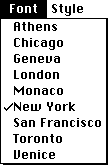
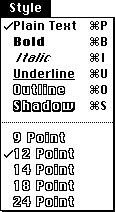 MacWrite includes nine fonts and six different text styles. Font sizes range from 9 points to 24 points. The outlined font size within the menu shows you what sizes of that font are installed on the Mac and will look best onscreen.
Even though MacWrite 1.0 was powerful (for its time) and created a template for all future GUI word processors, it lacked some features that we take for granted today, such as spell check and the ability to import graphics.
Next time we’ll look at MacPaint, the first paint program for the Mac.
Further Reading
Keywords: #macwrite1
Short link: http://goo.gl/s5hwHi
searchword: macwrite1
