
Text processing is the least glamorous aspect of design work – and probably the most important. This week, The Low End Designer looks at some alternatives to Microsoft Word, the 800-pound gorilla of the document processing market – and perhaps deservedly so.
 Word is a serious contender and has defined the entire text processing market for years. However, that doesn’t mean that it’s the only option.
Many years ago I ran into a problem with Word. Little did I know that it was “the Microsoft Way.” I had typed out a lengthy essay for my philosophy A-Level examination using a borrowed 286 Tandy laptop. The word processor was WordPerfect for Windows, and it was fine. I had no access to a printer, so I brought a floppy into school. We were a Mac-based school, so reading PC disks was no problem.
Getting Word for Mac to open a WordPerfect file was. In fact, as I later discovered, getting Word for Windows to open a WordPerfect file was nigh on impossible. It was at that point that I decide I would rather not use Microsoft Word, and I have done my best to stick to that decision ever since – but that’s just me.
Get Typing
If you’ve followed our advice, you may have an elderly Mac reserved solely for text work, perhaps with Microsoft Word 5.1a running on it. If you haven’t, then you’re probably looking at Microsoft Office. This article is not intended to put you off from purchasing Office – if you need all of those apps, go right ahead, but if you’re just looking for a word processor, there are cheaper and better options.
Let’s have a look at just twelve of them.
Publisher’s note: Bear in mind that this is a 2004 article. At least three of the suggested word processing apps have since been discontinued.
AppleWorks [discontinued]
If you own a consumer Mac, AppleWorks is free. In that sense it can’t be beat. Back in the days when it was called ClarisWorks, this was the best word processor for the Mac, but in time it was overtaken by competitors such as Nisus Writer and Microsoft Word.
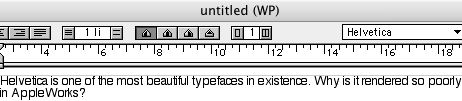
Helvetica rendered in AppleWorks
AppleWorks is a good, solid word-processor, and if it wasn’t for its poor text rendering (above), I would recommend it above all others. A good piece of advice for Apple would be to rip out the heart of the program and slap in TextEdit’s engine. I am sure that the AppleWorks development team could do this with a month or two of work.
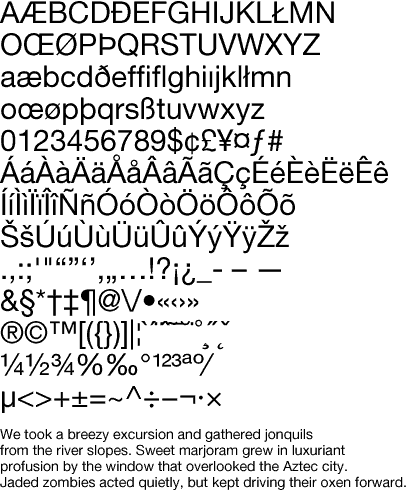
What Helvetica should look like.
Worth noting is that the vector-drawing module is actually a reasonable frame-based layout application, a bit like a baby Quark XPress. If you’re a user of the classic Mac OS, I would advise steering clear of this, as many printers won’t take your output, but with OS X’s native PDF support you can make files in any app.

Helvetica rendered in Word
Final Draft, $229
Final Draft is of no interest to the low-end designer, but not because it’s a poor product. Far from it, Final Draft is excellent. It’s just that it is such a specialized package that using it for general text handling would be nonsensical. Final Draft is designed for screenwriters, so if that’s your bag, by all means have a look.
Letter Star Pro [discontinued]
Again, another specialized program, Letter Star (formerly LetterWorks) is for serious letter writers. Irrelevant to our needs, Letter Star is still a capable product. A watermarked demo is available for download, so have a look.
Mariner Write, $69.95
PDFCompress? MLayout? I admit it, I have a soft spot for smaller software developers. The thing is, I still apply the same critical criteria to the output of small companies as I would to those from the Apples, Adobes, and Microsofts of this world. That’s why it’s so gratifying when a small software house develops something that’s as good as – or even better than – the big boys’ efforts.
Currently at version 3.6.3, Mariner Write is such an application. One big advantage for designers is that it incorporates some features for getting rid of text styling, a task which is often performed in standalone apps like TextSoap.
Mellel, $29
Does Microsoft hate foreigners? I doubt it. The color of their money is the same as anyone else’s, but it does strike this reviewer as odd that the flagship word processor for the Mac has such terrible support for non-Roman alphabets. If you want to write in Arabic, Hebrew, Yiddish, Greek, Chinese, Japanese, Russian, Korean, Coptic, or Persian, Word is either a poor choice – or not even an option.
If you’re interests are in using any of these languages and alphabets, whether they’re your day-to-day language or just because, like me, you’ve become obsessed with the Serbo-Croat language or Yiddish songs like Bei Mir Bist Du Schayn, Mellel would be an excellent option.
Mellel is clearly a labor of love – why else would it support ancient languages such as Etruscan? Such languages are likely to be poured over by academics, and as such Mellel has good support for footnotes and endnotes, styles, tables, and content lists.
Despite all of this heavy duty material, Mellel makes an excellent general purpose word processor, and at a mere $29 it’s hard to see how you could go wrong. A demo is available for download from the developer’s site.
RedleX, the developers behind Mellel, use a manual typewriter as their logo. Considering the astounding support for different alphabets, I personally think that a Linotype machine would be a better choice, but that’s another story.
Nisus Writer Express, $59.95
The best word processor on the Mac, bar none? Probably. There’s not much doubt that Nisus Writer was the best word processor for the classic Mac OS. Does Nisus Writer Express for OS X live up to expectations?
Yes, but only now. Considering that Nisus Writer was popular in the academic community, it was surprising that version 1 for Mac OS X didn’t support footnotes and endnotes. Version 2 has corrected this omission.
Text rendering is beautiful – unsurprising. really, as it uses Mac OS X’s native text engine.
Nisus is a great word processor, and now that it has footnote and endnote capabilities again, it’s the pick of the crop.
OpenOffice Writer, Free
Bzzt. Next. There’s nothing specifically wrong with OpenOffice Writer. On Linux and Solaris, it’s the most fully featured word processor, but on the Mac it’s a poor, hillbilly cousin to Word. It’s powerful, but it’s ugly and has a surfeit of digits on one of its hands.
In short: a clunky Windows-like interface; bloated, slow, non-antialiased text; and it requires you to install the Unix X-Window system (X11) in order to use it.
Avoid this unless you have a specific reason for running it, such as having it on Linux and wanting a familiar program on the Mac or being a masochistic Unix propeller-head.
When it runs without X11, we’ll come back and give it a second chance.
SendStory [discontinued]
Another specialized app. It’s interesting to note that so many specialized text processors are available for the Mac. Clearly software companies are wary of taking on the Microsoft behemoth by releasing competing “all-things-to-all-people” applications and are instead developing specialist programs which do one thing – and do it well.
Developed by Softmagic, the company behind MLayout, SendStory is an XML text editor specifically designed for publishing workflows. It is network aware and can be used to manage stories locally on your own computer’s hard drive or use Apple’s iDisk. A dedicated SendStory Server can also be set up for collaborative among writers and editors regardless of geographical location.
Its fey features are:
- Creates XML-tagged content in an easy-to-use, intuitive user interface
- Designs DTDs
- Indexes and manages stories
- Integrates seamlessly with either file-system or DB-based content management systems
- Integrates seamlessly with Apple’s iDisk for collaboration among Mac users
- Integrates seamlessly with Web templates created by third-party applications for online publishing
- Supports multiple languages
- Supports Unicode
- Imports RTF
- Generates “Apple Help Files”
If this is what you need, you’ll already know, and it’s a very good application. If you aren’t sure, have a look at it, but designers working on their own may find it overpowered and peculiar.
TextEdit, Free
What the hell is TextEdit doing here? Well, it’s free, which is always a bonus. Secondly, despite its unprepossessing look and feel, it is no SimpleText. TextEdit, thanks to Mac OS X’s built-in orthographic tools, is a full featured word processor.
Well, almost.
Okay, it isn’t going to replace Word any time soon, but then again most designers hate Word. It’s blubbery files include all sorts of extraneous data wholly unnecessary for the design process.
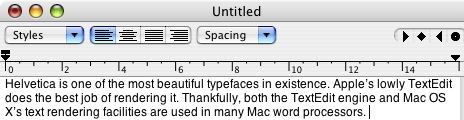
Helvetica rendered in TetEdit
The best bit is that TextEdit can open Microsoft Word files. Imagine that, Apple’s text utility can open files that have remained a mystery to some of the best word processors on both the Mac and PC. It even does a better job of retaining formatting than OpenOffice.
Kiss Word’s bloated corpse good-bye forever!
Thinkfree Write, $49.95
Java! Run away!
No, not really. While Thinkfree Write was written in Java, it doesn’t have the fetid stench of failure that clings to so many Java applications. (LimeWire anyone?)
Thinkfree Office isn’t free. Rather, it’s a one-year subscription based product costing $49.95 for the first year. After that period your subscription expires
The word processor, Write, is fine, if a little Windows-like in terms of interface, but it’s hard to see a compelling reason for ponying up the cash. There are better options for the Mac. If you need the entire office suite, however, it’s worth considering.
Ulysses, €100, €50 for educational users
Presumably named after Ireland’s finest exile, James Joyce, and not the Greek legend (or indeed the Franco-Canadian-Luxembourgeoise children’s cartoon from the 1980s), Ulysses is a peculiar beast.
The Blue Technologies Group is a European developer based near Leipzig in the former-DDR. It’s not just the country of birth that makes Ulysses unusual. It uses a paned, single-window approach similar to Z-Write (below). It takes some getting used to but is surprisingly efficient.
Like Nisus Writer Express, text handling is done courtesy of Apple’s TextEdit, so typefaces are rendered beautifully, and spell checking is done using Apple’s systemwide dictionaries. One nice feature is live word, paragraph, and page counting.
Ulysses also has a full screen mode with reversed text on a black background, which reminds me of learning to type on a BBC Microcomputer in primary school.
Am I prejudiced in favor of European products? Yes, but Ulysses is a great application anyway. Get your Euros out!
Z-Write, $29
The inimitable bearded-one, Charles W. Moore, wrote a review of Z-Write for Applelinks back in its OS 9 days, so I don’t plan on rehashing that here.
Aimed at creative writers, Z-Write features a dual-pane interface that makes it handy for writing long documents, such as the Great American Novel – may God have mercy on our souls!
Z-Write is now fully OS X complaint and is a great little performer. Discounts are available for upgrades from prior versions.
Next Week
In the next edition of The Low End Designer, we will get down to the nuts and bolts of text and have a look at creating good typography, something that’s far more important than which word processor or layout program you use.
Low End Designer Mailbag
From Michael Kohan:
Hi Jason,
I read your article on alternatives to Quark Xpress and thought I would mention Canvas. I know few people have heard of it, despite how vociferous ACD Systems (formally Deneba software) is about it being used by ‘many’ professionals, but I have used it since its beginnings and find it a very capable all-around graphics/design/layout program.
It has many functions built-in that duplicate Photoshop, Illustrator, Freehand, QuarkXpress, MacDraft, Dreamweaver, Type Styler. It does things in its on way, which requires a learning curve, but I am very happy with having everything in one place; photo retouching, text layout, web design, and be able to open and save all those formats (except QX).
You may want to check out a demo at Deneba.com
Hi Michael,
Thanks for the email. You’re not the only person who’s written in to suggest looking at Deneba, and it’s a good thing too &endash; I had forgotten the fact that the application even existed.Look out for reviews of both it and Stone Studio in later editions of the Low End Designer.
All the best,
J
From Simon at Gipping Press:
Hi Jason,
Simon from Gipping Press again (not Gipling Press as you posted last time:) )
As you know I am a professional “high end” graphics/pre press user (G5 2 GHz DP, etc…) but I have worked in the field since way before Macs appeared and revel in showing that if you have time, or don’t need the latest cutting edge tricks and filters etc. (many of which can be reproduced in earlier versions of software if you know how – most are just jumped up scripts/macros anyway…) You can do pretty much all print based design on low-end kit using old/low-rent apps.
I have always used PageMaker (version 3.5 on) and overall found it more intuitive and often more empowering than Xpress. Quark captured the commercial print market by being the first DTP application to bring “true” CMYK four colour separations to the desktop. Obviously I am also well versed in Xpress but I’ve never liked its paradigm – perhaps PM just fitted the way I translated from drawing board to screen better, I don’t know.
InDesign is now my weapon of choice, for me it blows Xpress’ bug ridden unintuitive $$$$ price carcass out of the water.
However InDesign has never really been low end, it overheads ARE high.
So let’s look at my choices for low-end Mac design work…
To me there are two really important questions that need to be asked before you make a choice.
1) Is this going to a commercial printer (i.e. Someone like me) or is it
being output digitally/photocopied etc.
2) Are we talking simple monotone reproduction (usually black and white), multi spot colour (say red and black) or full colour?
Regarding point 1
If we are talking commercial print PLEASE talk to your provider &endash; some printers (like me) support huge ranges of software both new and old and some don’t! Find out before you commit your labour of love to any format.
If you are going to digitally produce it then as long as you, or your
provider, can make the file print to the required printer your layout
package is probably irrelevant – but it’s always worth checking it will work before committing vast amounts of effort.
Regarding point 2
For monotone or (interestingly enough) full colour work most packages will work – especially if you can make a PDF or EPS from it. Strangely enough spot colour work is now most printer’s biggest problem, because most low end packages don’t support “true” spot colours (e.g. Pantone, etc.) the nice “spot colours” they offer you are actually just RGB colours that look nice on screen…
With that in mind I would like to say my choices for low end design work fall into two groups:
Group A
Basic newsletters/fanzines, flyers, business cards, leaflets/brochures or in fact pretty much anything which you are going to digitally produce yourself or have short run of less than 1000 copies commercially (litho) printed.
Group B
Anything that requires proper spot colour separation – e.g. foil block print (labels, some types of cards), most screen printing and laser cut vinyls etc. or commercial litho printing in two/three colours or requiring any “special” inks such as fluorescent, metallic and so on.
For Group A almost anything that will produce either an EPS or PDF output will be fine. If you are producing “in-house” then use whatever you like, but remember that if at some point you need to step up to commercial outsourcing “some app I got off the cover of a mag” probably won’t cut it unless it can do EPS or PDF (of course OS X scores here because it can make PDFs natively from the print dialogue…)
Good low-end choices depend on how low end/old tech you want to go. My recommendations would be: older versions of PageMaker or XPress, (Aldus HomePublisher which was a sort of cut down PM), PageStream, RagTime, older versions of Illustrator, Freehand, the much overlooked Claris/AppleWorks drawing mode that follows a basic frame based layout paradigm not unlike many more “professional” tools. Last chance saloon falls to the inevitable MS Word, WordPerfect etc., their pseudo DTP features have led many into trouble but with the riders above they’ll do at a push.
CorelDraw for Mac was pretty lousy but if you can get it to work for you it would pass muster.
N.B. Bitmap based applications such as Photoshop and its
derivatives/workalikes ARE GENERALLY NOT good choices (excluding certain specialist purposes or purely in house digital output).
For Group B you need something that you can be sure supports true
Pantone/Toyo/etc. SPOT colours and that you know your service provider will support (PDF/EPS will usually be acceptable but ONLY if the application you use really supports spot colours…)
Best bets (compared to above your choices are far more limited) – Illustrator/Freehand/CorelDraw (with comments as above – usually PDF/EPS only) XPress, PageMaker (usually as PDF/EPS). Word etc. (if you know your provider well and take advice first and buy them lots of beers (the operatives – not the reps) and make sure you both understand what you are about to do than it is possible (usually only from PDF/EPS) but expect to get charged for the heartache and pain you will be inflicting on them… ;P
Overall
I have churned out work in just about every package I could lay my hands on over the years – some were good (PageMaker/InDesign/Illustrator/ClarisWorks/PageStream worked for me) and others less so (CorelDraw, FreeHand, RagTime) and some are just not really meant to be doing that at all (step up every Word Processor ever that decided it could also be a real DTP tool) but that is just my opinionÖ
Epilogue
Before everyone starts flaming me DTP means Desk Top Publishing and yes Word et al. can do that, from YOUR desktop, give your file to me and it’ll probably reflow to hell… In my environment DTP has come to mean something slightly different (and should probably be called PFDT, Publishing From the Desktop…)
Anyway, always enjoy what you have to say and hope that this letter (hell – it’s become a whole article…) isn’t treading on your toes.
Simon Parnell
Wow Simon, that’s a lot of information to reply to.
First off, apologies on the name.
In brief, I basically agree with everything you say, which is interesting in itself as the relationship between designers and printers can often be fraught with misunderstanding. On which point, I think your comments underline the fact that designers need to develop good working relationships with their printer and accept that when they say “that won’t work”, or “that’s going to be a disaster” they’re usually right.
Regarding Quark – I have to disagree here. InDesign is fine, but I still like Quark. Certainly, it does crash too much, but once you get used to its spartan interface it can be hard to switch to anything else. InDesign often seems overly fiddly to me. I do appreciate that it is powerful, however.
Also, I hate PageMaker. Really, I cannot stand it. To be fair I need to qualify that by stating that I’m only 26 and by the time I was learning DTP, Quark was in charge.
Claris/AppleWorks Draw is interesting and it’s on the list to look at. In the past I advised against it as many printers couldn’t accept the files, but now that you can use Mac OS X to produce PDFs it’s more than suitable for basic work &endash; particularly digital press work.
One last thing, as you remember the pre-Mac area, presumably you once enjoyed getting “paste-up” in the press room. Sorry, I couldn’t resist that.
J
PREVIOUS: Killing Quark: Three Layout Alternatives
NEXT: Text and Typography: Serifs and Dashes
Keywords: #wordalternatives
Short link: http://goo.gl/JIob6w
searchword: wordalternatives
