
Jason Walsh examines Scribus, an intriguing alternative to the overpriced behemoths of Quark XPress and Adobe InDesign.
 You’ve installed X11, downloaded Fink and FinkCommander (see Preparing for Scribus: Working with X11 and FinkCommander). Now it’s time to install Scribus.
Launch FinkCommander and type Scribus into the dialog, click Install Binary packages, and agree to any dependencies. Now sit back and wait. Eventually FinkCommander will inform you that it has finished installing the application.
Open X11 and type the full path of the address in the terminal:
/sw/bin/scribus
Aqua Launch
As Scribus requires X11, it also requires that you launch X11, open a terminal, and type “/sw/bin/scribus” in the terminal to get it to launch. Not very Mac-friendly.
World Tech Communications felt similarly and developed AquaScribus, a handy little app that you can put in the dock and use to launch Scribus directly.
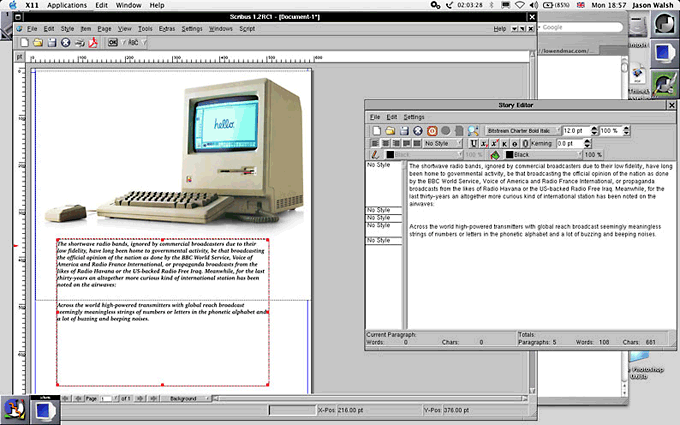
Scribus running in Mac OS X under X11. The NeXT-like AfterStep window-manager is being used in order to make the whole experience a bit more Mac-like. Note the handy “Story Editor” feature.
Once up and running, Scribus performs pretty much like every other frame-based layout application. Like MLayout (see Killing Quark: Three Layout Alternatives), its interface seems to be modeled on Quark XPress, so most users will be able to hit the ground running. Create a page, draw a frame, import your image or text – so far, so ordinary.
CMYK
The real test of any professional layout application is can it handle CMYK separations, and, if so, how well This has long been a thorn in the side of the free-software and open-source movements.
For example, GIMP (see Bring Out the GIMP), the would-be Photoshop competitor, has poor CMYK support due to patent issues. Many Linux geeks, knowing nothing of the worlds of professional prepress and design, ignore these problems and endlessly promote the likes of GIMP for tasks which it is simply not capable of.
So how does Scribus deal with CMYK? By using a trick to separate the colors into four single channels. This is invisible to the user and works flawlessly, as far as LEM’s tests went.
The downside of this is that the Linux geeks have now retaliated by saying that the GIMP’s RGB images can be used in Scribus and exported to CMYK in Scribus. Well, sure they can – as long as you don’t care about decent output, color matching, and working in a properly color-managed workflow.
The Good, the Bad and the Very, Very Ugly
Scribus is a fine application and for anyone wanting to get started on desktop publishing and layout. In interface terms, it’s pretty similar to Quark XPress, and as Quark remains the industry standard, this is certainly a good thing. Some items are located in curious places, and leading is referred to using (incorrect) the word-processing term of “line spacing,” but otherwise it’s pretty easy to find your way around.
There are some ugly aspects to Scribus, but they’re not the fault of the application as such. The fact that it requires X11 makes using it somewhat irritating – AquaScribus goes some way to making life easier, but the fact remains that X11 lacks the polish of Mac-native software.
For example, the menu bar is attached to the window instead of the top of the screen – something which has long annoyed Mac-users trying to get to grips with Windows or Unix. Secondly, the file browser displays the entire disk structure including the files and folders hidden and obfuscated (below).
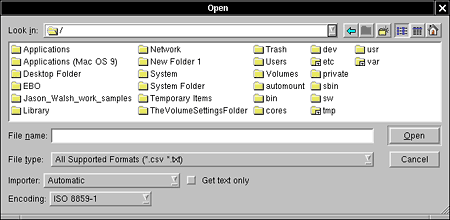
The X11 file browser dialogs show the entire Mac OS X filesystem – including
a lot of Unix-cruft normally hidden on the Mac.
Fount of All Knowledge
When you start working with text in Scribus, you may be surprised – or alarmed – to find that none of your fonts are available. What’s going on? Well, X11 doesn’t have access to the Mac’s font libraries, and X11’s fonts are horrendous.
Far from being an X11 expert, I couldn’t get fonts up an running before writing this piece, so expect a detailed how-to on X11 and fonts soon in The Low End Designer.
In the meantime, check out the Scribu’s Mac OS X fonts page, according to which, “Scribus supports OpenType Fonts, but not in the DFONT format that Mac OS X uses. You can use fondu, a tool to convert fonts with resource forks, into a format which can be understood by X11. You are recommended to convert OpenType fonts into TrueType/OpenType fonts, to preserve all the glyphs.”
The Future of Layout
Adobe’s InDesign has been making huge inroads in design – particularly in the publishing industry. While Quark remains the de facto standard, Adobe’s efforts mean that other programs, such as MLayout and Scribus, have been able to piggyback their way into design.
Having not yet tried Quark 6.5, I’m not in a position to comment on it, but InDesign is a great application, that remains expensive and has huge overhead. Scribus is free and has slightly lower raw power requirements than InDesign, but using X11 negates any speed benefits.
The Bottom Line
If you can afford to buy a commercial application, be that Quark, InDesign, or MLayout, you really should, even if only to ensure that you can open other people’s files. The question is, all other things being equal, is Scribus up to the job of professional DTP? The answer is yes, with a few caveats.
The font problem is particularly troubling – but that’s more to do with my lack of Unix knowledge, so hopefully we can report back to you with some success soon.
As a layout application, Scribus is fine, plus its PDF output is flawless.
Our final worry is that it doesn’t support proprietary color standards such as Hexachrome or Pantone – and likely never will.
In the meantime, write in to The Low End Designer with your Scribus successes and failures.
PREVIOUS: Preparing Your Mac for Scribus with X11 and FinkCommander
NEXT: 9 Top Mac Design Applications of 2004
Keywords: #scribus
Short link: http://goo.gl/Upj5hC
searchword: scribusonmac
