
Apple got a lot of mileage out of the PowerBook G3 nomenclature – some might argue more than they should have attempted to.
The original PowerBook G3 was the PowerBook 3500 or Kanga back in late 1997/early 1998 – a sort of factory hot rod consisting of a 250 MHz PowerPC 750 G3 motherboard swapped into a PowerBook 3400 case along with the upgraded graphics support and a 5 GB hard drive. It was a good computer – not to mention the fastest laptop on the planet at the time – but something of an oddball hybrid, and it holds the dubious distinction of being the only G3 Mac never supported by any version of Mac OS X.
However, the topic of this Compleat Guide is the G3 Series PowerBook, also known as WallStreet, MainStreet, and PDQ, sold in two-and-a-half model lines between May 1998 and May 1999. The WallStreet’s introduction on 1998.05.04 at the Worldwide Developer’s Conference (WWDC) marked a watershed in the development of Apple laptops. It was was a completely clean slate design, a clear break with the original PowerBook design motif.
MainStreet/WallStreet

The first G3 Series ‘Books were the MainStreet/WallStreet models introduced at the WWDC on May 4, 1998. They were a radical departure from previous PowerBooks, with their swoopy, contoured styling, big screens, wonderful scissors-action keyboards (the best that Apple ever put in a laptop, IMHO), expansive palm rests, and no standard floppy drive.
At the time, the PowerBook G3 Series machines were awesome in the true sense of the word. The June 1998 edition of Macworld magazine’s feature cover story entitled “Desktop Invaders” was a 12-page spread on the new machines in which author Henry Bortman allowed that the PowerBook G3 would threaten the relevance of desktop Macs. While the desktop is still very much with us, Apple ‘Books have been outselling their desktop cousins for more than a decade now, so Henry was on track, if a bit premature.
While they all look pretty much identical, there are six basic first generation PowerBook G3 Series configurations in two series (MainStreet and WallStreet), two internal bus speeds (66 MHz and 83 MHz), three processor speeds, and three different screen options. The MainStreet/WallStreet line included:
MainStreet
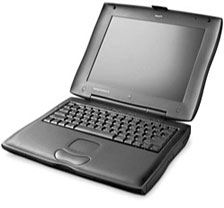 233 MHz G3 processor with no level 2 cache, a 66 MHz system bus, 16 MB of RAM, a 2 GB hard drive, a 12.1″ 800 x 600 passive matrix STN display, and 2 MB of video RAM. There was no S-video port, and the modem was an optional extra on the base model. You could also get a 13.3″ or 14.1″ monitor screen optionally.
It’s performance lagged far behind the G3 Series models with a Level 2 cache. Some have accused this machine as being “dog slow”. In fact, the cacheless 233 MHz MacBenched at 445 in processor performance – one third faster than the 15-month-earlier “fastest-in-the-world” 240 MHz PowerBook 3400c, which scored 337, although that pales in the face of the 233 MHz Series II model which has the cache and scores 764, the 250 MHz Kanga (747), and the 250 MHz Series I WallStreet (881).
Neither was the dual-scan fast supertwist nematic (FSTN) screen as doggy as some reviewers imply. I used one of these machines daily for a couple of months and found the FSTN screen quite pleasant viewing, albeit not as crisp and speedy as the TFT units.
WallStreet
250 MHz or 292 MHz G3 processors with 1 MB of L2 cache and an 83 MHz system bus. The 250 MHz machine came with 32 MB RAM, while the 292 MHz unit shipped with a whopping 64 MB of RAM. WallStreets had either a 13.3″ or 14.1″ 1024 x 768 TFT display with 4 MB of VRAM, a standard S-video out port, and an internal 56K modem. Either 4 GB or 8 GB hard drives were available, and high-end models came with a floppy drive expansion bay module as well (optional on other models).
The 13.3″ unit proved troublesome. The screen itself was okay, but there were many problems with insecure video ribbon cable connections.
Both the MainStreet and WallStreet came with 20x CD-ROM drive in their 5.25″ hot-swappable expansion bay on the right-hand side, and a hot-swappable 3.5″ expansion bay on the left, both of which can support a battery or a range of removable media drive options, including the the first DVD-ROM drive ever offered in a PowerBook (but rarely ordered) for the 292 MHz WallStreet.
All of these machines had SCSI, RS-422 serial, ADB, and 16-bit sound-in/sound-out ports, an ethernet port, an infrared port, two PC Card slots, and stereo speakers. They all had two expansion bays, either of which could support a lithium ion battery or a variety of expansion bay devices.
Series II: PDQ
The PowerBook G3 Series “Revision II”, dubbed PDQ, came along in September 1998 as a sort of second-generation WallStreet. The WallStreet name was later more or less generally applied to all May 1998 – May 1999 G3 Series PowerBooks, but the origin of the PDQ code name is rumored to be from Steve Jobs’ decree that problems besetting the early PowerBooks G3 Series get fixed “PDQ” (pretty damn quick).
Another reason for the mid-life revamp was that PowerBook production had been shifted from Apple’s own fabrication facility in Cork, Ireland, to a subcontractor, Quanta Computer, in Taipei, Taiwan, the company that still builds (and helps engineer) various Mac systems, including the MacBook Pro.
With the PDQ makeover, the partly crippled MainStreet was dropped, and with it the last-ever passive matrix PowerBook display. The PDQ line includes:
- 233 MHz G3 processor with 512 K L2 cache
- 266 MHz G3 processor with 1 MB L2 cache
- 300 MHz G3 processor with 1 MB L2 cache
All PDQ units have a 66 MHz system bus, a full slate of ports including S-video out, a standard 56K modem, and a 20x CD-ROM drive. The 233 MHz and 266 MHz machines came with 32 MB of RAM, while the 300 MHz machine shipped with 64 MB. The floppy drive was only available as an option. The troublesome 13.3″ screen was dropped, and the 14.1″ 1024 x 768 display and 4 MB of VRAM was standardized across the line.
WallStreet LE
However, about a month after the PDQ debuted, Apple released a low-end replacement for the MainStreet, which has come to be known as the “WallStreet LE”. This machine had most of the good stuff shared with its more expensive siblings, but was limited to availability with the 233 MHz processor with a 512 KB cache and a 12.1″ 800 x 600 active matrix TFT screen with 2 MB of VRAM. I bought one of these units in January 1999, and it served as my workhorse production Mac until August 2002, then lived on as a backup machine, and later as my wife’s word processing, surfing, and email computer until it was finally retired in the fall of 2007. It still works fine, although the original Li-Ion battery finally died at nine years of age.
While the 266 MHz and 300 MHz PDQs are nominally a bit faster than their 250 MHz and 292 MHz WallStreet counterparts, there isn’t much of a performance difference, as the slower system bus on the PDQs cancels out most of the speed advantage.
The 233 MHz PDQ/LE is almost equivalent in performance to the original 250 MHz G3 Kanga, thanks to its 66 MHz bus versus the Kanga’s 50 MHz bus. (Both had a 512 KB level 2 cache.)
The Best OS to Use
My favorite operating system for the WallStreet is Mac OS 9.2.2, which is fast and stable, but lots of folks successfully installed OS X on their WallStreets. The WallStreet was the last Apple “Old World ROM” architecture laptop and is also the oldest Mac portable that is officially supported by OS X, but only up to OS X 10.2.8 Jaguar (although Ryan Rempel’s XPostFacto hack can install OS X 10.3 Panther or 10.4 Tiger on a WallStreet), and OS X must be installed on the first partition of the hard drive which must be no larger than 8 GB (use 7 GB to play it safe), and with its slow G3 processors and puny video support, the WallStreet is a marginal OS X performer at best.
Expansion and Upgrades
The WallStreet was arguably the most comprehensively complete and expandable PowerBook ever built, with its full set of classic PowerBook ports, two PC Card slots (allowing upgrades including USB and FireWire support, WiFi, or other things), ethernet and IR connectivity, its expansion bays, the ability to support batteries in both the left and right bays, and the availability of the processor upgrades up to 450 MHz, 466 MHz, or 500 MHz, the latter of which outperformed a 500 MHz Pismo in some benchmark tests. Most WallStreet processor upgrades have been discontinued, but Sonnet still listed a Crescendo WS/G3 500 MHz upgrade with 1 MB/250 MHz L2 cache in 2008. G4 WallStreet upgrades may be available used from time to time on eBay.
One WallStreet shortcoming is its weight. At 7.4 pounds and up, it is heavier than even the 17″ MacBook Pro and a literal pain to lug around for more than short hauls. The upside of this is that, in addition to the comprehensive feature set, the WallStreet is rugged and can take a beating. That is, except for the screen hinges, which are notorious for breaking – a combination of bad design and poor materials. Treat your WallStreet hinges is gently.
Other problem areas with the WallStreet include the aforementioned to 13.3″ display connection issue, Power Manager board failures, and the power adapter plugs shorting out in contact with internal RF shielding.
In my estimation, the WallStreet’s day has passed as even a low-end workaday production computer, although if your needs are modest and you only want to do word processing, email, some casual web surfing, and maybe a bit of digital photo editing, then a WallStreet can still serve you very well, especially if you’re content running Mac OS 9.2.2 and Classic software from that era.
However, if you want to run OS X and up-to-date software, the WallStreet is probably not the best choice. It’s a moving target, but with the advent of Mac OS X 10.5 Leopard you need at least an 867 MHz G4.
Things to watch out for when shopping for a used WallStreet are problems with those screen lid hinge “clutches” – a potentially expensive repair job – and flaky video with the Series I units equipped with the 13.3″ screen. There were good reasons why this screen option was dropped with the Series II introduction in August 1998. Another fairly common fault with the WallStreet was bad power manager boards, but these should have been dealt with long since on machines still in use. Series I only get Rage II video, which is slightly inferior to the later Rage Pro. Both have 4 MB VRAM onboard except for the 12.1″ screen 233 MHz units, which have a paltry 2 MB.
Appendix: WallStreet, MainStreet, and PDQ Model by Model
Models are sorted by release date and CPU speed. All models share the following specifications:
- PowerPC 750 (G3) CPU
- Maximum RAM: 512 KB
- Lithium Ion battery (roughly 3-4 hours use)
- tappable trackpad
- 2 built-in speakers and microphone
- 2 PC card slots
- 10Base-T ethernet
- infrared support and video-out
- 16-bit stereo sound input/output
- supports SCSI Disk Mode
- size: 10.4″ x 12.7″ x 2.0″
- Weight: 7.2-7.8 pounds depending on configuration
PowerBook G3/233 Series I (May 1998)
- CPU: 233 MHz
- no Level 2 cache
- 66 MHz system bus
- Standard RAM: 32 MB
- 12.1″ 800 x 600 passive-matrix STN color display – 13.3″ or 14.1″ 1024 x 768 color display optional
- optional built-in 56k fax modem
- 20x CD-ROM drive (floppy drive optional)
- 2 GB hard drive
- 2 MB SDRAM
- MacBench Processor Score: 445
PowerBook G3/250 Series I (May 1998)
- CPU: 250 MHz
- 1 MB Level 2 cache
- 83 MHz system bus
- Standard RAM: 32 MB
- 13.3″ or 14.1″ 1024 x 768 active-matrix STN color display
- optional built-in 56k fax modem
- S-video out
- 20x CD-ROM drive (DVD-ROM optional)
- floppy drive
- 2-8 GB hard drive
- supports SCSI Disk Mode
- 4 MB SDRAM
- MacBench Processor Score: 881
PowerBook G3/292 Series I (May 1998)
- CPU: 292 MHz
- 1 MB Level 2 cache
- 83 MHz system bus
- Standard RAM: 32 MB
- 13.3″ or 14.1″ 1024 x 768 active-matrix color display
- S-video out
- 20x CD-ROM drive (DVD-ROM optional)
- floppy drive
- 8 GB hard drive
- supports SCSI Disk Mode
- 4 MB SDRAM video RAM
- MacBench Processor Score: 1,031
PowerBook G3/233 Series II (August 1998)
- CPU: 233 MHz
- 512k Level 2 cache
- 66 MHz system bus
- Standard RAM: 32 MB
- 14.1″ 1024 x 768 active-matrix color display
- S-video out
- 20x CD-ROM drive (floppy drive optional)
- floppy drive optional
- 2 GB hard drive
- supports SCSI Disk Mode
- 4 MB SDRAM
PowerBook G3/266 Series II (August 1998)
- CPU: 266 MHz
- 1 MB Level 2 cache
- 66 MHz system bus
- Standard RAM: 64 MB
- 14.1″ 1024 x 768 active-matrix STN color display
- built-in 56k fax modem
- S-video out
- 20x CD-ROM drive (DVD-ROM optional)
- floppy drive optional
- 4 GB hard drive
- supports SCSI Disk Mode
- 4 MB SDRAM
PowerBook G3/300 Series II (August 1998)
- CPU: 300 MHz
- 1 MB Level 2 cache
- 66 MHz system bus
- Standard RAM: 64 MB
- 14.1″ 1024 x 768 active-matrix color display
- Built-in 56k fax modem
- S-video out
- 20x CD-ROM drive (DVD-ROM optional)
- floppy drive optional
- 8 GB hard drive
- supports SCSI Disk Mode
- 1 MB Level 2 cache
- 4 MB SDRAM video RAM
PowerBook G3/233 Series II L (September 1998)
- CPU: 233 MHz
- 512 KB Level 2 cache
- 66 MHz system bus
- Standard RAM: 32 MB
- 12.1″ 800 x 600 active-matrix color display
- S-video out
- floppy drive optional
- 2 GB hard drive
- supports SCSI Disk Mode
- 2 MB SDRAM
- MacBench Processor Score: 764
Previous model: Compleat Guide to the Kanga PowerBook
Next Model: Compleat Guide to the Lombard PowerBook
* No, it isn’t a typo. Compleat is a legitimate, albeit archaic, spelling for complete. As Kenneth G. Wilson says in The Columbia Guide to Standard American English: “This obsolete spelling of the adjective complete suggests an air of antiquity that seems to please some of those who name things….” We find that fitting for Low End Mac’s Compleat Guides to “obsolete” hardware and software.
Keywords: #compleatwallstreet #compleatpowerbookg3
Short link: http://goo.gl/XV5shF
searchword: compleatwallstreet

