
Low End Mac Reader Specials
TypeStyler For Mac OS X is Now Shipping! Download The Free Fully Functional 60 Day Tryout at www.typestyler.com
OWC: Plug & Play Hardware RAID up to 8.0TB. High Performance, Data Redundant Solutions. FireWire 800, FireWire 400, USB2, or eSATA. Hot Swappable Bays, Data Rates over 200MB/s. Click here
Don't install Parallels to play poker online! Poker Mac will show you how
to download and install a native Mac poker application such as Full
Tilt Poker Mac.
Laptop Hardware Provided by TechRestore - Overnight Mac & iPod Repairs.
Compare products like desktop computers, apple laptops, apple macs, and LCD Monitors side by side! All the information and reviews to make the best purchasing decision for new mobile phones, sat nav systems, or MP3 players. The Ciao online shopping community makes searching products easy for you.
Adam's Apple
Working with Vintage Macs
Getting Inside Vintage Macs and Swapping Out Bad Parts
Adam Rosen - 2007.12.14 - Tip Jar
Popularity: ![]()
![]()
![]()
![]()
![]()
I deal with older (pre-G3) systems regularly, both through my consulting work and my personal collection, the Vintage Mac Museum. Here are some tips I've found for keeping the old beasts running.
Swapping Parts, Opening Cases
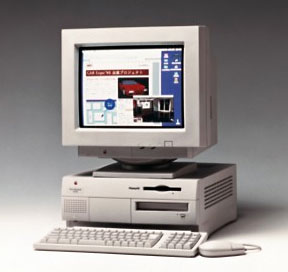
It's handy that old Macs are usually dirt cheap, since they may have hardware problems or failed components and be in need of some spare parts. If you use a particular old Mac regularly or have just acquired one and all isn't working, find some spares to cannibalize parts from. Yard sales, flea markets, craigslist, and eBay are great sources of old systems; if you're in the Boston area, try the MIT Flea in the warmer months.
Getting the case open or the part you need removed can sometimes be challenging. Use your spare to learn how to open the case - that way you can test whether that cracking sound you hear is normal (as the instruction tell you) or a learning experience (hint: small plastic pieces shouldn't fall out of the case). Many good take apart guides are available free online.
Don't force connectors, switches, and cables, they shouldn't be super difficult to connect or remove. If they are, you're probably overlooking a small tab or screw somewhere (this is where the test model with sacrificial plastic is so handy). Floppy drives and CD drives often need lubricants; WD40 has worked well for me (YMMV), though I'm sure I'll get flamed for admitting this.
I tend to replace items as modules rather than doing component repair (resoldering capacitors and the like); this usually comes down to swapping one or more of the following items:
- PRAM battery (very common)
- hard disk drive (common)
- optical or floppy disk drive (try lubricating)
- power supply (more common with age)
- motherboard, RAM, or video cards (uncommon)
- CRT or LCD screen assembly (if working, may be dim or blurry)
I don't repair CRT screens, high voltage power supplies, or monitors: it's easier, safer, and cheaper to just dispose of them (during my town's hazardous waste recycling day each quarter) and replace with a spare.
More Tips and Suggestions?
I'm sure there are many other tips and suggestions on the topic of
working with old and vintage Macs; write in to the Low
End Mac Mailbag or contact me with your suggestions and we may do a
follow-up to this column with additional ideas.
This article was originally published on Adam's Oakbog website. It has been adapted and reprinted here with his permission.
Adam also publishes The Vintage Mac Museum Blog. If you find Adam's articles helpful, please consider making a donation to his tip jar.
Recent Adam's Apple Columns
- Multiroom Audio with iTunes, 11.03. Apple's iTunes software makes it easy to stream audio to another room. All you need is the right hardware and sometimes an extra app.
- Oops: A Macintosh Undelete Odyssey, 10.05. Accidentally wiping a drive is recoverable, but it's a long, slow process. A bit of creativity will help with files that lose their names.
- Step by Step Guide to Manual Mac System Migration, 08.18. Migration Assistant doesn't always do the job. Manual migration involves copying, deauthorizing, and reinstalling apps and user files.
- Tips for Installing or Reinstalling Mac OS X 10.4 'Tiger', 06.10. Mac OS X 10.4 uses less memory than Leopard, supports Classic Mode on PowerPC Macs, and, unlike Leopard, is supported on G3 Macs.
- More in the Adam's Apple index.
Links for the Day
- Mac of the Day: Power Mac 4400, Nov. 1996 - Apple does cheap to compete with clones - and nobody is impressed.
- Group of the Day: Puma List is for anyone using Mac OS X 10.1.
- November 7 in LEM history: 00: PowerBook Lite dreams - Our first Macs - 01: OS 9, OS X, or Linux? - 02: Xserve for the classroom - 03: Panther on slot-loading iMacs - High capacity Lombard/Pismo battery - 05: Clean keyboard residue from laptop screen with ROR - SeaMonkey - 06: Dan Bricklin, inventor of the spreadsheet - Turn any Mac into a gameshow buzzer - 07: The transforming PowerBook 1400 - PowerBook 540 on Compact Flash
- Support Low End Mac
Recent Content on Low End Mac
- Quad-Core CPU Makes Sense in MacBook Pro, OS X 10.6 Causing Overheating, Overseas Power, and More, The 'Book Review, 11.06. Also Late 2009 MacBook reviewed, how to add RAM to new MacBook, 18.4in Acer notebook used Intel i7, and SanDisk SSD chosen for Sony VAIO X.
- Dumping Macs for Google Apps, SSD in iMac, Late 2009 iMac Performance Problems, and More, Mac News Review, 11.06. /newsrev/09mnr/1106.html
- WiFi Paranoia, iMac-O-Lantern, Magic Mouse Does Click, Free Clipboard Managers, and More, Charles W. Moore, Miscellaneous Ramblings, 11.05. Also strange time stamps, problem with ColorIt on Intel Mac, and the story behind OS X 10.5.4 install discs.
- IDE Is Dead; Long Live SATA!, Dan Knight, Mac Musings, 11.04. SATA has displaced parallel ATA. While IDE hard drives haven't disappeared, the best deals are in SATA hard drives.
- QuickTime X in Snow Leopard Imports, Trims, and Publishes Video Quickly and Easily, Alan Zisman, Zis Mac, 11.04. The long, slow process of importing video into iMovie to edit it, then render it to another format, is history as QuickTime X does that much more quickly.
- More links in our archive.
Recent Deals
- Best Mac Pro Deals, 11.03. Used 2.66 GHz 4-core, $1,300; 3.0 8-core. $2,299; refurb 2.66 4-core Nehalem, $2,149; 2.93, $2,549; 2.26 8-core, $2,799; 2.93, $4,999.
- Best iPhone Deals, 11.03. New 8 GB iPhone 3G, $$99; refurb 16 GB 3GS, $149; new, $199; 32 GB, $299.
- Best 12" PowerBook G4 Deals, 11.03. Used 867 MHz SperDrive, $348; 1 GHz, $499; 1.33 Combo, $298; SD, $559; 1.5 Combo, $448; SuperDrive, $589.
- Best Power Mac G3 and PCI Video Card Deals, 11.02. Used beige 300 MHz, $25; G4/366, $49; blue & white 350, $80; 400, $90; 450, $105; PCI video cards from $15; shipping additional.
- Best Power Mac G4 and AGP Video Card Deals, 11.02. Used 400 MHz, $50; 733 MHz, $69; 933 MHz, $209; 1.25 GHz dual, $299.
- Best 15" MacBook Pro Deals, 11.02. Used 2.0 GHz, $800; 2.2, $900; 2.4, $1,000; refurb 2.53, $1,449; 2.66, $1,699; 2.8, $1,949; 3.06, $2,169; new 2.53, $1,579; 2.66, $1,799; more.
- Best Mac mini Deals, 10.30. Used 1.33 GHz G4 mini, $379; 1.42, $389; 1.5, $419; 1.83 GHz Core Duo, $350; Core 2, $439; new 2.26 GHz nVidia, $580; 2.53 GHz, $770; Server, $990.
- Best G4 iBook Deals, 10.30. Used 12" 1.07 GHz Combo, $225; 1.33 GHz, $298; 14" 1 GHz, $349; 1.33 GHz, $398; 1.42 GHz SuperDrive, $498.
- Best Classic Mac OS Deals, 10.30. System 6.0.8 floppies, $10; 7.1, $12; 7.5, $20; 7.5 CD, $4; 7.6 $13; 8.1, $11; 8.5, $20; 8.6, $90; 9.0, $20; 9.2.2, $30.
- More deals in our archive.
About LEM | Support | Usage | Privacy | Contacts
Navigation
Used Mac Dealers
Apple History
Video Cards
Email Lists
Favorite Sites
MacSurfer
MacMinute
MacInTouch
MyAppleMenu
InfoMac
Macs Only!
The Mac Observer
Accelerate Your Mac
RetroMacCast
PB Central
MacWindows
The Vintage Mac
Museum
DealMac
DealsOnTheWeb
Mac2Sell
ramseeker
Mac Driver Museum
JAG's House
System
6 Heaven
System 7 Today
the pickle's Low-End
Mac FAQ
Abandonware
Petition
Mac vs. PC Info
Affiliates
The Apple
Store
Mac
Connection
B&H
MacMall
TechRestore
ExperCom
Crucial
Memory
batteries.com
Advertise
MacMinute
MacInTouch
MyAppleMenu
InfoMac
Macs Only!
The Mac Observer
Accelerate Your Mac
RetroMacCast
PB Central
MacWindows
The Vintage Mac
Museum
DealMac
DealsOnTheWeb
Mac2Sell
ramseeker
Mac Driver Museum
JAG's House
System 6 Heaven
System 7 Today
the pickle's Low-End
Mac FAQ
Abandonware
Petition
Mac vs. PC Info
Mac Connection
B&H
MacMall
TechRestore
ExperCom
Crucial Memory
batteries.com
